PRACTICING IN LEARNING MODE
PRACTICING RHYTHMS
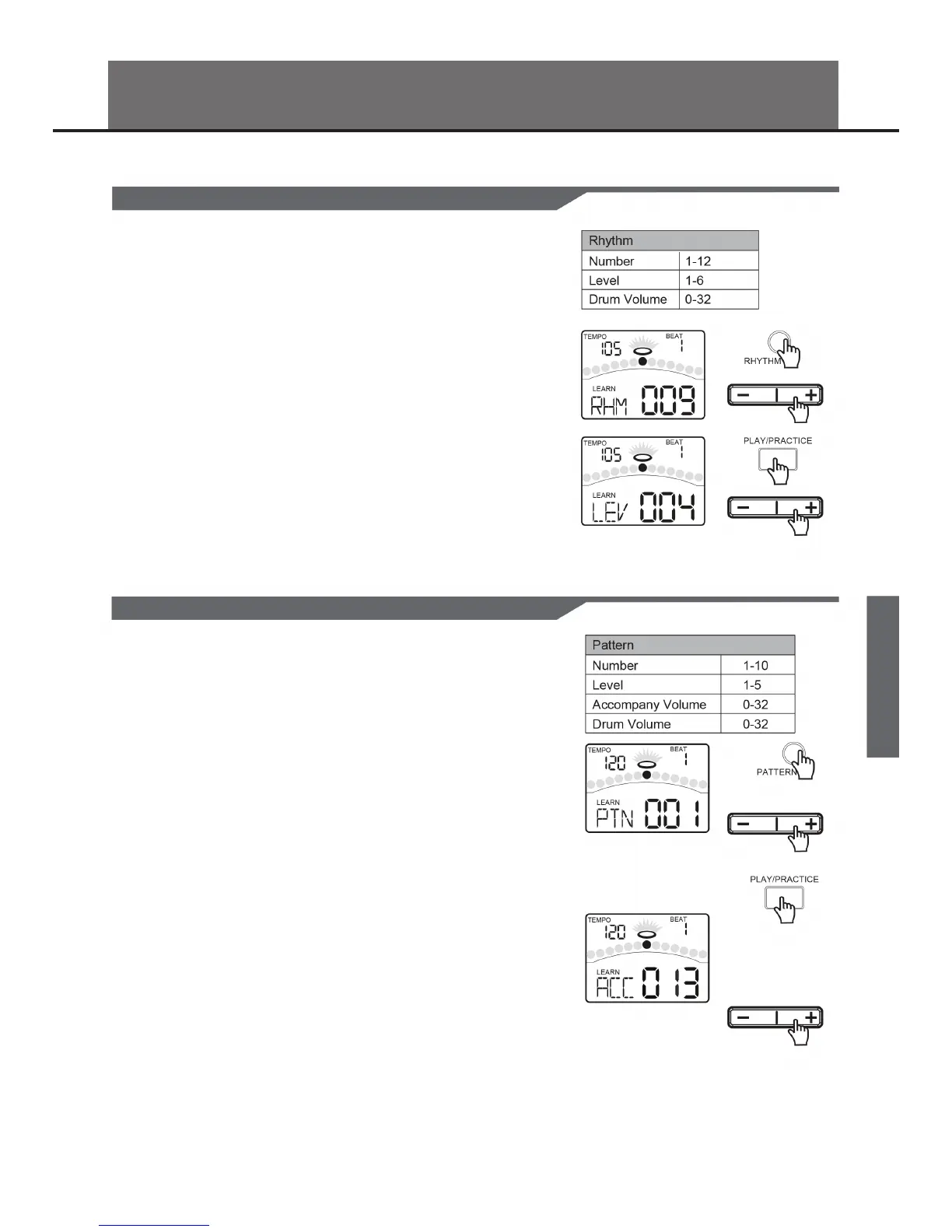
If the digital drum is not yet in RHYTHM menu, press the [RHYTHM] button to
enter it. You can adjust the parameters (as shown to the right).
1. Press the [ - ] or [ + ] button to select the rhythm.
2. Press the [PRACTICE] button to listen to the rhythm and follow it. Press it
again to stop the rhythm.
3. Press the [RHYTHM] or [PAGE] button to select the Rhythm Level page.
Press the [ - ] or [ + ] button to select the level of the rhythm.
4. Press the [RHYTHM] or [PAGE] button to select the Rhythm Drum Volume
page. Press the [ - ] or [ + ] button to adjust the drum volume of the rhythm.
PRACTICING WITH PATTERNS
If the digital drum is not yet in Pattern menu, press the [PATTERN] button to
enter it. You can adjust the parameters (as shown to the right).
1. Press the [ - ] or [ + ] button to select the pattern.
2. Press the [PRACTICE] button to listen to the pattern and follow it. Press it
again to stop the pattern.
3. Press the [PATTERN] or [PAGE] button to select the Pattern Level page.
Press the [ - ] or [ + ] button to select the level of the pattern.
4. Press the [PATTERN] or [PAGE] button to select the Pattern Accompany
Volume page. Press the [ - ] or [ + ] button to adjust the accompaniment
volume of the pattern.
5. Press the [PATTERN] or [PAGE] button to select the Pattern Drum Volume
page. Press the [ - ] or [ + ] button to adjust the drum volume of the pattern.
23


 To Next Page