EasyManua.ls Logo

Kawai FS690 - Before Using the FS690

Kawai FS690
68 pages
Print Icon
To Next Page IconTo Next Page
To Previous Page IconTo Previous Page
Loading...
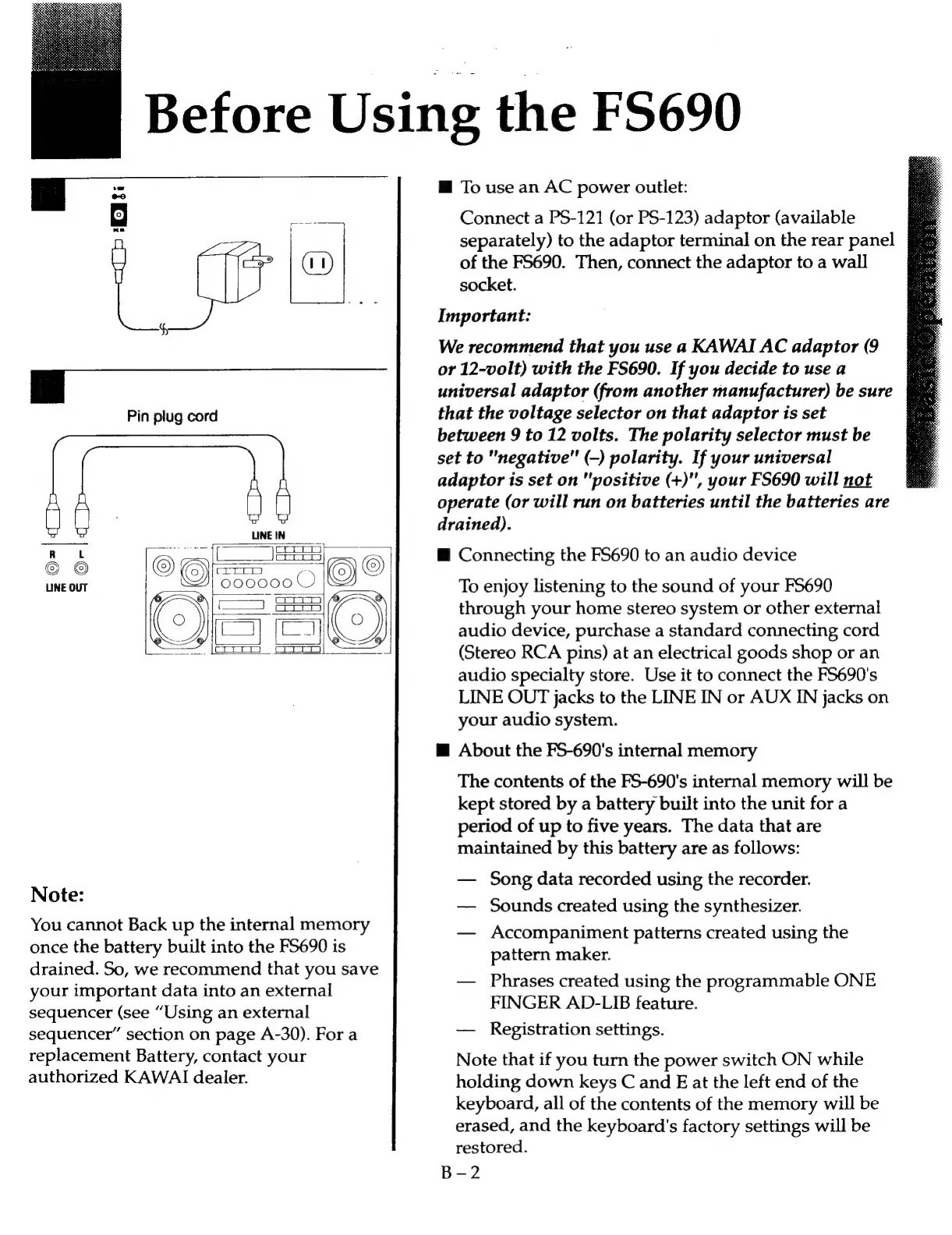
Pin
plug
cord
Note:
You
cannot
Back
up
the
internal
memory
once
the
battery
built
into
the
F5690
is
drained.
So,
we
recommend
that
you
save
your
important
data
into
an
external
sequencer
(see
“Using
an
external
sequencer”
section
on
page
A-30).
For
a
replacement
Battery,
contact
your
authorized
KAWAI
dealer.
Before
Using
the
FS690
M@
To
use
an
AC
power
outlet:
Connect
a
PS-121
(or
PS-123)
adaptor
(available
separately)
to
the
adaptor
terminal
on
the
rear
panel
of
the
F5690.
Then,
connect
the
adaptor
to
a
wall
socket.
Important:
We
recommend
that
you
use
a
KAWAI
AC
adaptor
(9
or
12-volt)
with
the
FS690.
If
you
decide
to
use
a
universal
adaptor
(from
another
manufacturer)
be
sure
that
the
voltage
selector
on
that
adaptor
is
set
between
9
to
12
volts.
The
polarity
selector
must
be
set
to
"negative"
(-)
polarity.
If
your
universal
adaptor
is
set
on
"positive
(+)",
your
FS690
will
not
operate
(or
will
run
on
batteries
until
the
batteries
are
drained).
@
Connecting
the
FS690
to
an
audio
device
To
enjoy
listening
to
the
sound
of
your
FS690
through
your
home
stereo
system
or
other
external
audio
device,
purchase
a
standard
connecting
cord
(Stereo
RCA
pins)
at
an
electrical
goods
shop
or
an
audio
specialty
store.
Use
it
to
connect
the
FS690's
LINE
OUT
jacks
to
the
LINE
IN
or
AUX
IN
jacks
on
your
audio
system.
@
About
the
FS-690's
internal
memory
The
contents
of
the
FS-690's
internal
memory
will
be
kept
stored
by
a
battery
built
into
the
unit
for
a
period
of
up
to
five
years.
The
data
that
are
maintained
by
this
battery
are
as
follows:
Song
data
recorded
using
the
recorder.
Sounds
created
using
the
synthesizer.
Accompaniment
patterns
created
using
the
pattern
maker.
Phrases
created
using
the
programmable
ONE
FINGER
AD-LIB
feature.
Registration
settings.
Note
that
if
you
turn
the
power
switch
ON
while
holding
down
keys
C
and
E
at
the
left
end
of
the
keyboard,
all
of
the
contents
of
the
memory
will
be
erased,
and
the
keyboard's
factory
settings
will
be
restored.
B-2

Related product manuals