23
Dial pad
Make a call
Touch Phone icon on the Home screen.
In dialing screen, input number and touch dial icon to dial the inputted
number.
Options available during a call
During a call, there are some call options available to you. These call
options can be seen only during a call. When a call is in progress, you can
put it on hold, initiate a phone conference, mute your microphone etc.
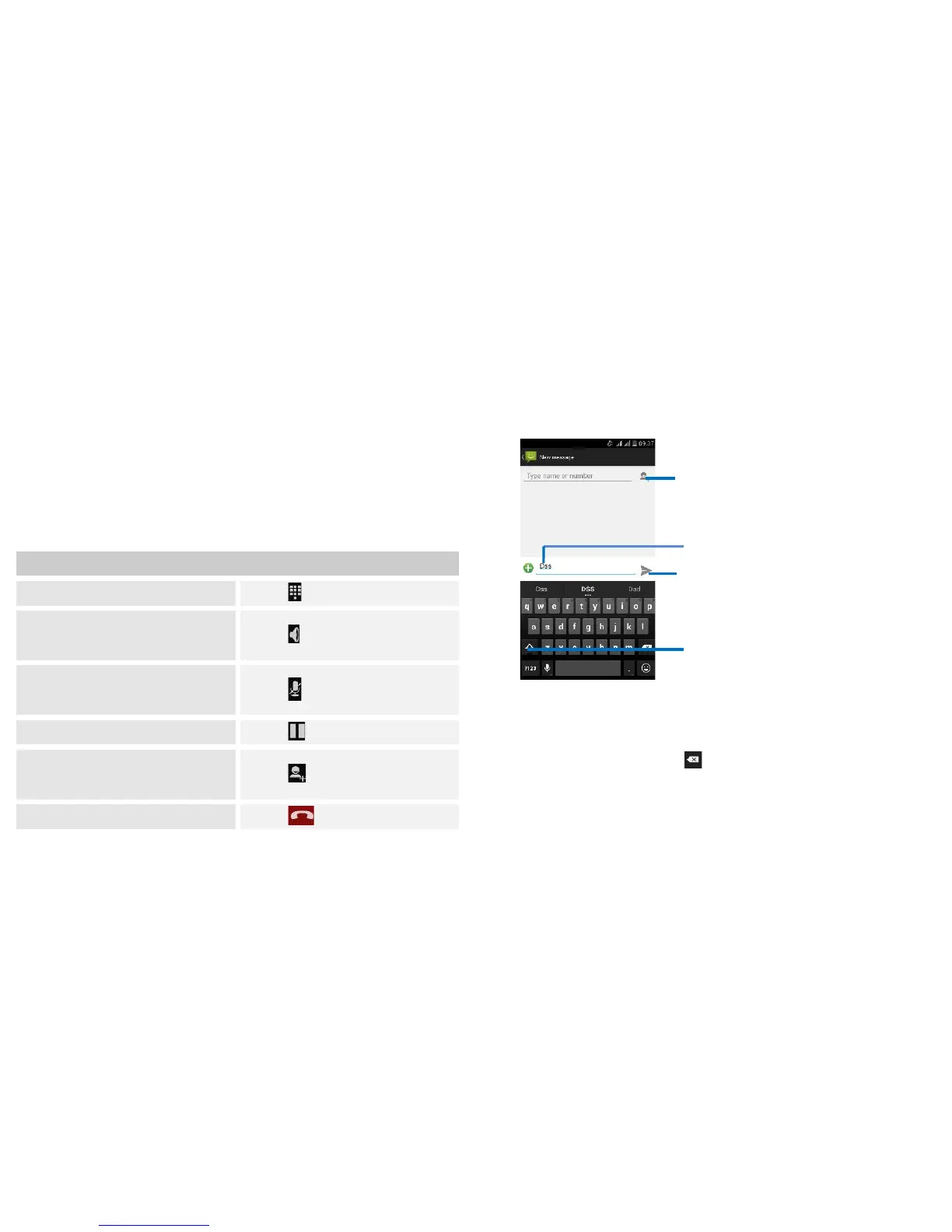
Key pad: Go to the key pad.
Speaker: To turn on/off the
speaker.
Mute: Mute your voice so that the
other party cannot hear you.
Hold: To place a call on hold.
Add call: Open dial pad to dial the
second call.
Press Volume keys to adjust the call volume.
24
Text entry
On-screen keyboard
Touch the keys of the on-screen QWERTY keyboard to enter text
conveniently. You can open this keyboard by touching a text field.
Android keyboard input method
Enter text
Touch the keys on the keyboard to type.
Use the Delete key to erase characters to the left of the
cursor.
When you finished typing, Touch Back key to close the
keyboard.
Touch this icon to select desired
contact from phonebook.
Touch to capitalize the next letter
you type.


 To Next Page