
 To Next Page
L
Lisa CoxJul 27, 2025
How to fix sound fading out on KEF X X300A Speaker System?
- CcchavezJul 27, 2025
If the sound fades out, switch off the speaker and switch it on again after 15 minutes.

How to fix sound fading out on KEF X X300A Speaker System?
If the sound fades out, switch off the speaker and switch it on again after 15 minutes.
Why is there no sound coming from my KEF Speaker System?
If you're not getting any sound, here are a few things to check: * Ensure the USB cable to the computer is disconnected when using the AUX IN source. * Verify the amber light status, as explained in the 'Status Indication' section. * Note that playback is disabled in Wireless Setup Mode and Firmware Upgrade Mode. * Make sure the USB or 3.5mm stereo cable is properly connected. * If you're a Mac OS user, manually select KEF X300A Wireless as your sound device. * Increase the volume on the system, computer, and app to an audible level. * Confirm that the left and right speakers are correctly connected. * Ensure the speakers are powered on. * Try turning the speakers off and on again.
What to do if my KEF Speaker System X300A Wireless does not turn on?
If your X300A Wireless isn't turning on: * Connect the power cords between the speakers and the main socket. * Ensure that your main power supply is turned on.
What to do if the amber light is on my KEF X X300A?
If the amber light is on, verify that your home Wi-Fi network is functioning correctly. If the problem continues, attempt to re-setup the wireless connection.
Why is my KEF X X300A wireless network cannot be established?
If you're having trouble establishing a wireless network, check that your home Wi-Fi network is working properly. If the problem persists, try re-setting up the wireless connection.
What to do if fast amber light is blinking on KEF X X300A Speaker System?
Try to upgrade your firmware again. If the problem continues, please contact your local dealer or service helpdesk.
Responsible disposal and recycling instructions for the KEF X300A Wireless speakers.
Essential safety warnings for operating the KEF X300A Wireless system.
Compliance statement regarding FCC rules and radio frequency interference.
List of package contents and instructions for unpacking the speakers.
Details on AC power, USB, and AUX inputs on the KEF X300A Wireless speakers.
Identifies standby button, gain, balance, EQ, and LAN port functions.
Steps for connecting the Left and Right speakers and powering on the system.
Step-by-step guide for connecting speakers to a Wi-Fi network.
Instructions for establishing a wired network connection via Ethernet.
How to modify Wi-Fi network settings or rename speakers.
Guide for streaming audio from iOS devices or Macs using AirPlay.
Instructions for streaming music from an Android device using DLNA.
Configuration steps for Windows Media Player to enable DLNA streaming.
Guide to streaming music from a PC to the KEF X300A Wireless speakers.
How to connect computers via USB or other devices via AUX input.
Steps to set KEF X300A Wireless as audio output on Windows/Mac.
How to use balance and system gain knobs for desired sound output.
Using EQ settings for desktop or stand placement for optimal acoustics.
How to use the outer bung to reduce bass when speakers are near a wall.
How to use the full bung for greater bass reduction.
Steps to fix issues like no sound, fading audio, or playback interruptions.
Solutions for failed wireless setup or inability to establish a network connection.
 General
| Frequency Response | 58Hz - 28kHz (±3dB) |
|---|---|
| Crossover Frequency | 2.5kHz |
| Resolution | 24-bit/96kHz |
| Type | Active Speaker System |
| Amplifier Output Power | LF: 50W, HF: 20W |
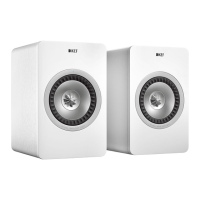
| Drive Units | Uni-Q driver array: 25mm (1in.) aluminium dome HF, 130mm (5.25in.) magnesium/aluminium alloy cone LF |
| Input | USB |
| Weight | 7.5kg (each) |
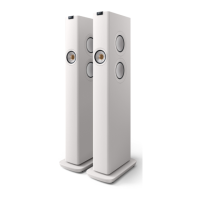
| Finish | Linear White |