KR-RM Series(1~3kVA) UPS
User Manual
3 Basic Principle and Structure
All rights reserved ©Xiamen Kehua Hengsheng Co., Ltd.
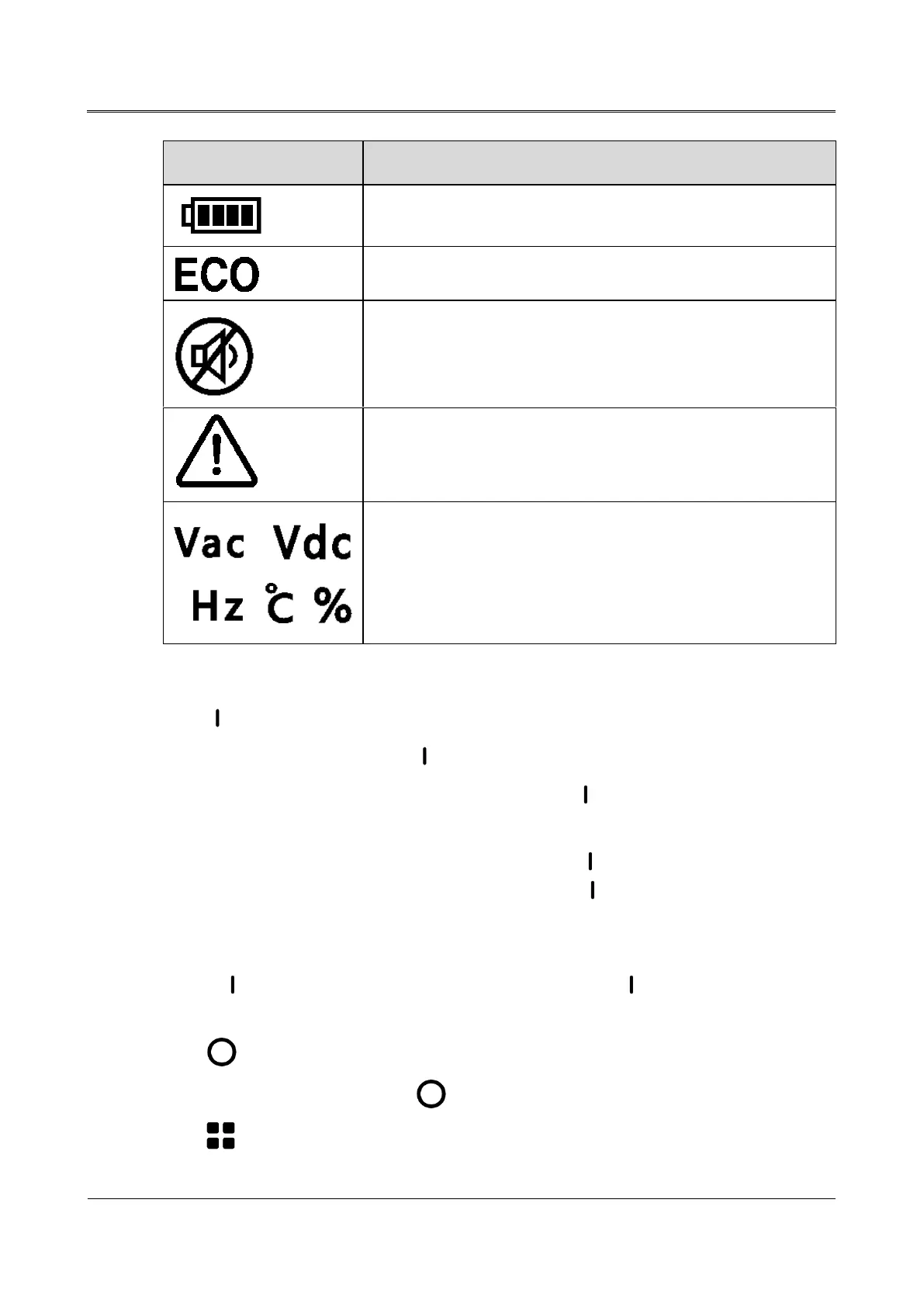
UPS works in the battery mode
UPS works in the ECO mode
Buzzer is in the silence status
Stand for each unit respectively: AC voltage/DC
voltage/frequency/temperature/load percentage
Operation instructions of buttons on the panel
" " button
− When UPS is off, long press" " button for 1s, the UPS will be on.
− When UPS is on and in the mains mode, long press " " button for 3s, it will do the battery
test.
− When UPS is on and in the battery mode, long press " " button for 3s to silence the buzzer
(remove the mains abnormal alarm); then long press " " button for 3s again, it will cancel
the silence.
− When UPS is on and in the battery mode and with the battery low-voltage alarm, long press "
" button for 3s to silence the buzzer; then long press " " button for 3s again, it will
cancel the silence.
" " button
− When UPS is on, long press " " button for 1s, the UPS will be off.
" " button



 To Next Page