KR-RM Series(1~3kVA) UPS
User Manual
All rights reserved ©Xiamen Kehua Hengsheng Co., Ltd.
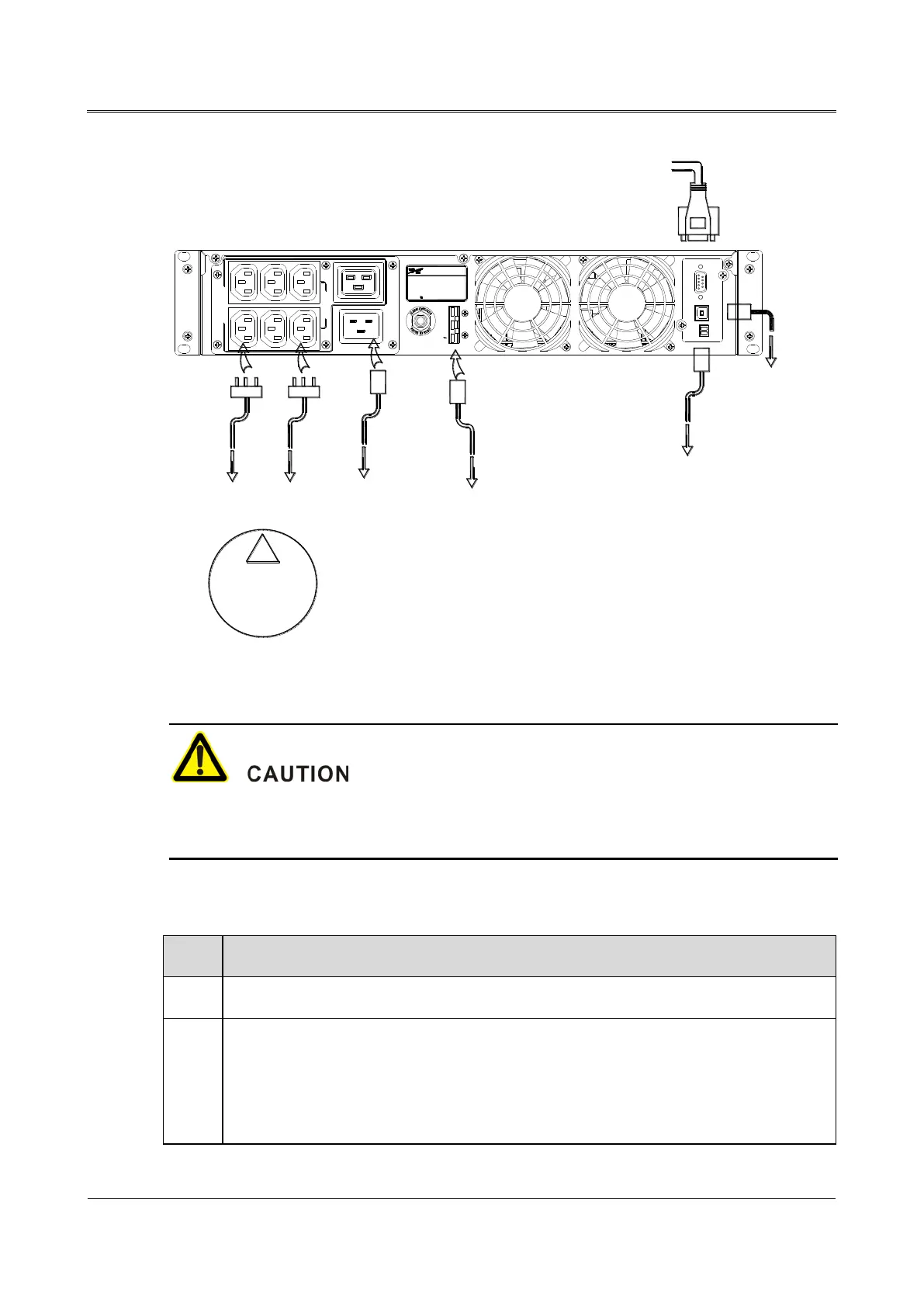
Connect output
sockets with load
!
Output sockets
share load
Connect
with mains
USB port
Connect
with EPO
Upper communication device
PRODUCED BY: ZHANGZHOU KEHUA TECHNOLOGY
CO.,LTD. (CHINA)
NAME:UPS
MODEL:
INPUT:
OUTPUT:
DC INPUT:
1W+N+PE,AC220V,50Hz,13.6A
1W+N+PE,AC220V,50Hz,13.6A
3000VA/2700W
KR3000-RM
72V,42.6A
EACH OUTLET
10A MAX.
AC OUTPUT
220V 13.6A TOTAL
AC INPUT
CIRCUIT PROTECTOR
250V,20A
DC INPUT
RS232 USB EPO
+
Extended battery
cabinet
Figure4-4 Wiring diagram of KR3000-RM
1. The mains socket should be installed near UPS and it is convenient to operate.
2. Generally, the load current of each output socket with 10A should be less than 5A.
4.6 Check the Electrical Connection
Check whether the connection of AC input power wire is firm.
Check the AC output wire: whether the color of AC output wire is in accordance with the
specification, whether the cross-sectional area of AC output wire is suitable, whether the
connection of the live wire(L), the neutral wire(N), the grounding wire(PE) is correct,
whether the connection of AC output wire is firm.



 To Next Page