p10.
M3i INDOOR GROUP CYCLE
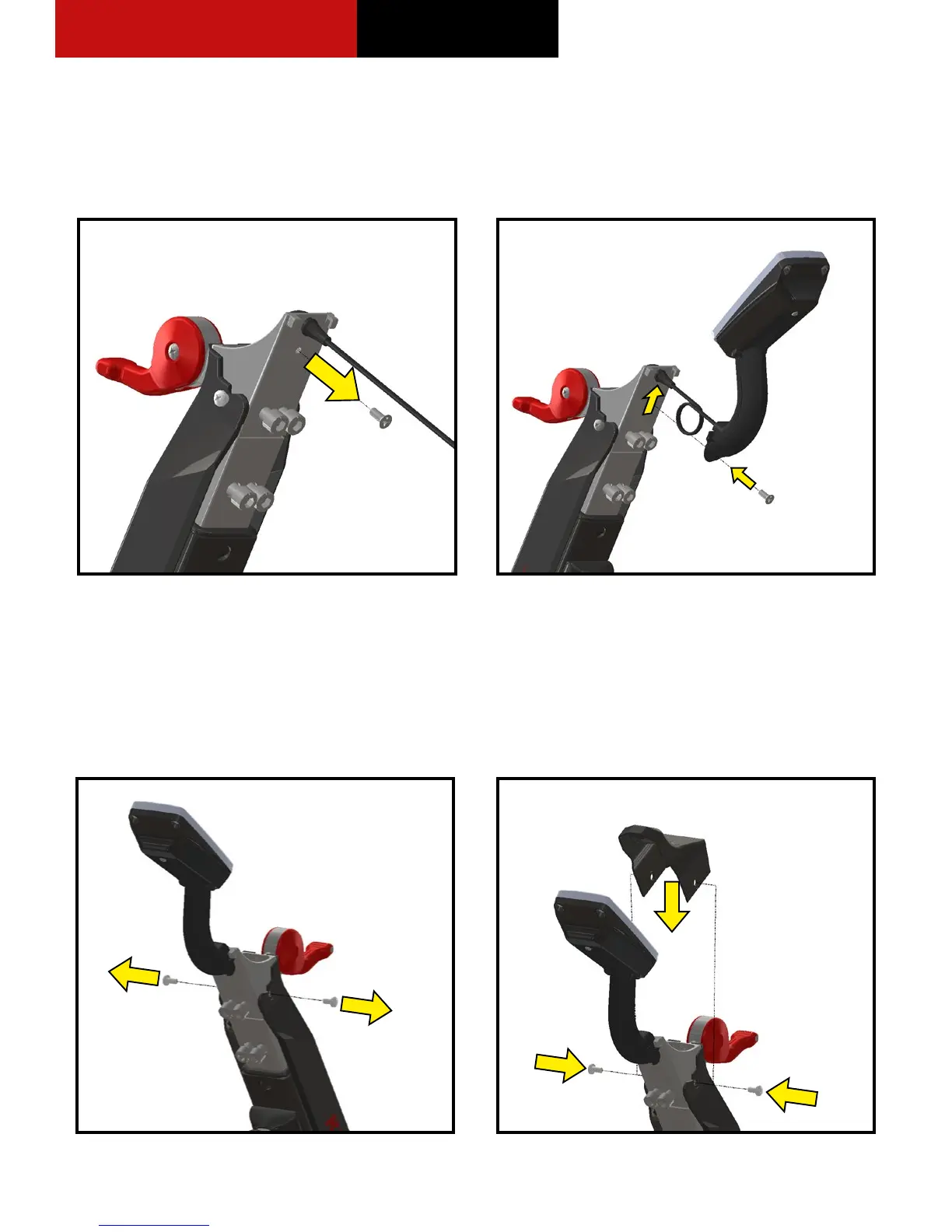
1. Use a #2 Phillips screwdriver and remove the computer
mounting screw from the handlebar tube, refer to
Figure 11.
2. Coil the computer cable into the computer mount
cavity, refer to Figure 12.
3. Slide the computer up into the two locking ears.
4. Insert and secure the computer with the screw
previously removed using a #2 Phillips screwdriver.
1. Remove screws from both sides of the sweat guard,
refer to Figure 13.
2. Slide on the guard cover over the sweat guard and
snap it in place, refer to Figure 14.
3. Secure the cover with the screws previously removed.
Do not over tighten screws.
4. Remove the four 8 mm Allen screws from the handlebar
tube, located below the computer mount, refer to
Figure 15.
INSTALLING THE COMPUTER
ASSEMBLING THE HANDLEBAR
Figure 11. Remove Mounting Screw From Handlebar
Tube
Figure 13. Remove Screws From Sweat Guard
Figure 14. Align the Guard Cover Over the Mounting
Holes
Figure 12. Attach the Computer to the Handlebar Tube


 To Next Page