p13.
M3i INDOOR GROUP CYCLE
1X
1X
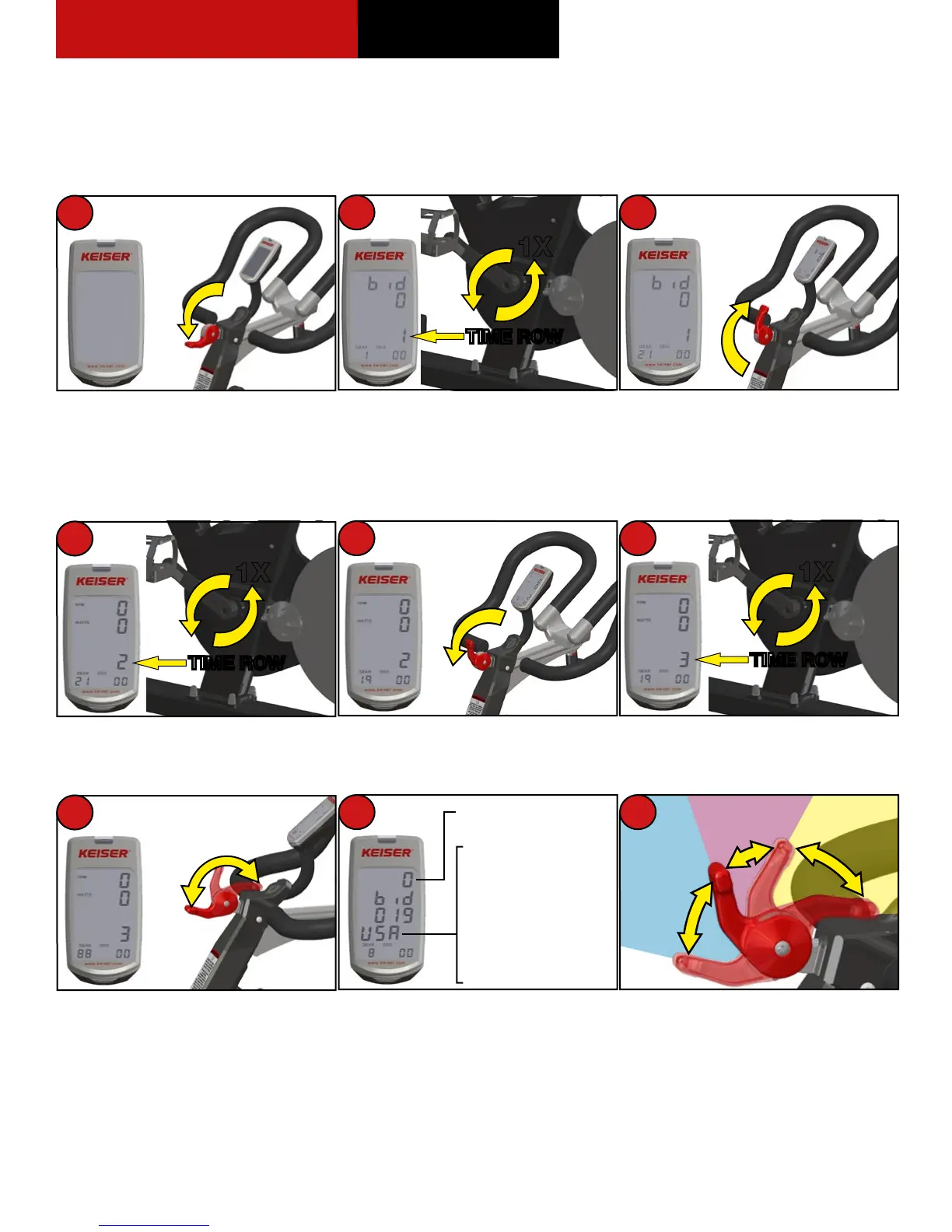
NOTE: STEPS 1 THROUGH 7 MUST BE COMPLETED WITHIN 1 MINUTE
SETTING TRIP UNITS TO MILES OR KILOMETERS (KM) AND BIKE ID NUMBER
(Unless otherwise specied or requested at the time of purchase, the M3i trip distance is set to miles.)
1X
Begin with the bike off, push shift lever
all the way down
Pedal 1 full revolution. The bike id
(bid) in the screen above is 0, yours
may be different. Also, notice the 1
in the “TIME ROW”.
Pedal 1 full revolution. Notice the 2
in the “TIME ROW”.
Pedal 1 full revolution. Notice the 3
in the “TIME ROW”.
Move the shift lever from stop to
stop 6 times.
bike id number (bid)
USA = the trip units
were successfully set
to Miles
EURO = the trip units
were successfully set
to Kilometers
1
2 3
4
5 6
7
8 9
Conrm the correct units have been
set.
Gear 8 to 16
holds bid number
Gear 1 to 7
decreases bid
number
Gear 17 to 24
increases bid
number
TIME ROW
TIME ROW
TIME ROW
Set shift lever to gear 21 for Miles, or
set shift lever to gear 19 for Kilometers.
Set shift lever to gear 19 for Miles, or
set shift lever to gear 21 for Kilometers.
Once the trip units have been set, you
have the opportunity to adjust the
bike id number. Adjust the shift lever
to attain the desired bike id number,
then set the shift lever to any number
between gear 8 and 16.
NOTE: The computer will only shut
down while the shift lever is be-
tween gears 8 and 16.


 To Next Page