CHANGING DUST BAG
TO REPLACE DUST BAG
DUST BAG STYLE O
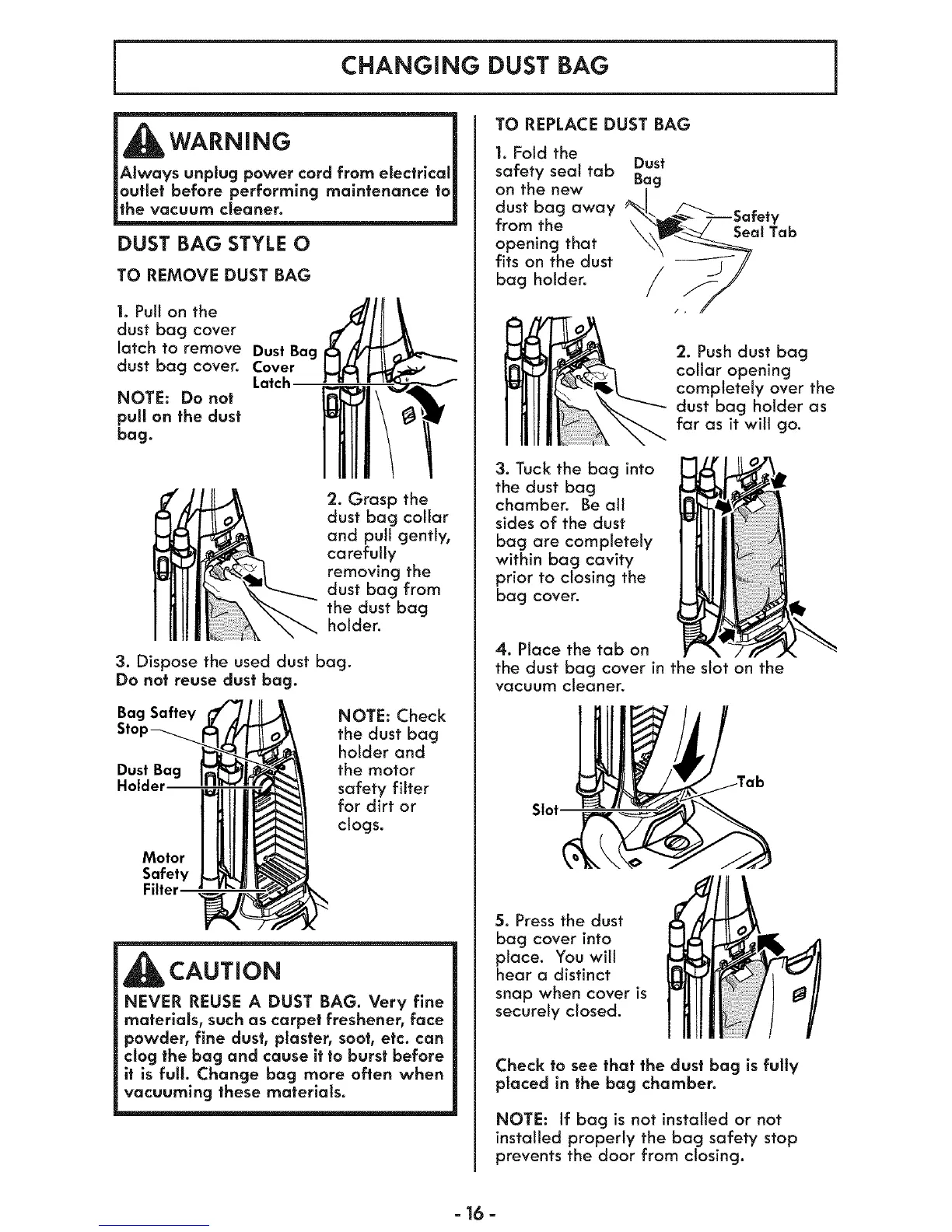
TO REMOVE DUST BAG
1. Pull on the
dust bag cover
latch to remove Dust Bag
dust bag cover. Cover
Latch
NOTE: Do not
pull on the dust
bag.
2. Grasp the
dust bag collar
and pull gently,
carefully
removing the
dust bag from
the dust bag
holder.
3. Dispose the used dust bag.
Do not reuse dust bag.
Bag Saftey
Dust Bag
Holder
NOTE: Check
the dust bag
holder and
the motor
safety filter
for dirt or
clogs.
Motor
Safety
Filter
CAUTION
NEVER REUSE A DUST BAG. Very fine
materials, such as carpet freshener, face
powder, fine dust, plaster, soot, etc. can
clog the bag and cause it to burst before
it is full. Change bag more often when
vacuuming these materials.
1. Fold the
safety seat tab Dust
on the new Bag
dust bag away %_.-_/_///--Safe
from the t{a b
opening that
fits on the dust
bag holder.
/,
_ . Push dust bag
collar opening
completely over the
dust bag holder as
far as it will go.
3. Tuck the bag into
the dust bag
chamber. Be all
sides of the dust
bag are completely
within bag cavity
prior to closing the
bag cover.
4. Place the tab on
the dust bag cover in the slot on the
vacuum cleaner.
Slot
5. Press the dust
bag cover into
place. You will
hear a distinct
snap when cover is
securely closed.
Check to see that the dust bag is fully
placed in the bag chamber.
NOTE: If bag is not installed or not
installed properly the bag safety stop
prevents the door from closing.
=16 =




 To Next Page