HANDLE RELEASE
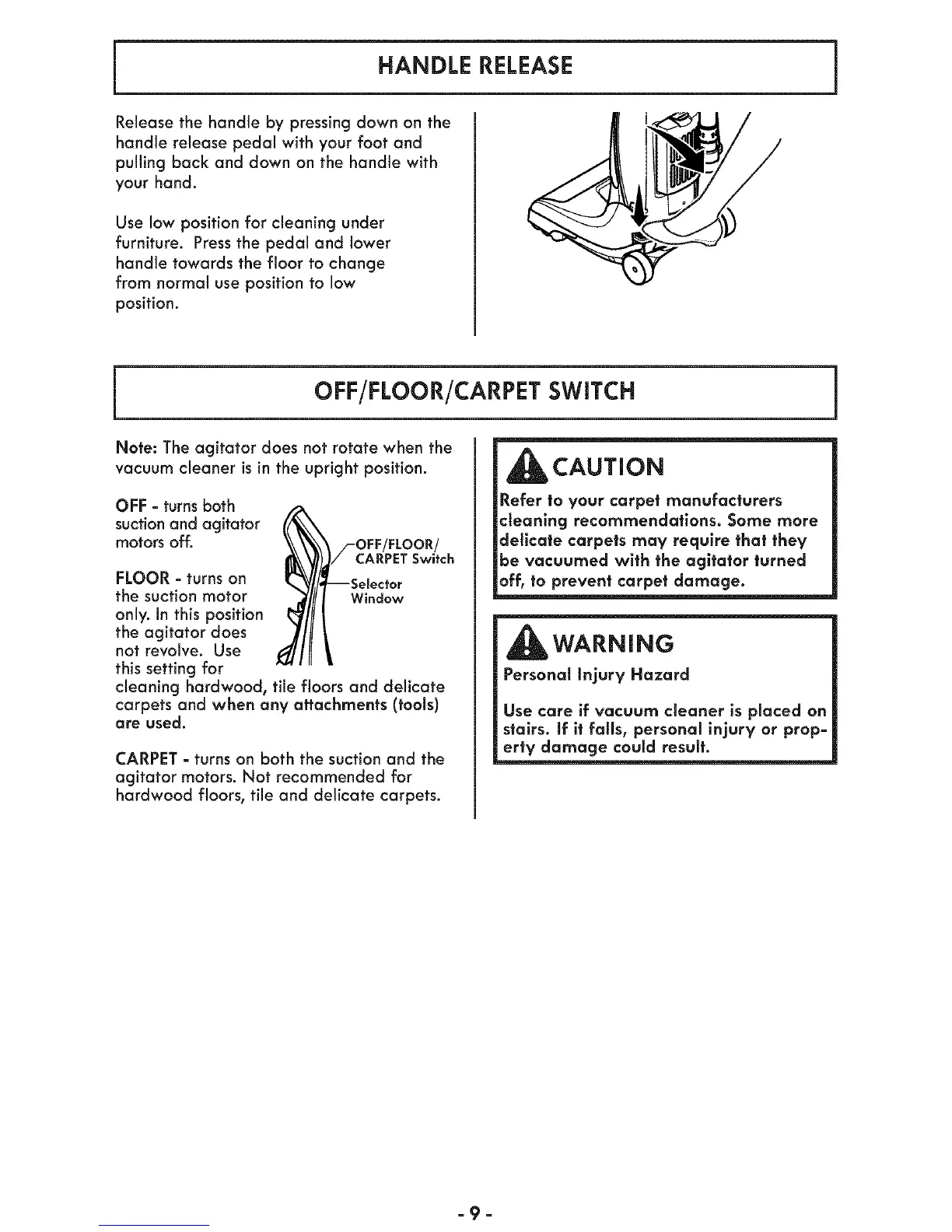
Release the handle by pressingdown on the
handle release pedal with your foot and
pulling back and down on the handle with
your hand.
Use low position for cleaning under
furniture. Press the pedal and lower
handle towards the floor to change
from normal use position to low
position.
OFF/FLOOR/CARPET SWITCH
Note: The agitator does not rotate when the
vacuum cleaner is in the upright position.
OFF = turns both
suction and agitator
motors off.
FLOOR- turns on
the suction motor
only. In this position
the agitator does
not revolve. Use
this setting for
/-OFF/FLOOR/
/CARPET Switch
--Selector
Window
cleaning hardwood, tile floors and delicate
carpets and when any attachments (tools)
are used.
CARPET - turns on both the suction and the
agitator motors. Not recommended for
hardwood floors, tile and delicate carpets.
CAUTION
Refer to your carpet manufacturers
cleaning recommendations. Some more
delicate carpets may require that they
be vacuumed with the agitator turned
off, to prevent carpet damage.
WARNING
Personal Injury Hazard
Use care if vacuum cleaner is placed on
stairs. If it fails, personal injury or prop-
erty damage could result.
-9-




 To Next Page