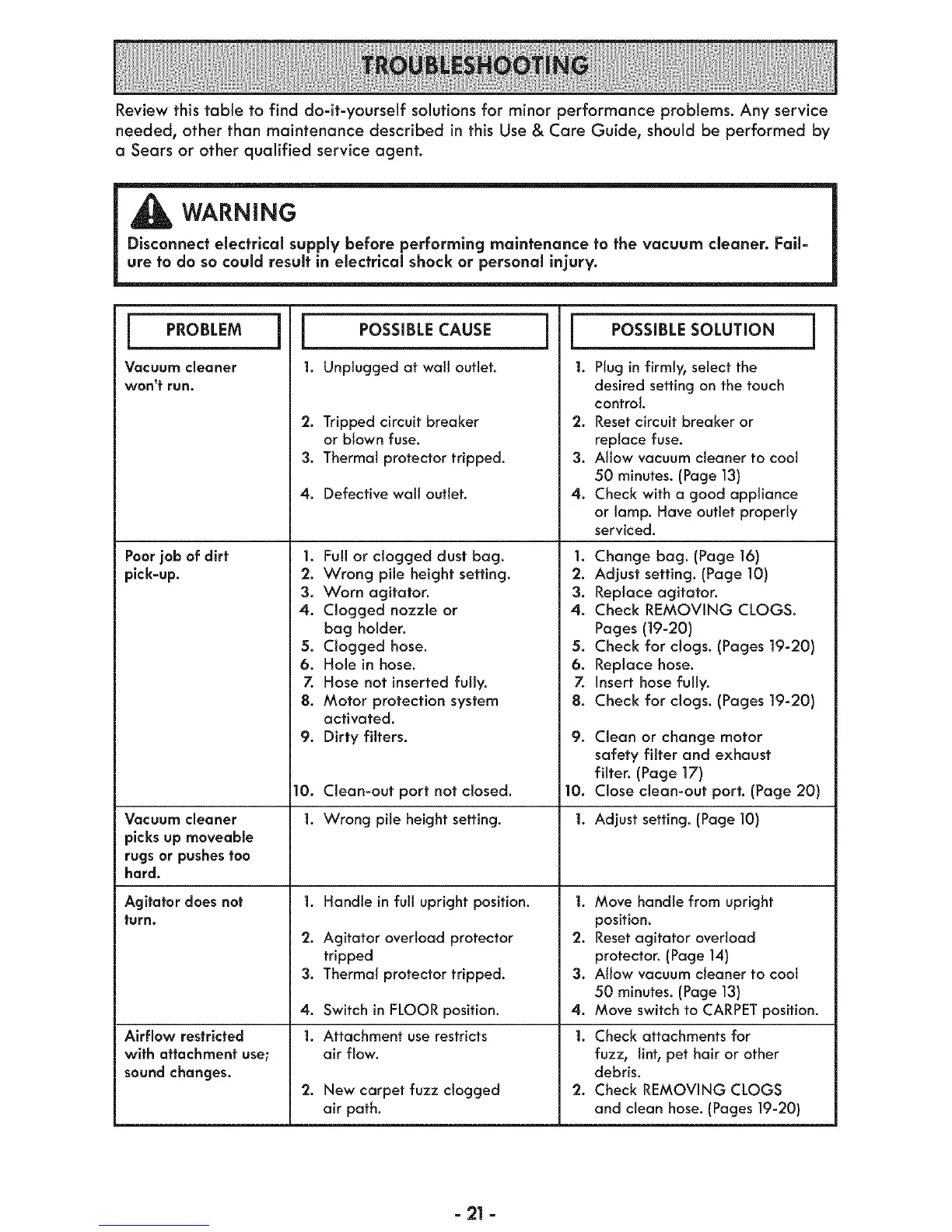
Review this table to find do-it-yourself solutions for minor performance problems. Any service
needed, other than maintenance described inthis Use & Care Guide, should be performed by
a Sears or other qualified service agent.
WARNING
Disconnect electrical supply before performing maintenance to the vacuum cleaner. Fail=
ure to do so could result in electrical shock or personal injury.
I PROBLEM
Vacuum cleaner
won't run.
Poor job of dirt
pick-up.
Vacuum cleaner
picks up moveabme
rugsor pushes too
hard.
Agitator does not
turn.
Airflow restricted
with attachment use;
sound changes.
I
I POSSIBLE CAUSE ]
1. Unplugged at wall outlet.
2. Tripped circuit breaker
or blown fuse.
3. Thermal protector tripped.
4. Defective wall outlet.
1. Full or clogged dust bag.
2. Wrong pile height setting.
3. Worn agitator.
4. Clogged nozzle or
bag holder.
5. Clogged hose.
6. Hole in hose.
Z Hose not inserted fully.
8. Motor protection system
activated.
9. Dirty filters.
10. Clean-out port not closed.
1. Wrong pile height setting.
1,
2.
3.
4.
1.
Handle in full upright position.
Agitator overload protector
tripped
Thermal protector tripped.
Switch in FLOOR position.
Attachment use restricts
air flow.
2. New carpet fuzz clogged
air path.
l POSSIBLE SOLUTION j
|. Plug in firmly, select the
desired setting on the touch
control.
Resetcircuit breaker or
replace fuse.
Allow vacuum cleaner to cool
50 minutes. (Page 13)
Check with a good appliance
or lamp. Have outlet properly
serviced.
2,
3.
4.
1. Change bag. (Page 16)
2. Adjust setting. (Page 10)
3. Replace agitator.
4. Check REMOVING CLOGS.
Pages (19-20)
5. Check for clogs. (Pages 19-20)
6. Replace hose.
7. Insert hose fully.
8. Check for clogs. (Pages 19-20)
9.
Clean or change motor
safety filter and exhaust
filter. (Page ]7)
10. Close clean-out port. (Page 20)
1. Adjust setting. (Page 10)
].Move handle from upright
position.
2. Resetagitator overload
protector. (Page 14}
3. Allow vacuum cleaner to coot
50 minutes. (Page 13)
4. Move switch to CARPET position.
1. Check attachments for
fuzz, lint, pet hair or other
debris.
2. Check REMOVING CLOGS
and clean hose. (Pages 19-20)
=21 =




 To Next Page