- 12 -
NOTE:
When the remaining
lter life is more than 200 hours,
the Filter Reset Button cannot be
operated. Only a "Di" sound will
be heard.
• Forced Filter Life Reset: Within
30 seconds of powering on, in
the standby state, press and
hold the ON/OFF Button and
Filter Reset Button at the same
time for more than 5 seconds.
All indicators of the buttons
will ash for 6 times to indicate
that the lter life is reset. The air
purier will enter standby state.
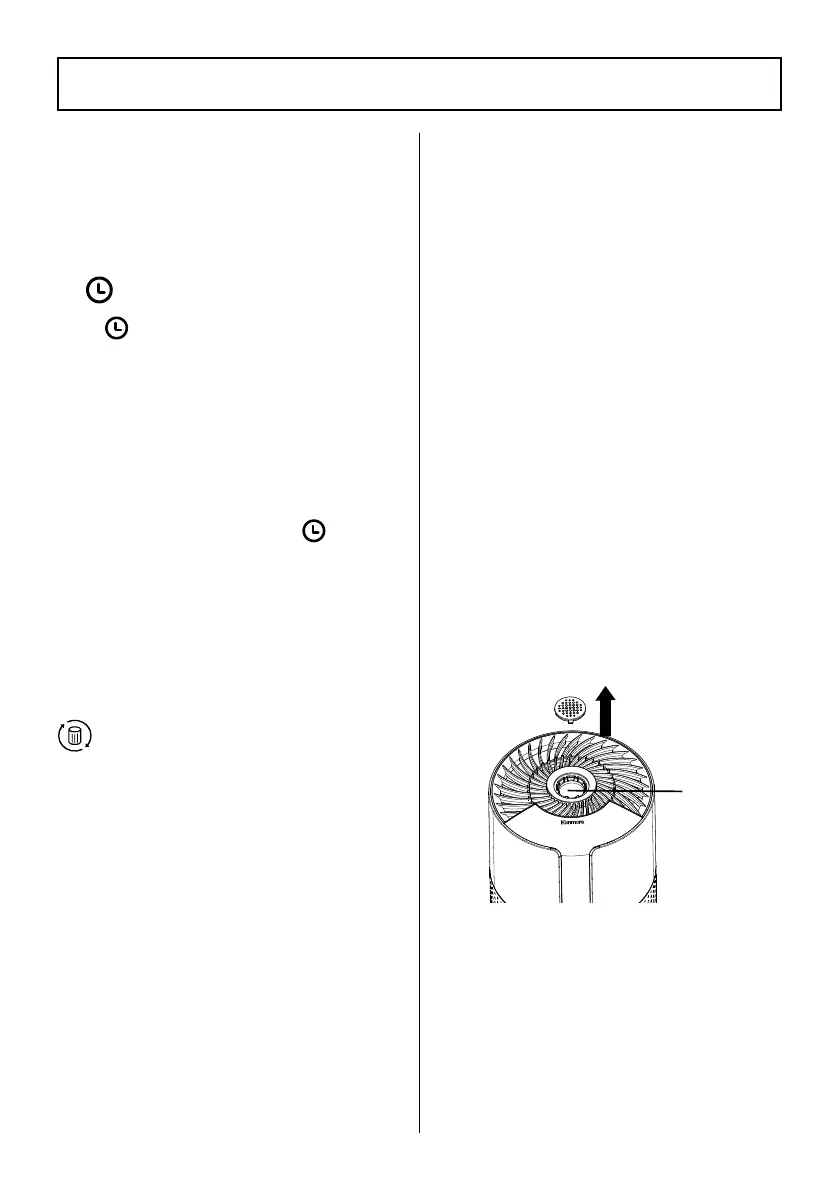
Aroma Cover
The option to add an essential
oil to the air purier is available if
needed.
1. Open the aroma cover on the
top of the air purier.
2. Add the essential oil on the
aroma pad inside the air
purier.
3. Replace the aroma cover.
• Press the Light button and Fan
Speed button at the same time
for 3 seconds to exit the child
lock state. All other buttons can
now be used.
Timer Button/Indicators
Tap
to manually set a timer
for 2, 4, or 8 hours.
• The corresponding timer
indicator 2h, 4h or 8h will light
up when active.
• Once the timer has nished, the
air purier will automatically
turn off.
• To cancel a timer, tap
until
all timer indicators are off.
• Fan speed can be changed at
any time while the timer is on.
• The timer will restart if the time
is changed.
Filter Reset Button
• The lter life is about 6 months.
When the remaining lter life
is less than 200 hours, the Filter
Reset indicator will ash red
to remind users to replace the
lter until the lter life is reset.
• Filter life reset: When the Filter
Reset indicator ashes red,
replace with a new lter (page
14). Turn on the air purier.
Press and hold the Filter Reset
button for more than 3 seconds
to reset the Filter Reset button.
The Filter Reset indicator will be
in dim light again.
CONTROLS & DISPLAY
Aroma
Pad




 To Next Page