10
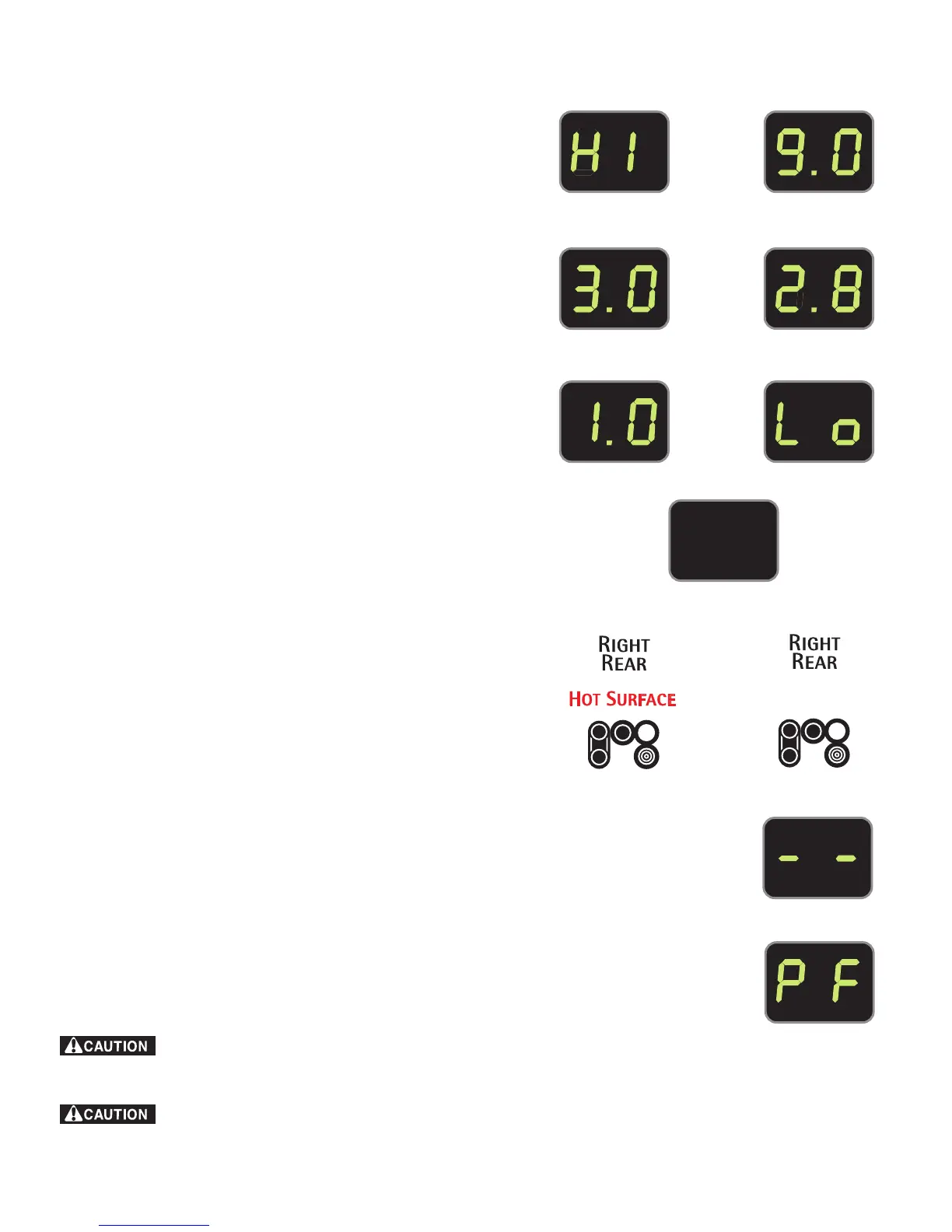
Fig. 3 Fig. 4
Fig. 1
Fig. 2
Fig. 5 Fig. 6
Fig. 7
Fig. 10
Fig. 8
Fig. 9
Fig. 11
Setting Surface Controls
• Electronic Surface Element Controls (ESEC)
• Available ESEC Display Settings
• Hot Surface Indicator Lights
• ESEC Lockout Feature (- -)
Radiant surface elements may appear to have cooled after they have been
turned off. The glass surface may still be hot and burns may occur if the glass surface is
touched before it has cooled sufficiently.
Do not place aluminum foil or plastic items such as salt and pepper
shakers, spoon holders or plastic wrappings on top of the range when it is in use.
These items could melt or ignite. Potholders, towels or wooden spoons could catch fire if
placed too close to the surface elements.
The Electronic Surface Element Control (ESEC)
The Electronic Surface Element Control (“ESEC”) feature
provides a digital display of the radiant surface elements on the
cooktop. The ESEC displays in combination with the touch
pads are designed to replace the conventional control knob and
power level tick mark indicators.
In addition your range includes shared radiant element touch
pad settings. The “Bridge” element combinations and Triple
radiant element settings are also shown in the ESEC display
windows.
The available ESEC Window Display Settings
The ESEC control will display heat levels ranging from Hi (Fig.
1) to Lo (Fig. 6) and OFF (Fig. 7) that will display in the ESEC
windows. The settings between 9.0 (Fig. 2) and 3.0 (Fig. 3)
decrease or increase in increments of .5 (1/2). The settings
between 3.0 (Figs. 3 & 4) and 1.0 (Fig. 5) are Simmer settings
which decrease or increase in increments of .2 to Lo ( Fig. 6;
lowest Simmer setting) for more precise settings at lower heat
levels. Use the Recommended Surface Setting Chart (See
page 11, Fig. 1) to determine the correct setting for the kind of
food you are preparing.
Hot Surface Indicator Lights
After using any of the radiant element positions the cooktop
will become very hot. After turning any of these elements OFF,
the cooktop will remain HOT for some time. The backguard
control monitors the temperature for 5 positions on the
cooktop. The “Hot Surface” indicator light (Fig. 8) will glow
whenever any of the element positions becomes HOT. The Hot
Surface indicator light will remain ON while hot and turn OFF
once the cooktop has cooled sufficiently (Fig. 9).
ESEC Lockout Feature ( - - )
The ESEC feature will not operate during a Self-Clean cycle or when the Oven Lockout
feature is active. Whenever the ESEC Lockout feature is active, " - - " will appear in any
display window (See Fig. 10. Also refer to the Oven Lockout instructions on page 21).
ESEC PF message
The ESEC will display the PF message whenever there has been a power interruption to the
appliance. PF will appear in the ESEC display windows as shown in Fig. 11. To clear the PF
message touch any ON/OFF ESEC control pad to reset and be sure to reset the clock with
the correct time of day if necessary. If the PF displays again repeat these steps.



 To Next Page