42
The oven lights automatically turn ON when the door is opened. The oven lights may also be manually operated by pressing
the pad.
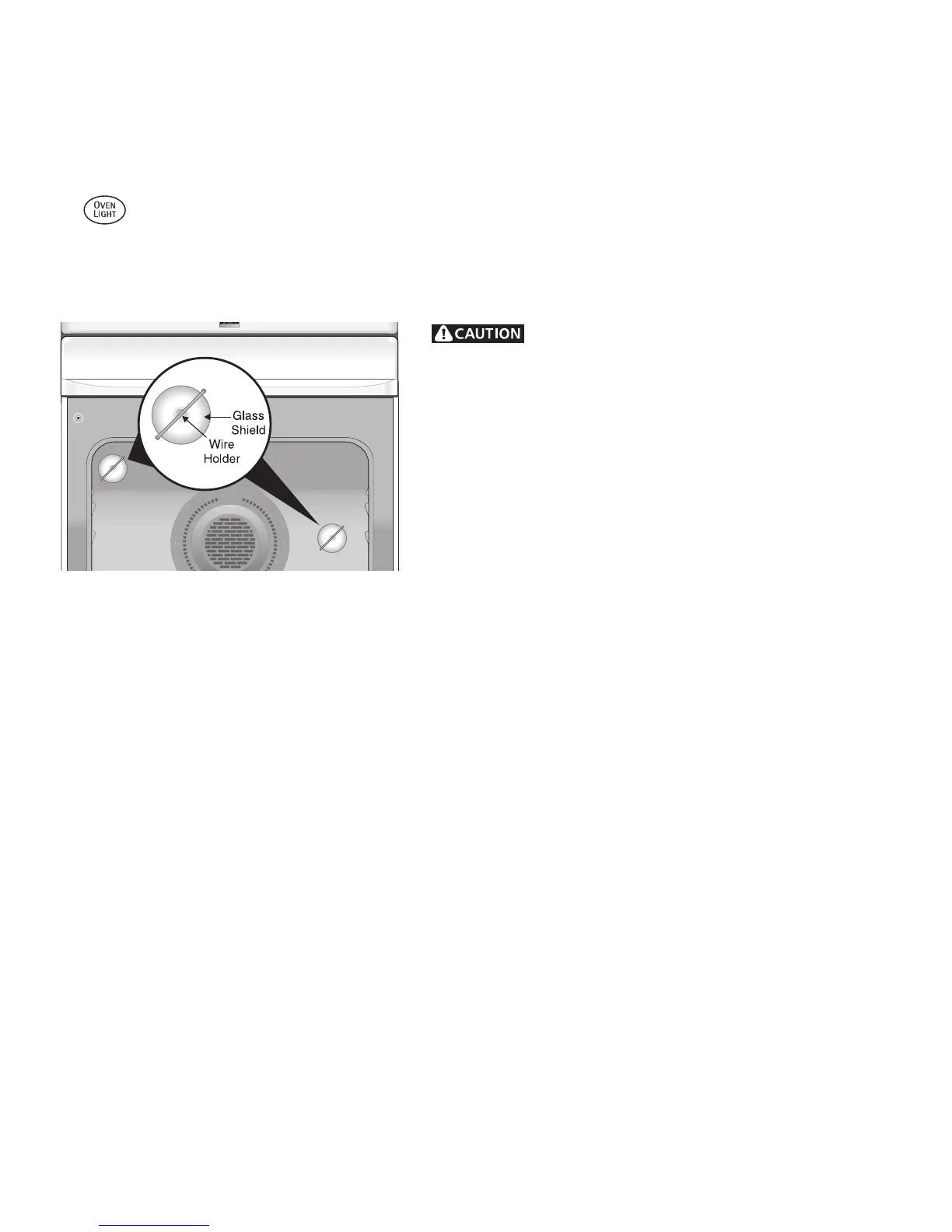
The oven light bulbs are located at the rear of the oven and are covered with a glass shield held by a wire holder. The glass
shields must be in place whenever the oven is in use.
Some models are equipped with stainless steel exterior parts. Special care and cleaning are required for maintaining the
appearance of stainless parts. Refer to the Care & Cleaning Table for detailed cleaning instructions.
Care & Cleaning of Stainless Steel (some models)
Changing Oven Light(s)
General Care & Cleaning
• Changing Oven Lights
• Care & Cleaning of Stainless Steel (some models)
To replace the oven light bulb(s):
1. Turn electrical power off at the main source or unplug the range.
2. Press wire holder to one side to release the glass shield.
3. Replace bulb with a new 40 watt appliance bulb.
4. Replace glass shield over bulb and snap wire holder into place.
5. Turn power back on again at the main source (or plug the range
back in).
6. The clock will then need to be reset. To reset, see Setting the
Clock and Minute Timer in this Use & Care Guide.
Be sure the range is unplugged and all parts are
COOL before replacing oven light. Wear a leather-faced glove for
protection against possible broken glass.



 To Next Page