Setting Oven Controls
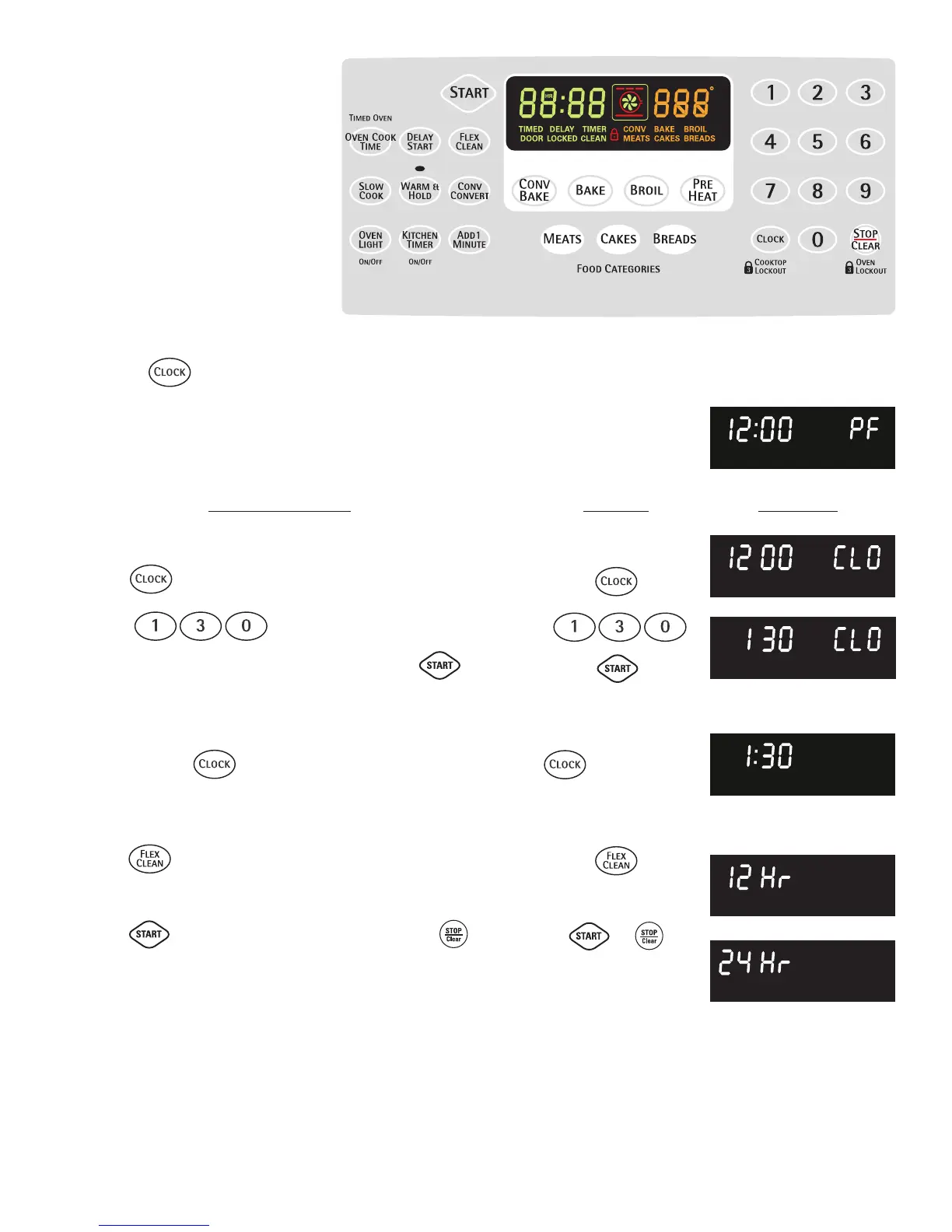
• Setting the Clock
• Changing between 12 or 24 hour
display
Setting the Clock
The CLOCK pad is used to set the clock. The clock may be
set for 12 or 24 hour time of day operation. The clock has been
preset at the factory for the 12 hour operation. When the range is
first plugged in, or when the power supply to the range has been
interrupted, the timer in the display will flash with power failure "PF"
(See Fig. 1).
To set the clock (example below for 1:30):
1. Press . "CLO" will appear in the display (Fig. 2).
2. Press pads to set the time of day to 1:30
(Fig. 3). "CLO" will appear in the display. Press . "CLO"
will disappear and the clock will start (Fig. 4).
Changing between 12 or 24 hour time of day display:
1. Press and hold for 6 seconds (Fig. 3). While holding the
pad down the current time of day will remain and "CLO" will
disappear from the display (Fig. 4). CONTINUE holding the pad
until "12 Hr"(Fig. 5) or "24 Hr" appears in the display.
2. Press to switch between the 12 and 24 hour time of day
display. The display will show either "12 Hr" (Fig. 5) or "24 Hr"
(Fig. 6).
3. Press to accept the desired change or press to
reject the change.
4. Reset the correct time as described in To set the Clock above.
Please note that if the 24 hour time of day mode was chosen,
the clock will now display time from 0:00 through 23:59 hours.
for 6 seconds
INSTRUCTIONS PRESS DISPLAY
Fig. 1
Fig. 2
Fig. 3
Fig. 4
Fig. 5
Fig. 6
or
ENGLISH
19
Note: Changing between 12 or 24 hour time of day display will lockout the cooktop. See page 8 for complete
instructions for unlocking the cooktop.



 To Next Page