23
Setting Cook Time
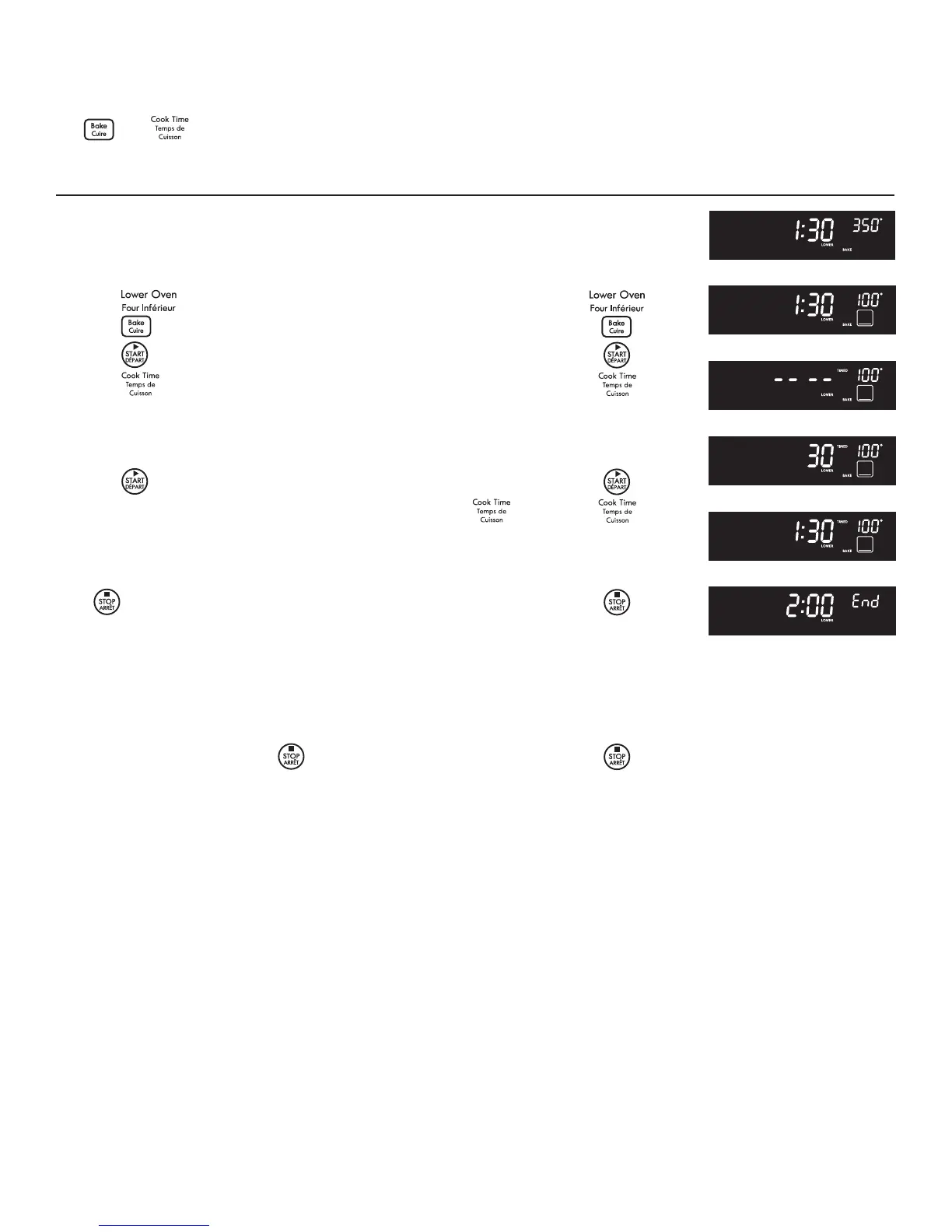
The and pads control the Cook Time feature. The automatic timer of the Cook Time feature will turn the oven
OFF after cooking for the desired amount of time you selected.
Setting Oven Controls
To program the oven to begin baking immediately and to shut
1. Be sure the clock is set for the correct time of day.
2. Arrange interior oven rack(s) and place the food in the oven.
3. Press
.
4. Press
(Fig. 1).
5. Press
. The actual temperature oven will be displayed (Fig. 2).
6. Press (Fig. 3).
7. Enter the desired baking time by pressing
(Fig. 4).
Note: Baking time can be set for any amount of time between 1
minute to 11 hours and 59 minutes. .
8. Press
. The display returns to the time of day (Fig. 5).
Note: After the Timed Bake feature has been activated, press
to display the bake time remaining in the Timed Bake mode. Once
Timed Bake has started baking, a beep will sound when the oven
temperature reaches the set temperature.
Press
when baking has nished or at any time to cancel the
Timed Bake feature.
1. "End", and the time of day will show in display. The oven will shut
o automatically (Figure 6).
2. The control will beep 3 times. The control will continue to beep 3
times every 30 seconds until
is pressed.
Fig. 1
Fig. 2
Fig. 3
Fig. 4
Fig. 5
Fig. 6




 To Next Page