The Electronic Surface Element Control (ESEC) feature provides a digital display of
the radiant surface elements on the cooktop. The ESEC display in combination with
the touch pads is designed to replace conventional control knobs.
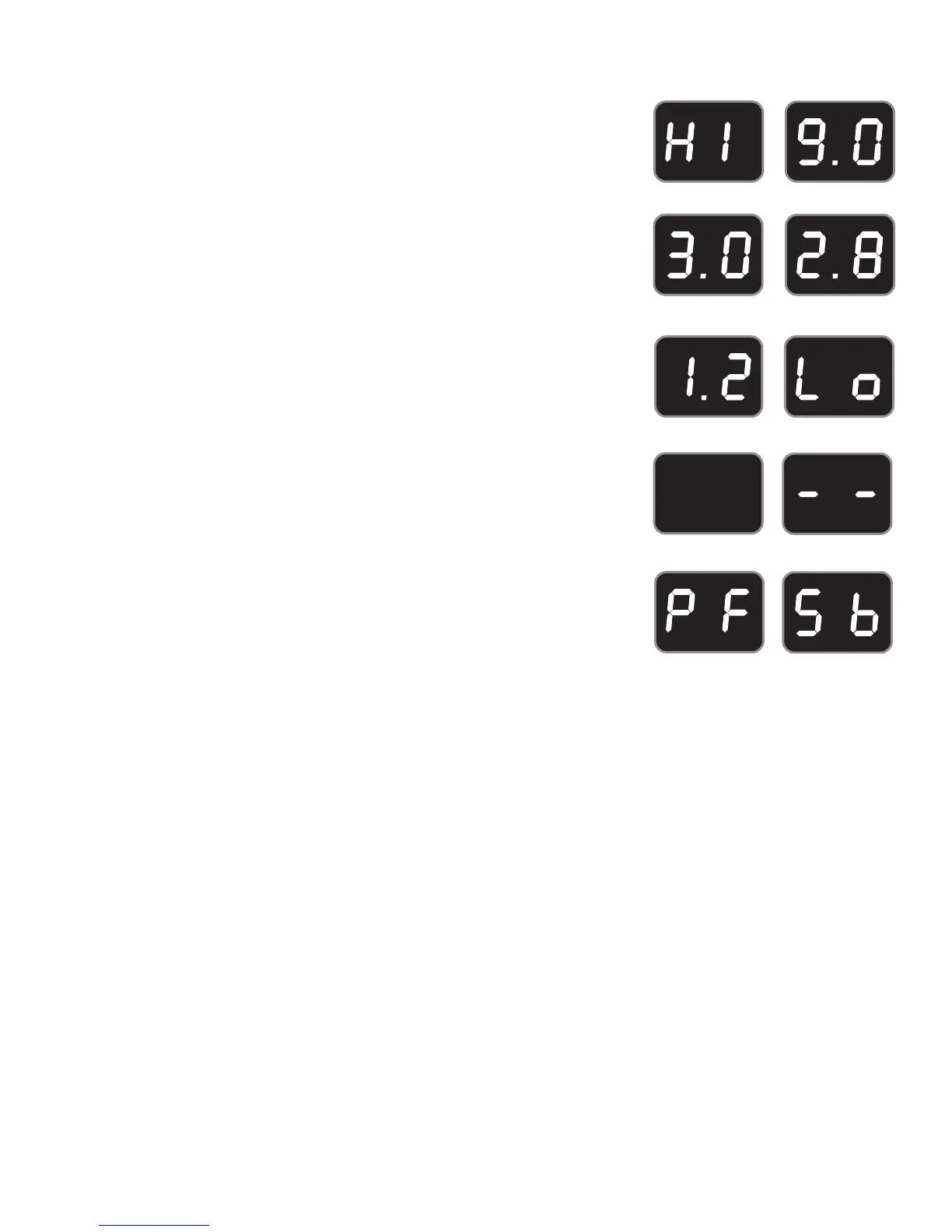
The available ESEC Window Display Settings
The ESEC control will display heat levels ranging from Hi (Figure 1) to Lo (Figure 6)
and OFF (Figure 7). The settings between (Figure 2) and (Figure 3) decrease
or increase in increments of .5 (1/2). The settings between (Figures 3 & 4) and
(Figure 5) are Simmer settings which decrease or increase in increments of .2 (1/5) to
Lo (Figure 6; lowest Simmer setting) for more precise settings at lower heat levels. Use
the Recommended Surface Setting Chart to determine the correct setting for the kind
of food you are preparing.
The ESEC feature will not operate during a Self-Clean cycle or when the Cooktop
Lockout feature is active. Whenever the Cooktop Lockout feature is active, “” will
appear in any display window (See Figure 8).
The ESEC will display the PF message (Figure 9) whenever there has been a power
interruption to the appliance. The PF message will disappear by itself after a few
seconds.
Figure 1
Figure 2
Figure 3
Figure 4
Figure 5
Figure 6
Figure 7
Note: The size and type of cookware used will inuence the setting needed for best cooking results. The
Simmer settings are used to simmer and keep larger quantities of foods warm such as stews and soups.
The lower Simmer settings are ideal for delicate foods and melting chocolate or butter.
Setting Type of Cooking
HIGH Start most foods, bring water to a boil or pan broiling
MEDIUM HIGH Continue a rapid boil, fry, deep fat fry
MEDIUM Maintain a slow boil, thicken sauces and gravies, steam vegetables
MEDIUM LOW Keep foods cooking, poach, stew (2.8 or lower is a simmer setting).
LOW/SIMMER Keep warm, melt, simmer (2.8 or lower is a simmer setting).
Figure 8
Figure 9 Figure 10
Setting Surface Controls
When using any of the radiant element positions the cooktop will become very hot. The
hot surface indicator light will turn ON when the element is hot enough to cause burns,
and will remain ON until the cooktop has cooled enough to be safe to touch.
Note: The hot surface message can turn ON when the upper oven is in self-clean
mode.
How the Electronic Surface Element Controls work when the Sabbath feature is ON.
When your Oven Sabbath feature is ON, the Electronic Surface Elements are also in Sabbath mode. This means that all
electronic surface element control displays show “Sb” (Figure 10). The surface elements can be used even if the Sabbath
Feature is on.
To turn ON the surface element, press the ON/OFF button for that element and then press HI or Lo. With the Sabbath
feature active, a surface element will not start heating until 15-30 seconds after you turn it on. The heat setting you have
turned to will not appear in the display because “Sb” is showing there. Any adjustment to the heat setting will also take 15
-30 seconds to go into eect.
To shut o the surface element while the Sabbath feature is ON, press the ON/OFF button for that element. The element
will immediately turn o without delay.
Note: Refer to the Sabbath Feature section.




 To Next Page