34
The pad controls the Self-Cleaning feature. If you are
planning to use the oven directly after a self-clean cycle remember to
allow time for the oven to cool down and the oven door to unlock. This
normally takes about one hour. So a 3 hour self-clean cycle will actually
take about 4 hours to complete.
*It is recommend to use a 2 hour self-clean cycle for light soils, a 3 hour
cycle for average soils, and a 4 hour cycle for heavy soils (to assure
satisfactory results)
To avoid possible burns use
care when opening the oven door after the Self-
Cleaning cycle. Stand to the side of the oven
when opening the door to allow hot air or steam
to escape.
DO NOT force the oven door
open. This can damage the automatic door locking
system. Use caution and avoid possible burns when
opening the door after the Self-Cleaning cycle has
completed. The oven may still be VERY HOT.
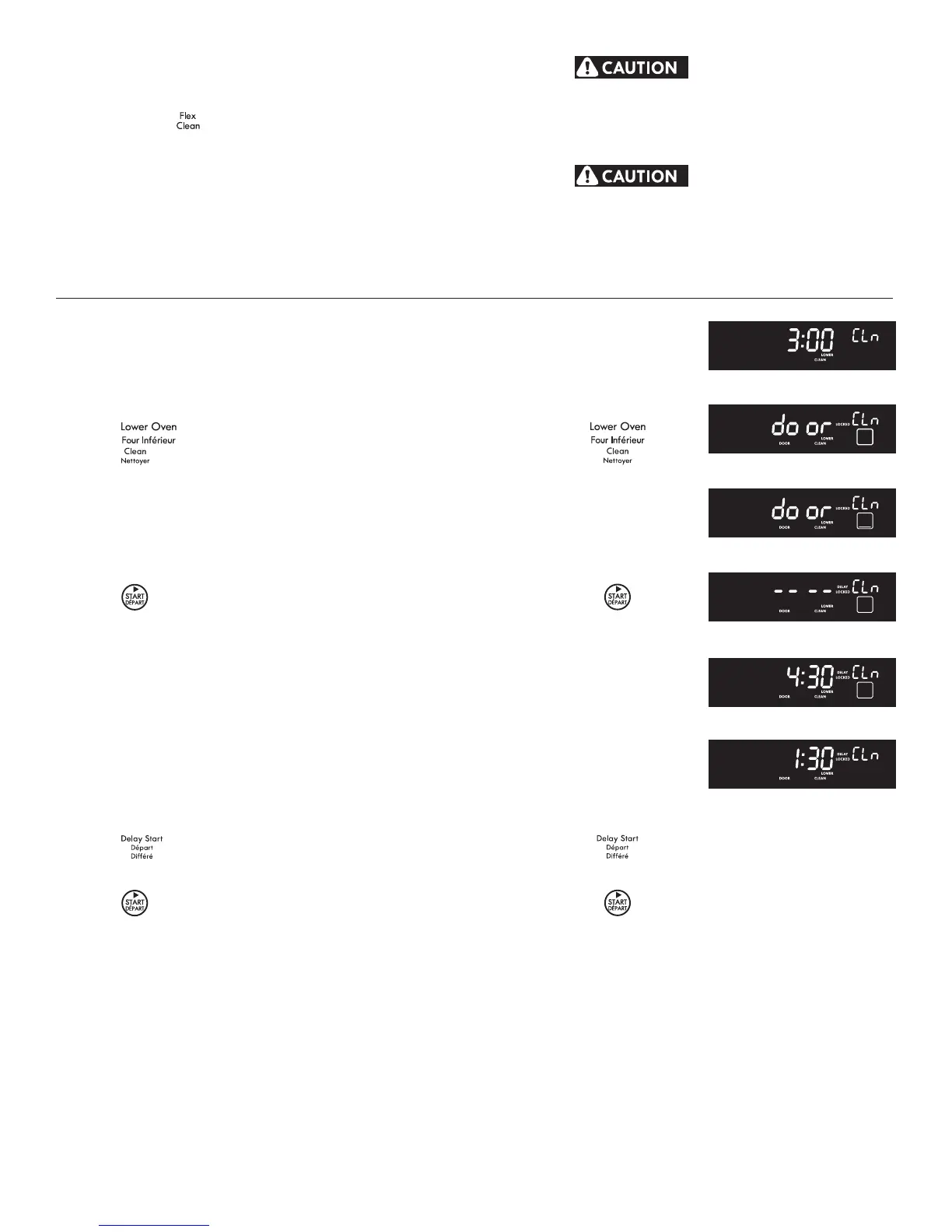
1. Be sure the clock is set with the correct time of day and the oven
door is closed.
2. Press
.
3. Press
. "" will ash and "" will show in the
display (Fig. 1). The control will automatically clean for a 3 hour
period (default self-cleaning cycle time). Note: If a 2 or 4 hour
clean time is desired, press
for 2 hour or press
for a 4 hour clean time. Set the cleaning time based on
the amount of soil: light, medium or heavy (* See above).
4. Press
. The "DOOR LOCKED" icon will ash; "" icon
and the letters "CLn" will remain on in the display (Fig. 2).
5. As soon as the control is set, the motor driven oven door lock will
begin to close automatically. Once the door has been locked the
"DOOR LOCKED" indicator light will stop ashing and remain on.
Also, the oven icon will appear in the display (Fig. 3).
Note: Allow about 15 seconds for the oven door to lock.
following page.
6. Press
(Fig. 4). Enter the desired start time using the number
pads
(Fig. 5).
7. Press
. "", "", "LOCK" and "DOOR" will be
displayed (Fig. 6).
9. The control will start the self-cleaning at the set start time, for the
period of time previously selected. At that time, the icon ""
will go out.
1. “HOT” will appear in the display. The time of day, the "DOOR
LOCKED" and "" icon will remain in the display.
2. Once the oven has cooled down for approximately 1 HOUR, and
the "DOOR LOCKED" icon is no longer displayed, the oven door
can then be opened.
or
Fig. 1
Fig. 2
Fig. 3
Fig. 4
Fig. 5
Fig. 6




 To Next Page