11
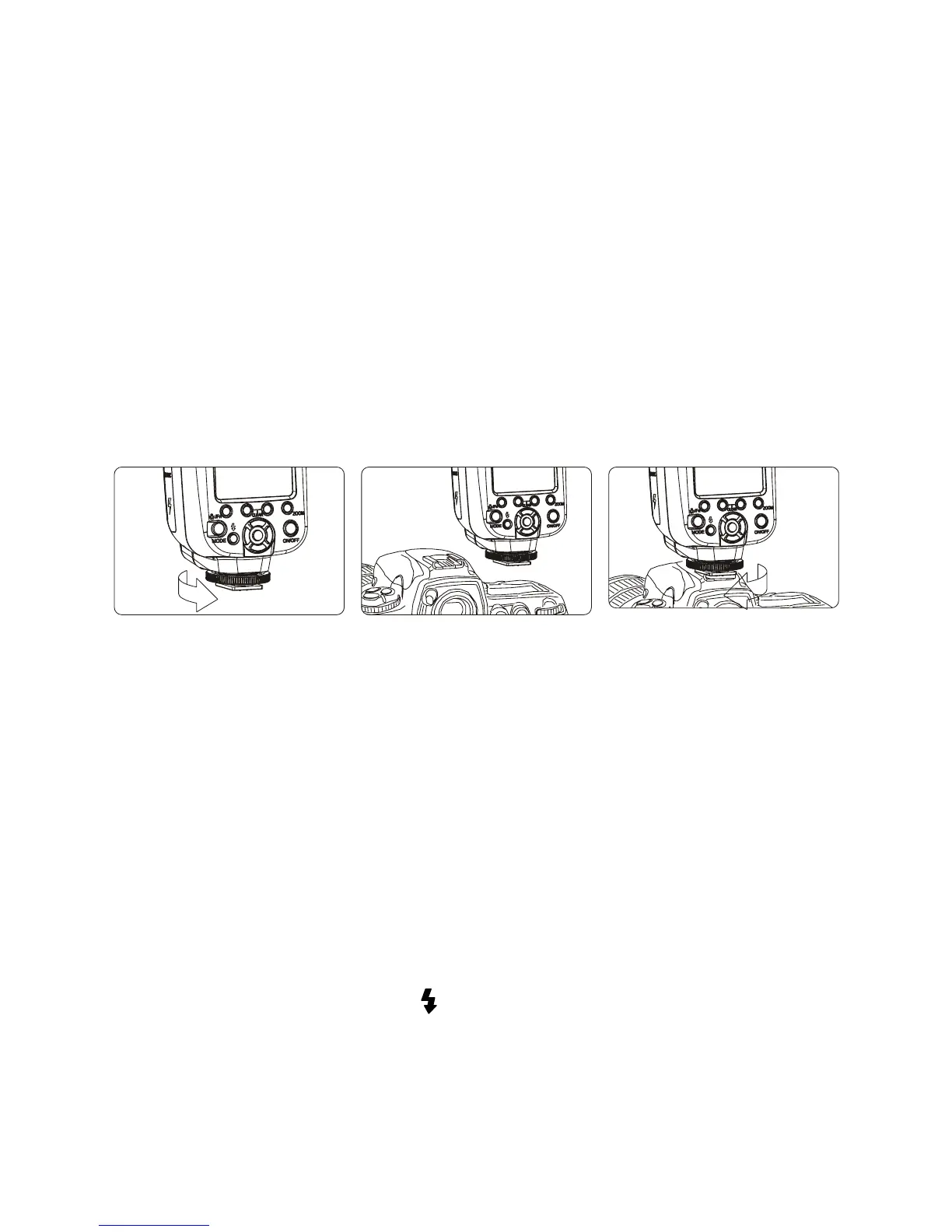
Install speedash on camera
Make sure the speedash and camera power are both off.
1. Prepare
Spin the lock dial fully to the left.
2. Install
Insert the speedash’s foot completely into the camera’s hotshoe.
3. Lock
Spin the lock dial back to the right to lock the speedash into
place. Do not overtighten.
4. Remove
Spin the lock dial to the left, and slowly remove the ash from
the hotshoe. Never pull the speedash out forcibly.
Turn on the power
Press and hold the ON/OFF button for two seconds to turn the
speedash on or off.
In order to save battery power and avoid leakage, the default
settings are as follows:
Automatic power saving mode
If the speedash is inactive for 60 seconds, the unit will automatically
go into sleep mode. If this occurs, press any button to wake it up. If
the speedash is not going to be used for a long period of time, it is
recommended to turn it off using the main power switch and remove
the batteries. Always turn off the power before removing batteries.
When the ash is fully charged and ready to be triggered, the ash
indicator button will light up:
Before shooting, ensure that the ash charging and camera
viewnder indicator lights are illuminated.


 To Next Page