EasyManua.ls Logo

Kenwood DPC-721 - Page 11

Kenwood DPC-721
28 pages
Print Icon
To Next Page IconTo Next Page
To Previous Page IconTo Previous Page
Loading...
M@
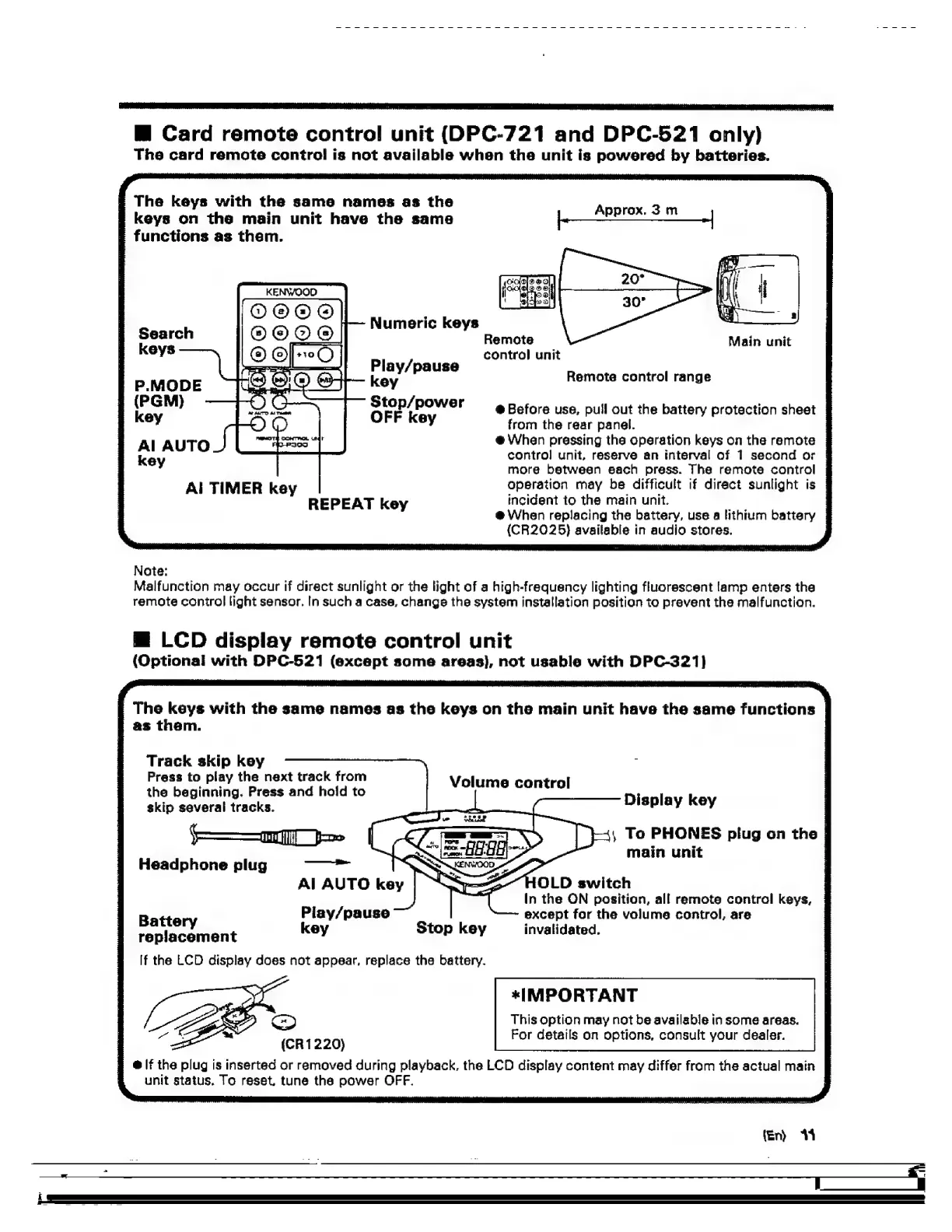
Card
remote
control
unit
(DPC-721
and
DPC-521
only)
The
card
remote
control
is
not
availabla
when
the
unit
is
powored
by
batteries.
The
keys
with
the
same
names
as
the
keys
on
the
main
unit
have
the
same
Pa
3m
-
functions
as
them.
Numeric
keys
Search
,
Remote
Main
unit
keys
|
control
unit
aithal
Play/pause
key
Stop/power
:
@
Before
use,
pull
out
the
battery
protection
sheet
key
OFF
key
from
the
rear
panel.
@
When
pressing
tha
operation
keys
on
the
remote
Remote
control
range
Al
AUTO
ee
|
key
control
unit,
reserve
an
interval
of
1
second
or
|
more
between
each
press.
The
remote
control
|
A!
TIMER
key
operation
may
be
difficult
if
diract
sunlight
is
|
REPEAT
key
incident
to
the
main
unit.
@
When
replacing
the
battery,
use
a
lithium
battery
|
(CR2025}
avaitable
in
audio
stores.
Note:
Malfunction
may
occur
if
direct
sunlight
or
the
light
of
a
high-frequency
lighting
flucrescent
lamp
enters
the
remote
control
light
sensor.
In
such
a
case,
change
the
system
installation
position
to
prevent
the
malfunction.
—@
LCD
display
remote
control
unit
(Optional
with
DPC-521
(except
some
areas},
not
usable
with
DPC-321}
The
keys
with
the
same
names
as
the
keys
on
the
main
unit
have
the
same
functions
|
as
them.
Track
skip
key
Press
to
play
the
next
track
from
the
beginning.
Press
and
hold
to
Volume
control
Display
k
skip
several
tracks.
|
splay
key
——m
I
je
|
é
=
|
ie
e's
To
PHONES
plug
on
the
|
Headphone
plug
main
unit
AL
AUTO
key
In
the
ON
position,
all
remote
contral
keys,
Piay/pause
except
for
the
volume
control,
are
Battery
key
Stop
key
invalidated.
replacement
If
the
LCD
display
does
not
appear,
replace
the
battery.
*IMPORTANT
This
option
may
not
be
available
in
some
areas.
For
detail
ions,
(CR1220}
or
details
on
options,
consult
your
dealer
@
lf
the
plug
is
inserted
or
removed
during
playback,
the
LCD
display
content
may
differ
from
the
actual
main
unit
status,
To
reset.
tune
the
power
OFF.
fen)
+

Related product manuals