EasyManua.ls Logo

Kenwood DPC-721 - Page 20

Kenwood DPC-721
28 pages
Print Icon
To Next Page IconTo Next Page
To Previous Page IconTo Previous Page
Loading...
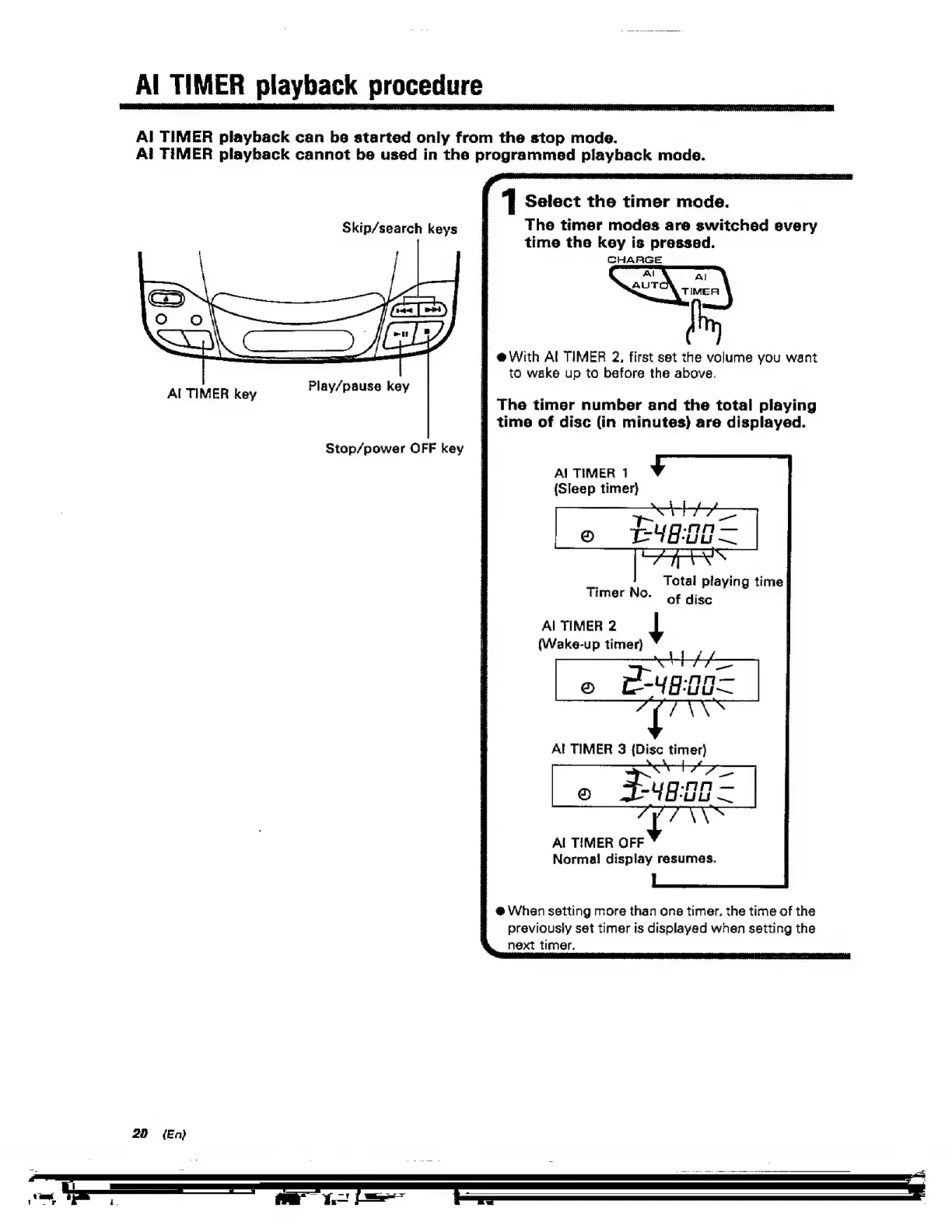
Al
TIMER
playback
procedure
_
Al
TIMER
playback
can
be
started
only
from
the
stop
mode.
Al
TIMER
playback
cannot
be
used
in
the
programmed
playback
mode.
Skip/search
keys
Al
TIMER
key
20
(En)
Play/pause
key
Stop/power
OFF
key
1
Select
the
timer
mode.
The
timer
modes
are
switched
every
time
the
key
is
pressed.
CHARGE
@With
Al
TIMER
2,
first
set
the
volume
you
want
to
wake
up
to
before
the
above.
The
timer
number
and
the
total
playing
7
time
of
disc
(in
minutes)
are
displayed.
A!
TIMER
1
(Sleep
timer}
Total
playing
time
of
disc
Timer
No.
Al
TIMER
2
a
(Wake-up
timer)
Al
TIMER
3
{Disc
timer)
F£ug.00
=
(ry
@
GRE
“nen
Al
TIMER
OFF
Norma!
display
resumes.
#
@
When
setting
more
than
one
timer.
the
time
of
the
previously
set
timer
is
displayed
when
setting
the
next
timer.

Related product manuals