EasyManua.ls Logo

Kenwood DPC-721 - Page 22

Kenwood DPC-721
28 pages
Print Icon
To Next Page IconTo Next Page
To Previous Page IconTo Previous Page
Loading...
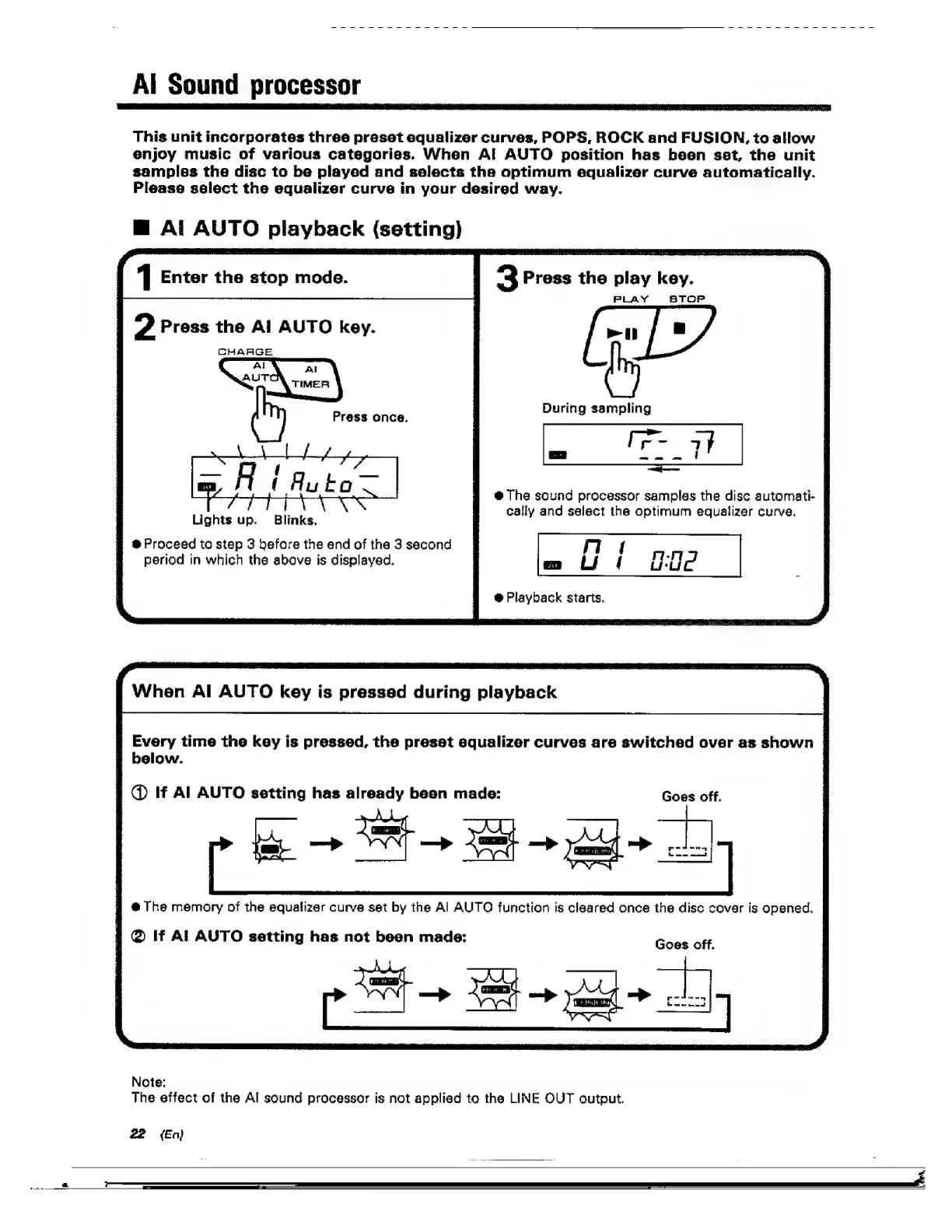
Al
Sound
processor
This
unit
incorporates
three
preset
equalizer
curves,
POPS,
ROCK
and
FUSION,
to
allow
enjoy
music
of
various
categories.
When
AI
AUTO
position
has
been
set,
the
unit
samples
the
disc
to
be
played
and
selects
the
optimum
equalizer
curve
automatically.
Please
select
the
equalizer
curve
in
your
desired
way.
Al
ebuild
playback
chon
1
Enter
the
stop
mode.
2
Press
the
Al
AUTO
key.
CHAAGE
Press
once.
During
sampling
m7
=
eee
SS
——
@
The
sound
processor
samples
the
disc
automati-
cally
and
select
the
optimum
equalizer
curve.
Blinks.
®@
Proceed
to
step
3
before
the
end
of
the
3
second
period
in
which
the
above
is
displayed.
Lights
up.
@
Playback
starts.
When
Al
AUTO
key
is
pressed
during
playback
Every
time
the
key
is
pressed,
the
preset
equalizer
curves
are
switched
over
as
shown
|
below.
|
@
If
Al
AUTO
setting
has
already
been
made:
Goes
off.
!
@
The
memory
of
the
equalizer
curve
set
by
the
Al
AUTO
function
is
cleared
once
the
disc
cover
is
opened.
|
@
If
Al
AUTO
setting
has
not
been
made:
Goes
off.
Note:
The
effect
of
the
Al
sound
processor
is
not
applied
to
the
LINE
OUT
output.
22
(En)

Related product manuals