EasyManua.ls Logo

Kenwood DRV-410 - User Manual

Kenwood DRV-410
104 pages
Print Icon
To Next Page IconTo Next Page
Loading...
B5A-0959-01 (E)© 2016 JVC KENWOOD Corporation
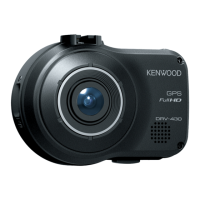
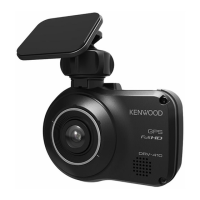
DRV-410
GPS Integrated Dashboard Camera
INSTRUCTION MANUAL
Camera de tableau de bord avec GPS integre
MODE D’EMPLOI
Camara de salpicadero con GPS integrado
MANUAL DE INSTRUCCIONES

Other manuals for Kenwood DRV-410

Questions and Answers

  • J
    John CoxSep 23, 2025
    Why does Kenwood Dash Camera turn off due to high temperature?
    • C
      Catherine HuangSep 23, 2025
      If your Kenwood Dash Camera turns off due to high temperature, it indicates that the power was turned off for safety reasons due to the temperature of the device rising. Reduce the temperature inside the vehicle. The protection circuit operation will be canceled and recording will become possible.
  • W
    wstanleyAug 23, 2025
    Why does Kenwood Dash Cameras system update fail?
    • D
      Dennis DelgadoAug 23, 2025
      A system update failure on your Kenwood Dash Camera can occur if the update file could not be read properly from the SD card. Format the SD card in the device, copy the update data to the SD card again, and then perform the update operation again.
  • Z
    Zachary DeanAug 25, 2025
    Why is my Kenwood DRV-410 not recording?
    • D
      Deborah ClarkAug 26, 2025
      If your Kenwood Dash Camera isn't recording, there might be several reasons: * Check if an SD card is inserted. * Ensure the SD card's capacity is between 8 GB and 32 GB. * Verify the SD card complies with SDHC standards. * Format the SD card using the device if it's not already formatted. * If the device's internal temperature is high, try to reduce the temperature inside the vehicle to allow recording to resume.
  • K
    Kim WilsonAug 26, 2025
    Why won't my Kenwood DRV-410 turn on?
    • L
      Leah HuntAug 27, 2025
      If your Kenwood Dash Cameras won't power on, consider these potential causes: * The vehicle's cigarette lighter socket may not be active. Try turning on the vehicle's accessories power (ACC) or starting the engine. Also, check the cigarette lighter plug's connection. * A blown fuse could be the issue. Inspect the cords for shorts and replace the fuse with one of the same capacity if needed. * Incorrect power cord connections can prevent power-up. Confirm the connections with your dealer. * If the fuse and wiring are fine, reset the device after consulting the section, 'If You Notice a Problem with the Device'.
  • M
    Melissa BrownAug 27, 2025
    What to do if my Kenwood DRV-410 says SD card requires formatting?
    • H
      hallangelaAug 27, 2025
      If your Kenwood Dash Cameras displays 'SD card requires formatting', it means the SD card's format is unrecognizable. You should format the SD card using the device.
  • S
    Steven BrooksSep 16, 2025
    What causes 'File cannot be played' error on Kenwood Dash Cameras?
    • J
      James SmithSep 16, 2025
      A 'File cannot be played' error on your Kenwood Dash Camera can occur if a file that cannot be played was recorded. Back up any necessary data to a PC or other device, and then format the SD card with the device.
  • T
    tim76Sep 13, 2025
    What does it mean when my Kenwood Dash Camera says 'Manual recording failed (file limit exceeded)'?
    • C
      Cynthia ConleySep 13, 2025
      If your Kenwood Dash Camera displays 'Manual recording failed (file limit exceeded)', it means that "Overwrite (manual)" is "OFF" and the file limit of the folder for manual recordings has been reached. When "Overwrite (manual)" is set to "ON," old files are deleted to record.
  • P
    Peter AlexanderSep 14, 2025
    What to do if Kenwood Dash Cameras displays 'Still image recording failed (file limit exceeded)'?
    • A
      Amanda MontgomerySep 15, 2025
      If your Kenwood Dash Camera displays 'Still image recording failed (file limit exceeded)', it indicates that the file limit for still images has been reached. Delete unnecessary files.
  • D
    Deborah DavisSep 5, 2025
    Why is my Kenwood Dash Camera not recording?
    • C
      Christopher EdwardsSep 5, 2025
      Your Kenwood Dash Camera may not be recording because an SD card is not inserted. Insert an SD card that can be used with the device into the SD card slot. The SD card may need to be formatted with the device. High internal temperature can also stop recording, so reduce the temperature inside the vehicle.
  • D
    Donna BowersSep 3, 2025
    What to do if my Kenwood Dash Cameras says 'No SD card inserted'?
    • W
      Wesley StevensSep 3, 2025
      If your Kenwood Dash Camera displays 'No SD card inserted', it could be that the power was turned on without an SD card inserted. Insert an SD card that can be used with the device into the SD card slot.

Summary

Precautions for Use

Installation and Operational Precautions

Guides on safe device installation, operation while driving, and lens care.

Device Maintenance and Troubleshooting

Instructions for cleaning the device and steps to resolve common issues or reset the unit.

How to Install

Recommended Installation Position

Details on the optimal placement of the device inside the vehicle for best recording and safety.

How to Wire

Names and Functions of Parts

Driving Support Setup

Adjusting Vehicle Settings

Guide to configure device settings like mounting height and horizon for optimal driving support function performance.

Basic Operations

SD Card and Power Management

Instructions for handling SD cards and controlling the device's power.

Recording Modes Overview

Explains the different types of recording the device performs.

Recording Functions

Manual Recording and Photo Capture

How to manually record video clips and capture still images.

Recording Screen Indicators

Explanation of the icons and information displayed on the device's recording screen.

Playback Operations

Playing Recorded Files

Steps to select and play recorded video files or photos from the device's storage.

Playback Screen Indicators

Details on the icons and information displayed during video playback on the device.

File Management

Protecting and Deleting Files

Procedures to protect important files or delete unwanted recordings and photos via the playback menu.

Various Settings

General Device Settings

Configuration for date, time, language, and system updates.

Recording Configuration

Adjusting video quality, parking, and file handling options.

Driving Support & SD Card Configuration

Configuring driving assistance features and managing the SD card.

Driving Support Settings

System Settings

Date and Time Configuration

Step-by-step guide to set the device's date and time automatically or manually.

Updating the System

Using the PC Application

Software Installation and File Access

Installing the PC software and accessing recorded files from the SD card.

PC Application Features

Using the PC software for file operations, playback, map viewing, and data export.

Important Notices

Appendix

SD Cards

Information on supported SD cards, usage precautions, disposal, and file structure.

Driving Support Function

Explanation of how the driving support features work, their limitations, and operating conditions.

GPS Functionality

Details on how GPS positioning works, its limitations, and factors affecting signal reception.

Recording Performance Data

Device Specifications

Kenwood DRV-410 Specifications

General IconGeneral
Product colorBlack
G-shock sensorYes
Languages supportCZE, DEU, ENG, ESP, FIN, FRE, ITA, POL, POR, RUS, SWE
Number of cameras1
Main camera sensorCMOS
Maximum frame rate27 fps
Power cable length3.5 m
Main camera resolution2304 x 1296 pixels
Main camera sensor size1/3 \
Main camera viewing angle128 °
Video compression formatsAVC, H.264, MOV, MPEG4
Audio recording-
Display diagonal1.5 \
Compatible memory cardsMicroSDHC
Maximum memory card size32 GB
Wi-FiNo
Operating voltage12 V
Input operation voltage (max)16 V
Image formats supportedJPG
Quantity per pack1 pc(s)
Weight and Dimensions IconWeight and Dimensions
Depth56 mm
Width77 mm
Height34 mm
Weight79 g

Related product manuals