To Next Page
K
Karen GarzaSep 7, 2025
What to do if Kenwood Car Receiver displays “READING” keeps flashing?
- AAaron HoweSep 7, 2025
If your Kenwood Car Receiver displays “READING” keeps flashing, avoid using too many hierarchical levels or folders.

What to do if Kenwood Car Receiver displays “READING” keeps flashing?
If your Kenwood Car Receiver displays “READING” keeps flashing, avoid using too many hierarchical levels or folders.
Why can't I hear any sound from my Kenwood Car Receiver?
If you can't hear any sound from your Kenwood Car Receiver, first, ensure the volume is at an audible level. If the sound is still not present, inspect the cords and connections to confirm they are properly connected. Another possible solution is to try cleaning the connectors.
What to do if my Kenwood Car Receiver displays “PROTECTING SEND SERVICE”?
If your Kenwood Car Receiver displays “PROTECTING SEND SERVICE”, you will need to send the unit to the nearest service center for assistance.
What does “NOT CONNECTED” mean on Kenwood Car Receiver?
If your Kenwood Car Receiver displays “NOT CONNECTED”, the link to the application is impossible.
How to fix interrupted sound during Bluetooth playback on Kenwood Car Receiver?
If sound is being interrupted or skipped during playback of a Bluetooth audio player on your Kenwood Car Receiver, reduce the distance between the unit and the Bluetooth audio player. Also, try turning the unit off and on again, and ensure no other Bluetooth devices are trying to connect to the unit.
What to do if Kenwood KDC-BT365U displays “iPod ERROR”?
If your Kenwood Car Receiver displays “iPod ERROR”, try reconnecting the iPod. If that doesn't work, reset the iPod.
What does “STATION LIMIT” mean on my Kenwood KDC-BT365U?
If your Kenwood Car Receiver displays “STATION LIMIT”, the number of registered stations has reached its limit. Retry after deleting unnecessary stations from your device.
What does “RATING ERROR” mean on my Kenwood Car Receiver?
If your Kenwood Car Receiver displays “RATING ERROR”, registration of thumbs up/thumbs down has failed due to insufficient network connectivity.
How to fix echo during phone conversation on Kenwood KDC-BT365U?
If you hear echo or noise during a phone conversation using your Kenwood Car Receiver, adjust the microphone unit’s position and check the [ECHO CANCEL] setting.
What to do if Kenwood KDC-BT365U says “NO DISC”?
If your Kenwood Car Receiver displays “NO DISC”, insert a playable disc into the loading slot.
Record serial numbers and product details for future reference.
Operating safety, radiation, and modification advisories.
FCC/IC compliance, disposal guidelines, and specific regional notices.
Usage rights, limitations, and prohibited actions for the licensed software.
Rules on confidentiality, third-party rights, indemnity, and termination.
Critical instructions and warnings for safe and proper operation.
How to interpret the manual's structure and conventions.
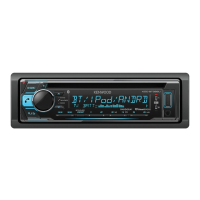
Identification and functions of the unit's front panel controls.
Operation and features of the RC-406 remote control.
Steps to select display language and disable the demonstration mode.
Configuration for time, date, and initial system settings.
Customization for display appearance and tuner behavior.
Options for audio sources, key beep, and factory reset.
Procedures for searching, storing, and directly accessing radio stations.
Configuration options to optimize FM reception and program types.
Steps to connect and play audio from an external device via AUX.
Changing the display name for the AUX input source.
Initiating playback and using basic playback controls for various media.
Methods for browsing and selecting music files and folders.
Guide to setting up and using the Pandora music streaming service.
Instructions for connecting and listening via the iHeartRadio service.
Steps to activate SiriusXM service and tune into available channels.
Utilizing features for previewing songs and managing playback modes.
Configuring channel lock, codes, and playback options for SiriusXM.
Process for pairing and connecting Bluetooth-enabled phones and audio players.
Handling incoming/outgoing calls, contacts, and voice commands via Bluetooth.
Listening to music and internet radio services via Bluetooth audio connection.
Configuring Bluetooth options and performing connectivity tests.
Controls for Fader, Balance, Volume Offset, Sound Effects, and EQ settings.
Settings for speaker size, crossover, subwoofer output, and bass enhancement.
Customizing display colors, brightness levels, and dimmer settings.
Options for text scrolling behavior and displayed information.
Solutions for common sound, power, and radio reception problems.
Troubleshooting steps for media errors and Bluetooth/service connection issues.
Lists playable files, discs, devices, and compatible online services.
Information on service centers, firmware updates, and application support.
Technical specifications for tuner, CD, USB, and Bluetooth functions.
Power output, impedance, operating voltage, and physical dimensions.
Step-by-step instructions for installing the unit in the vehicle.
Diagrams and instructions for connecting the unit's wiring harness.
Details on what is covered, excluded, and the warranty duration.
Procedures for requesting warranty service and locations of authorized centers.
Precautions regarding suffocation, power, water, dust, and unstable locations.
Guidelines for cleaning, modification, and responding to abnormal smells or unit malfunction.
 General
| Brand | Kenwood |
|---|---|
| Model | KDC-BT365U |
| Category | Car Receiver |
| Channels | 4 |
| RMS Power Output | 22 watts |
| Peak Power Output | 50 watts |
| Bluetooth | Yes |
| USB Port | Yes |
| AUX Input | Yes |
| MP3 Playback | Yes |
| WMA Playback | Yes |
| AAC Playback | Yes |
| FLAC Playback | No |
| Display Type | LCD |
| CD Player | Yes |
| Radio Tuner | AM/FM |
| HD Radio | No |
| Satellite Radio Ready | No |
| iPod/iPhone Compatible | Yes |
| Android Compatible | Yes |
| Steering Wheel Control Compatible | Yes |
| Subwoofer Control | Yes |
| Preamp Outputs | 2 |