TK-3170
13
Panel Tuning Mode
■ Preparations for tuning the transceiver
Before attempting to tune the transceiver, connect the
unit to a suitable power supply.
Whenever the transmitter is turned, the unit must be con-
nected to a suitable dummy load (i.e. power meter).
The speaker output connector must be terminated with a
8Ω dummy load and connected to an AC voltmeter and an
audio distortion meter or a SINAD measurement meter at all
times during tuning.
■ Transceiver tuning
(To place transceiver in tuning mode)
Press [S] key, now in tuning mode. Use [B] key to write
tuning data through tuning modes, and [Selector] to adjust
tuning requirements (1 to 256 appears on LCD).
Use [C] key to select the adjustment item through tuning
modes. Use [A] key to adjust 3 or 5 reference level adjust-
ments, and use [Side2] key to switch between Wide/Narrow.
Channel appears on LCD. Set channel according to tuning
requirements.
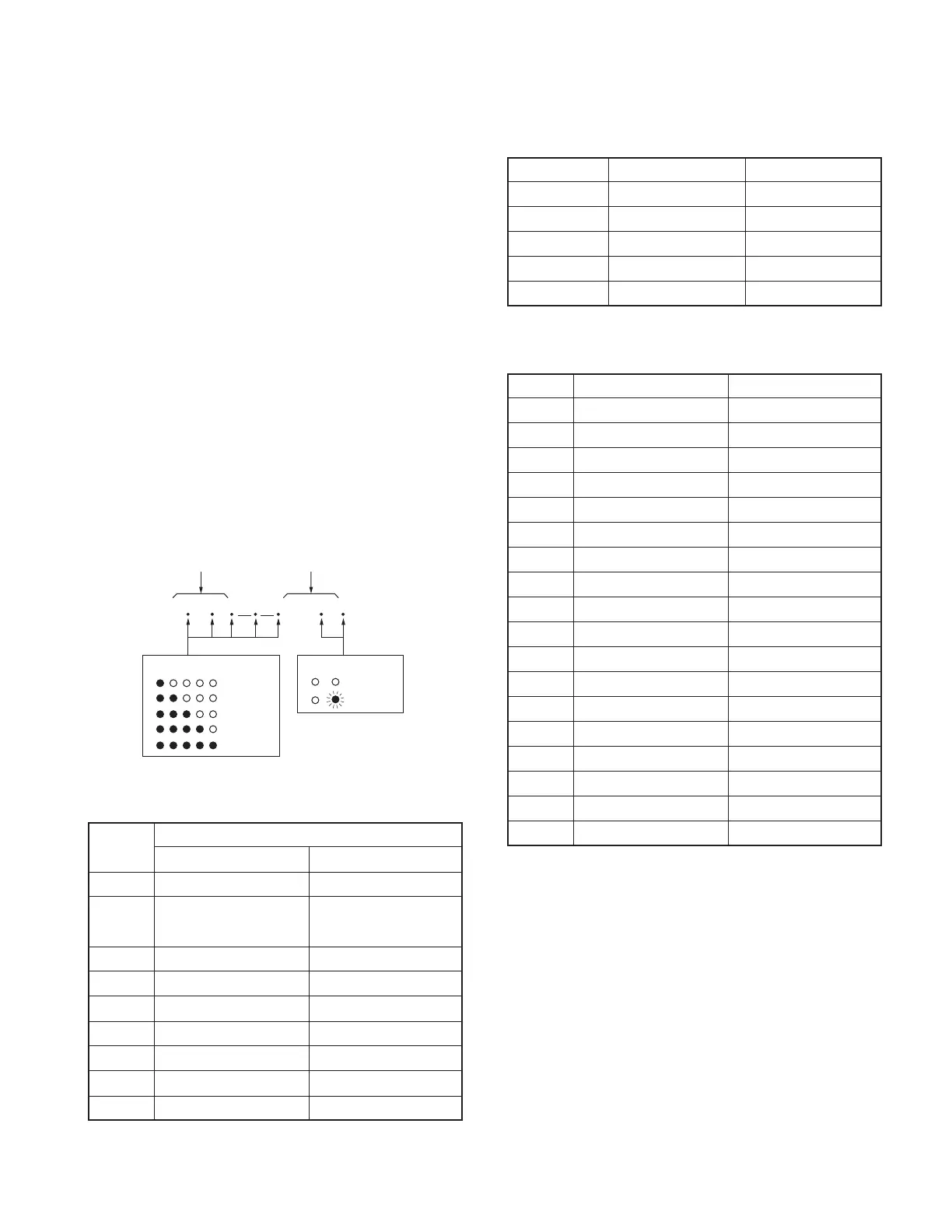
• LCD display in panel tuning mode
BAL
129
Adjustment item Adjustment value
Narrow/Wide
Wide
3 or 5 reference level
Narrow
: Low
: Low’
: Center
: High’
: High
■ 3 or 5 reference level adjustments frequency
Tuning point RX (MHz) TX (MHz)
Low 400.05000 400.10000
Low’ 407.55000 407.60000
Center 415.05000 415.10000
High’ 422.55000 422.60000
High 429.95000 429.90000
■ Adjustment item and Display
(✳✳✳ : 1~256, MSK only : 1~64)
Order Adjustment item Display
1 Frequency F R E Q _ ✳✳✳
2 High power H P W R _ ✳✳✳
3 Low power L P W R _ ✳✳✳
4 DQT balance BAL__✳✳✳
5 Max deviation DEV__✳✳✳
6 VOX 1 VX1__ ✳✳✳
7 VOX 10 V X 1 0 _ ✳✳✳
8 QT deviation QT___✳✳✳
9 DQT deviation DQT__✳✳✳
10 DTMF deviation D T M F _ ✳✳✳
11 MSK deviation MSK___✳✳
12 Tone deviation T O N E _ ✳✳✳
13 Sensitivity SENS_✳✳✳
14 Squelch SQL__✳✳✳
15 Low RSSI LRSSI ✳✳✳
16 Squelch tight S Q L T _ ✳✳✳
17 High RSSI HRSSI✳✳✳
18 Battery detection BATT_✳✳✳
ADJUSTMENT
■ Key operation
Key
Function
Push Hold (1 second)
[S]
End of panel tuning mode
-
[A] To enter 3 or 5 reference -
level adjustments
[B]
Writes the adjustment value
-
[C]
Go to next adjustment item
Back to last adjustment item
[Selector]
Adjustment value up/down
[Volume] Volume level up/down
[Side1] Squelch on/off -
[Side2] Selects Narrow, Wide -
[AUX] All segment appears -






 To Next Page