EasyManua.ls Logo

Kenwood X-E5 - Page 28

Kenwood X-E5
54 pages
Print Icon
To Next Page IconTo Next Page
To Previous Page IconTo Previous Page
Loading...
X-E5
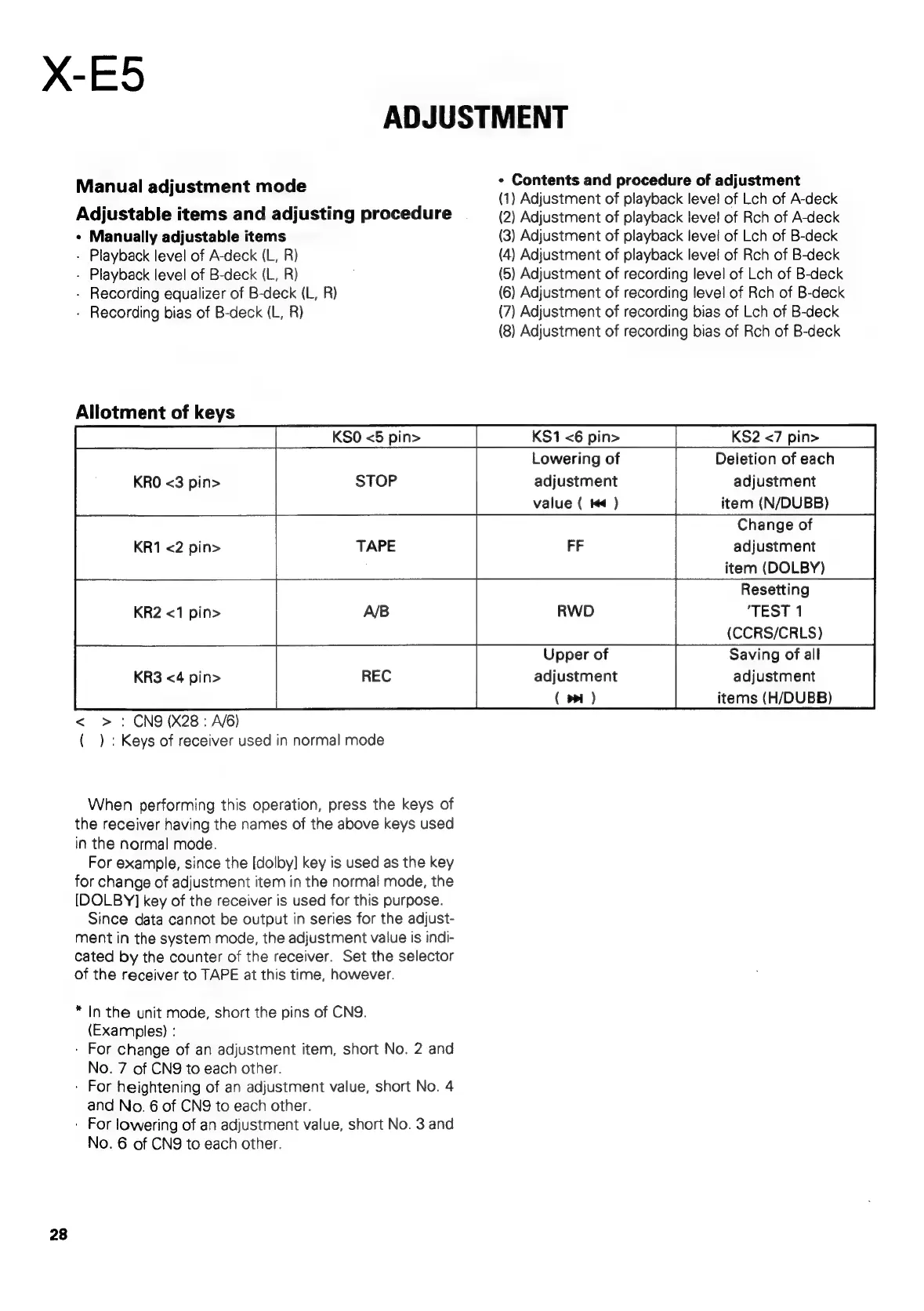
ADJUSTMENT
.
¢
Contents
and
procedure
of
adjustment
Manual
ediusiment
mode
:
(1)
Adjustment
of
playback
level
of
Lch
of
A-deck
Adjustable
items
and
adjusting
procedure
(2)
Adjustment
of
playback
level
of
Rch
of
A-deck
¢
Manually
adjustable
items
(3)
Adjustment
of
playback
level
of
Lch
of
B-deck
-
Playback
level
of
A-deck
(L,
R)
(4)
Adjustment
of
playback
level
of
Rch
of
B-deck
-
Playback
level
of
B-deck
(L,
R)
(5)
Adjustment
of
recording
level
of
Lch
of
B-deck
-
Recording
equalizer
of
B-deck
(L,
R)
(6)
Adjustment
of
recording
level
of
Rch
of
B-deck
-
Recording
bias
of
B-deck
(L,
R)
(7)
Adjustment
of
recording
bias
of
Lch
of
B-deck
(8)
Adjustment
of
recording
bias
of
Rch
of
B-deck
Allotment
of
keys
KSO
<5
pin>
KS1
<6
pin>
KS2
<7
pin>
Lowering
of
Deletion
of
each
KRO
<3
pin>
STOP
adjustment
adjustment
value
(
4
)
item
(N/DUBB)
Change
of
adjustment
item
(DOLBY)
Resetting
KR2
<1
pin>
AB
RWD
"TEST
1
(CCRS/CRLS)
Upper
of
Saving
of
all
KR3
<4
pin>
adjustment
adjustment
(
pp
)
items
(H/DUBB)
<
>
:
CN9(X28:
A/6)
(
)
:
Keys
of
receiver
used
in
normal
mode
When
performing
this
operation,
press
the
keys
of
the
receiver
having
the
names
of
the
above
keys
used
in
the
normal
mode.
For
example,
since
the
[dolby]
key
is
used
as
the
key
for
change
of
adjustment
item
in
the
normal
mode,
the
[DOLBY]
key
of
the
receiver
is
used
for
this
purpose.
Since
data
cannot
be
output
in
series
for
the
adjust-
ment
in
the
system
mode,
the
adjustment
value
is
indi-
cated
by
the
counter
of
the
receiver.
Set
the
selector
of
the
receiver
to
TAPE
at
this
time,
however.
*
In
the
unit
mode,
short
the
pins
of
CN9.
(Examples)
:
-
For
change
of
an
adjustment
item,
short
No.
2
and
No.
7
of
CN9
to
each
other.
-
For
heightening
of
an
adjustment
value,
short
No.
4
and
No.
6
of
CN9
to
each
other.
:
For
lowering
of
an
adjustment
value,
short
No.
3
and
No.
6
of
CNQ
to
each
other.
28

Related product manuals