6 7
› To congure the path of RS-232 control signals from an External I/O Port to an HDMI output, use
the command “SPOH xx RSS 1 S yy”. xx= RS-232 destination, yy= RS-232 source
› To congure the path of RS-232 control signals from an External I/O Port to an HDMI input, use
the command “SPI xx RSS 1 S yy”. xx= RS-232 destination, yy= RS-232 source
Point-to-Many IR Control Routing
› To congure the path of IR control signals from an External I/O Port to multiple RJ45 outputs, use
the command “SPOC xx IR 1 S yy”. xx=IR destination, yy=IR source.
» Then repeat the “SPOC xx IR 1 S yy” command for each additional destination.
› To congure the path of IR control signals from an External I/O Port to multiple HDMI outputs, use
the command “SPOH xx IR 1 S yy”. xx=IR destination, yy=IR source.
» Then repeat the “SPOH xx IR 1 S yy” command for each additional destination.
› To congure the path of IR control signals from an External I/O Port to multiple HDMI inputs, use
the command “SPI xx IR 1 S yy”. xx=IR destination, yy=IR source.
» Then repeat the “SPI xx IR 1 S yy” command for each additional destination.
Point-to-Many RS-232 Control Routing
› To congure the path of RS-232 control signals from an External I/O Port to multiple RJ45
outputs, use the command “SPOC xx RS 1 S yy”. xx=RS-232 destination, yy=RS-232 source. .
» Then repeat the “SPOC xx RS 1 S yy” command for each additional destination.
› To congure the path of RS-232 control signals from an External I/O Port to multiple HDMI
outputs, use the command “SPOH xx RS 1 S yy”. xx= RS-232 destination, yy= RS-232 source.
» Then repeat the “SPOH xx RS 1 S yy” command for each additional destination.
› To congure the path of RS-232 control signals from an External I/O Port to multiple HDMI inputs,
use the command “SPI xx RS 1 S yy”. xx= RS-232 destination, yy= RS-232 source.
» Then repeat the “SPI xx RS 1 S yy” command for each additional destination.
Settings
The KD-HD4x4/6x6/8x8Lite features a library of 12 internal EDID (Extended Display Identication
Data) les, in addition to allowing any Input source to receive a copy of the EDID information of any
display connected via HDMI or CAT cable. The default EDID setting is “04” – 1080p 2ch Digital
Audio. Changing EDID settings may be necessary when connecting to or from an AV Receiver, or
for passing 3D content.
The possible EDID settings can range from ‘01’ to ‘12’. (‘04’ is the default).
01 1080i, 2CH Audio 07 3D, 1080p 2CH Audio
02 1080i, DOLBY/DTS 5.1 08 3D, DOLBY/DTS 5.1
03 1080i, HD Audio 09 3D, HD Audio
04 1080p, 2CH Audio 10 1280x1024 DVI
05 1080p, DOLBY/DTS 5.1 11 1920x1080 DVI
06 1080p, HD Audio 12 1920x1200 DVI
When selecting an EDID from the library (settings 01-12), your source
device will see the KD-HD4x4/6x6/8x8Lite EDID choice instead of the
display’s EDID, overriding the display’s own EDID information.
If your display is not capable of accepting the video resolution or audio
type selected, you may not see a picture or hear sound. In this case
please choose another more compatible EDID, or use the default EDID.
Remote Control
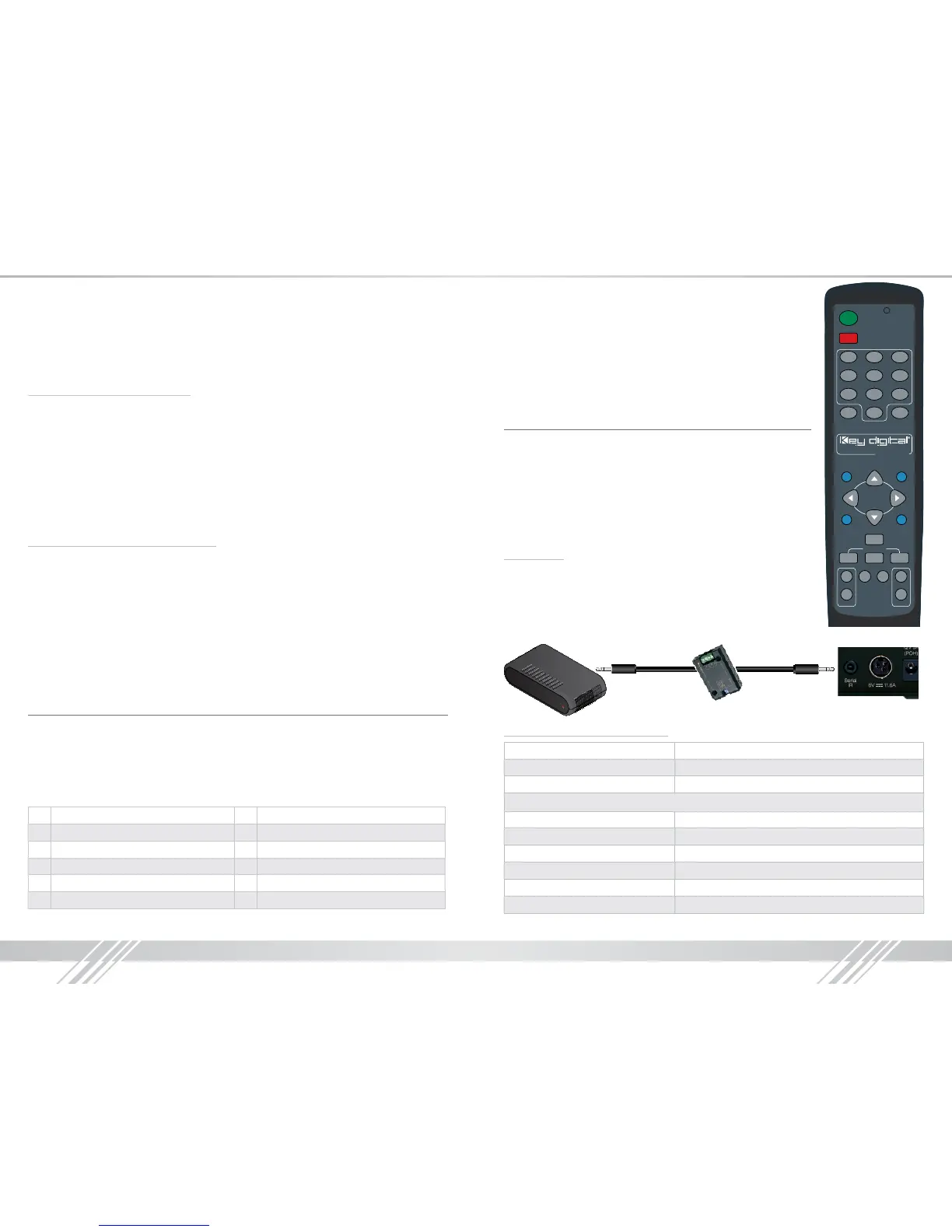
You may switch inputs on the KD-HD4x4/6x6/8x8Lite by using
the supplied IR Remote control. You can also perform basic EDID
adjustments with the IR remote.
Please see the below chart for IR remote commands.
IR Extender:
You may want to use an IR extender, such as the KD-IRKIT300. Front
and Rear panel sensors are available for use with the IR extender. A
wired IR serial connector is also provided at the rear of the unit. Wired IR
Extender KD-IRB3099 in the KD-IRKIT300 uses a 3.5mm male-to-male
Mono cable. (Not Included with KD-HD4x4/6x6/8x8Lite)
Connecting Block
KD-IRCB204
KD-IRB3099
Back of the Unit
Wired IR Extender
3.5mm male-to-male
mono cable
IR/Remote Control Command List
Command Description
Power On Power On
Power Off Power Off »
Video Output Setup Commands XX = [01-99], Y = [01-99]
R1 » XX » Video Mode » Mute Set Output XX Video Mute ON
R1 » Video Mode » All Mute Set All Outputs to Video Mute ON
R1 » XX » Video Mode » Restore Set Output XX to Video Mute OFF
R1 » Video Mode » All Restore Set All Output to Video Mute OFF
R1 » XX » Video Mode » YY Set Output XX to Video Input YY
R1 » Video Mode » YY Set All Output to Video Input YY
1 2 3
4 5 6
7 8 9
0
All Mute
Volume
Mute
Audio ModeVideo Mode
Balance LipSync
Bass Middle Treble
Restore
All Restore
R1 R2
R3 R4
Power Off
Power On
www.keydigital.com
Tone Controls


 To Next Page
 Loading...





