8 9
System Control Setup Commands
EDID Setup, XX = [01-08], YY = [01-08], ZZ = [01-12]
R2 » XX » Bass » YY Copy EDID from Output YY to Input XX
R2 » Bass » YY Copy EDID from Output YY to All Inputs
R2 » XX » Treble » ZZ Copy EDID from Default EDID ZZ to Input XX
R2 » Treble » ZZ Copy EDID from Default EDID ZZ to All InputS
› DEFAULT EDID 01 : HDMI Video 1080i@60, Audio 2CH PCM Audio
› DEFAULT EDID 02 : HDMI Video 1080i@60, Audio PCM,DTS/DOLBY
› DEFAULT EDID 03 : HDMI Video 1080i@60, Audio PCM,DTS/DOLBY/HD
› DEFAULT EDID 04 : HDMI Video 1080p@60, Audio 2CH PCM Audio
› DEFAULT EDID 05 : HDMI Video 1080p@60, Audio PCM,DTS/DOLBY
› DEFAULT EDID 06 : HDMI Video 1080p@60, Audio PCM,DTS/DOLBY/HD
› DEFAULT EDID 07 : HDMI Video 1080p@60/3D, Audio 2CH PCM Audio
› DEFAULT EDID 08 : HDMI Video 1080p@60/3D, Audio PCM,DTS/DOLBY
› DEFAULT EDID 09 : HDMI Video 1080p@60/3D, Audio PCM,DTS/DOLBY/HD
› DEFAULT EDID 10 : DVI Video Max. 1280x1024@60, No Audio
› DEFAULT EDID 11 : DVI Video Max. 1920x1080@60, No Audio
› DEFAULT EDID 12 : DVI Video Max. 1920x1200@60, No Audio
System Addressing Mode
R3 » R2 » R4 » X » X Set System Address xx [xx=00-99]
R4 » X » X Prex Command for Addressing Mode xx [xx=00-99]
RS-232 Commands
The KD-HD4x4/6x6/8x8Lite provide access to all functions when used with an RS-232 control
system.
The connection protocol is as follows:
» Baud rate: 57,600
» Data Bits: 8
» Parity: None
» Stop Bits: 1
» Flow Control: None
» Carriage Return: Required
» Line Feed: Required
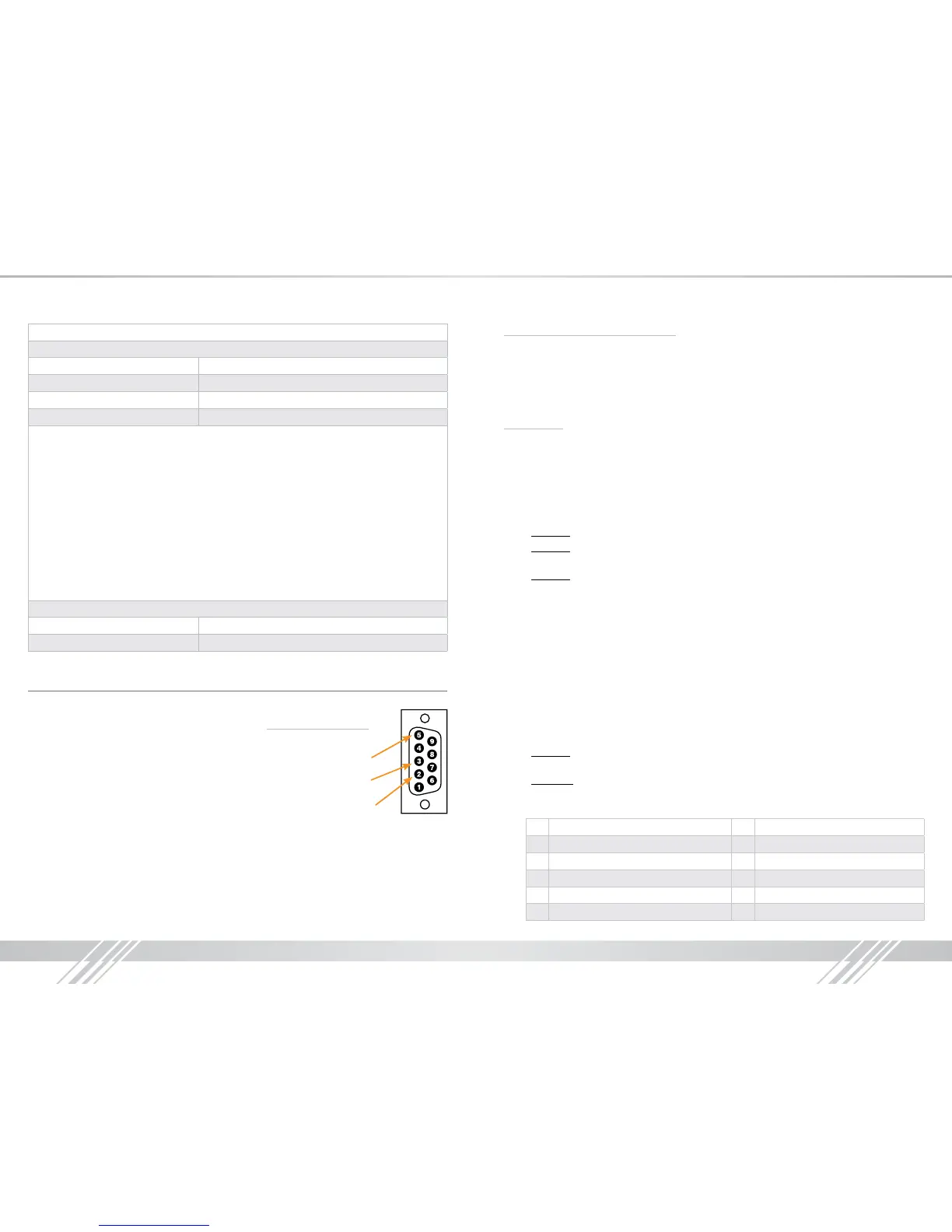
Pin 5 – Ground
Pin 3 – Receive
Pin 2 – Transmit
RS-232 cable pin out
NOTE: Commands are not case sensitive. Spaces are shown for clarity; commands should not
have any spaces. Every command below requires a carriage return at the end of the string for the
command to be executed. If a new command is received, a prompt should be sent back.
Most Common RS-232 Commands:
› H: Help - Help command. List of all RS-232 commands and Firmware version.
› STA: Status Command - Displays unit status for all internal variables such as Video Input, and
EDID selected for each Input.
› PF: Power Off - Power Off command
› PN: Power ON - Power ON command
Commands:
Video Switch:
» ‘SP O xx SI yy’ To switch the desired Video Input to the desired Output:
» xx = the Output number [01-04/06/08] –OR- [A] for ‘All’
» yy = the Input number [01-04/06/08] –OR- [U, D] for ‘Up’,’ Down’ respectively.
» ‘U/D’ will increase/decrease the input number from its current position.
» This command will switch Inputs to your desired Output.
» Example: To switch Output 3 to Input 1, issue the command; ‘SPO01SI03’
» Example: To incrementally switch the Input Up from its present number for Output 1, issue
the command: ‘SPO01SIU’
» Example: To switch All Outputs to Input 3, issue the command: ‘SPOASI03’
EDID Copy and Default EDID Library:
» ‘SP C EDID xx H/C/D yy’:
To Copy EDID to Input from HDMI Output, or from a Default Library
» xx = Input numbers [01-04/06/08] –OR- [A] for ‘All’ Inputs
» H = EDID Copy from HDMI Output
» C = EDID Copy from CAT Output
» D = Default EDID Library selection (see list below)
» yy = Output numbers [01-04/06/08] when ‘H’ variable is selected –OR-
Default EDID library settings [01-12] when ‘D’ variable is selected.
» This command will either copy the EDID information from a selected Output to a specic
Input (or All Inputs), or, write EDID information from an internal library of default EDID settings
to a specic Input (or All Inputs).
» Example: To copy the EDID information from HDMI Output 2 to Input 4, issue the command:
‘SPCEDID04H02’
» Example: To write the EDID information from the built-in default EDID library using default
EDID 1 to Input 2, issue the command; ‘SPCEDID02D01’
» The possible EDID settings can range from ‘01’ to ‘12’. (‘04’ is the default).
01 1080i, 2CH Audio 07 3D, 1080p 2CH Audio
02 1080i, DOLBY/DTS 5.1 08 3D, DOLBY/DTS 5.1
03 1080i, HD Audio 09 3D, HD Audio
04 1080p, 2CH Audio 10 1280x1024 DVI
05 1080p, DOLBY/DTS 5.1 11 1920x1080 DVI
06 1080p, HD Audio 12 1920x1200 DVI


 To Next Page
 Loading...





