12 13
33 SPOC xx IR z S yy Route IR from xx to RJ45 Output yy from z;
xx=IR destination, yy=IR source, z=IR Origin Port Type
34 SPOC xx IRR z S yy Route IR from xx to RJ45 Output yy from z;
xx=IR destination, yy=IR source, z=IR Origin Port Type
35 SPOC xx RS z S yy Route RS232 from xx to RJ45 Output yy from z;
xx=RS232destination, yy=RS232 source, z=RS232 Origin Port Type
36 SPOC xx RSS z
S yy
Route RS232 from xx to RJ45 Output yy from z;
xx=RS232destination, yy=RS232 source, z=RS232 Origin Port Type
37 SPE xx IR z S yy Route IR from xx to I/O Port yy from z;
xx=IR destination, yy=IR source, z=IR Origin Port Type
38 SPE xx IRR z S yy Route IR from xx to I/O Port yy from z;
xx=IR destination, yy=IR source, z=IR Origin Port Type
39 SPE xx RS z S yy Route RS232 from xx to I/O Port yy from z;
xx=RS232destination, yy=RS232 source, z=RS232 Origin Port Type
40 SPE xx RSS z S yy Route RS232 from xx to I/O Port yy from z;
xx=RS232destination, yy=RS232 source, z=RS232 Origin Port Type
41 SPC ARCxx
ON/OFF
Set Output xx ARC ON/OFF
EDID Setup, xx = [01-08,A], yy = [01-08], zz = [01-12]
42 SPC EDID xx H yy Copy EDID from HDMI Output yy to Input xx
43 SPC EDID xx C yy Copy EDID from RJ45 Output yy to Input xx
44 SPC EDID xx D zz Copy EDID from Default EDID zz to Input xx
› DEFAULT EDID 01 : HDMI Video 1080i@60, Audio 2CH PCM Audio
› DEFAULT EDID 02 : HDMI Video 1080i@60, Audio PCM,DTS/DOLBY
› DEFAULT EDID 03 : HDMI Video 1080i@60, Audio PCM,DTS/DOLBY/HD
› DEFAULT EDID 04 : HDMI Video 1080p@60, Audio 2CH PCM Audio
› DEFAULT EDID 05 : HDMI Video 1080p@60, Audio PCM,DTS/DOLBY
› DEFAULT EDID 06 : HDMI Video 1080p@60, Audio PCM,DTS/DOLBY/HD
› DEFAULT EDID 07 : HDMI Video 1080p@60/3D, Audio 2CH PCM Audio
› DEFAULT EDID 08 : HDMI Video 1080p@60/3D, Audio PCM,DTS/DOLBY
› DEFAULT EDID 09 : HDMI Video 1080p@60/3D, Audio PCM,DTS/DOLBY/HD
› DEFAULT EDID 10 : DVI Video Max. 1280x1024@60, No Audio
› DEFAULT EDID 11 : DVI Video Max. 1920x1080@60, No Audio
› DEFAULT EDID 12 : DVI Video Max. 1920x1200@60, No Audio
Status Commands: xx = [01-08, A=all]
45 STA Show Global System Status
46 STPC Show Control System Setup Status
47 STPExx Show Expansion I/O xx Status
48 STPIxx Show Video Input xx Status
49 STPOxx Show Video Output xx Status
50 STMA Show Global System Status by Micro-Code
51 STMC Show Control System Setup Status by Micro-Code
52 STMExx Show Expansion I/O xx Status by Micro-Code
53 STMIxx Show Video Input xx Status by Micro-Code
54 STMOxx Show Video Output xx Status by Micro-Code
Firmware Upgrade Procedure
KD-HD4x4/6x6/8x8Lite units are rmware upgradeable via USB.
› First you must download the Device Manager software from the KD-4x4Lite/KD-6x6Lite or
KD-8x8Lite product pages on the Key Digital website. The software can be found under the
“Downloads” section.
1. Connect the Digital IQ unit to your PC via USB or RS-232
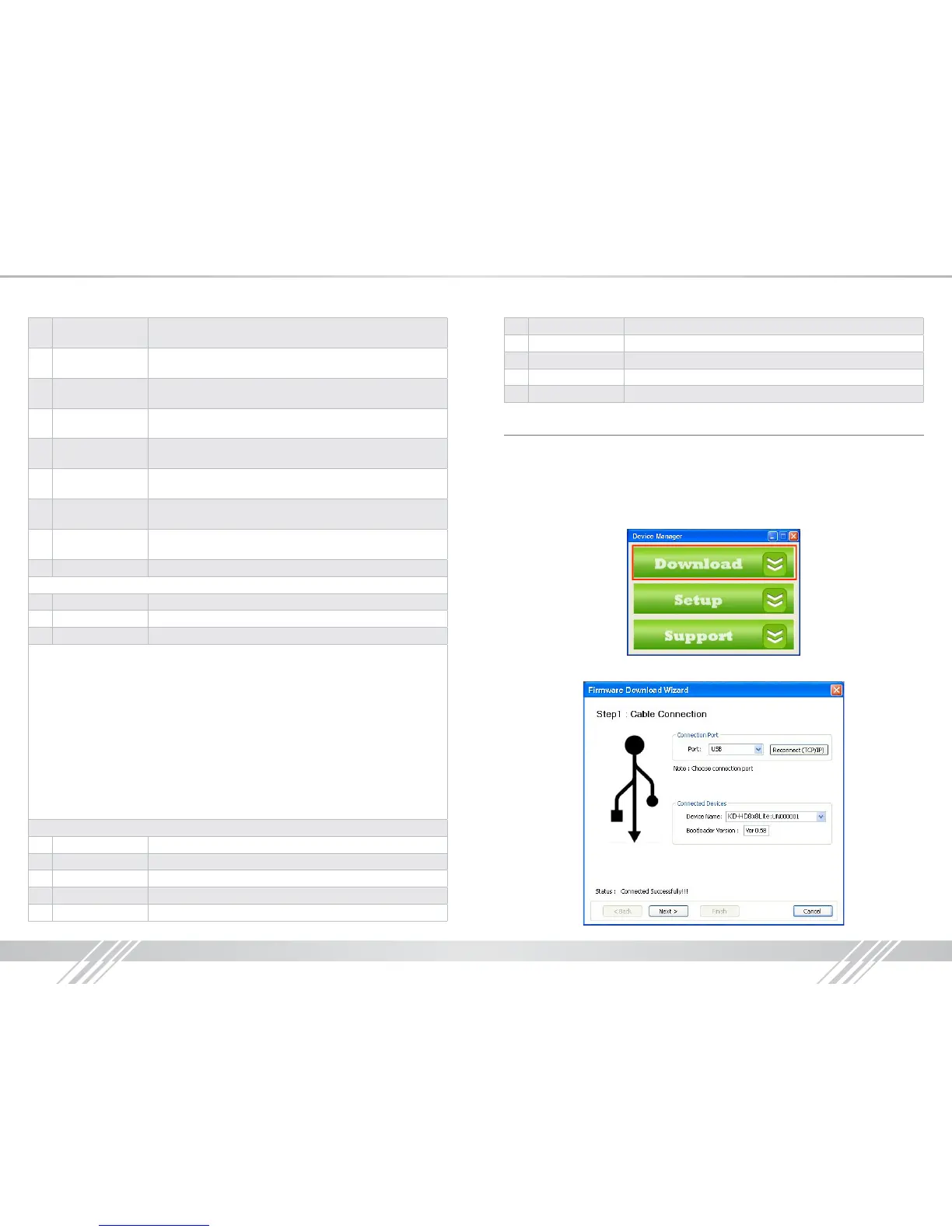
2. Open the Device Manager software and select Download on the Home Page:
3. Wait for conrmation that the PC has established a connection with the Digital IQ unit



 To Next Page