14 15
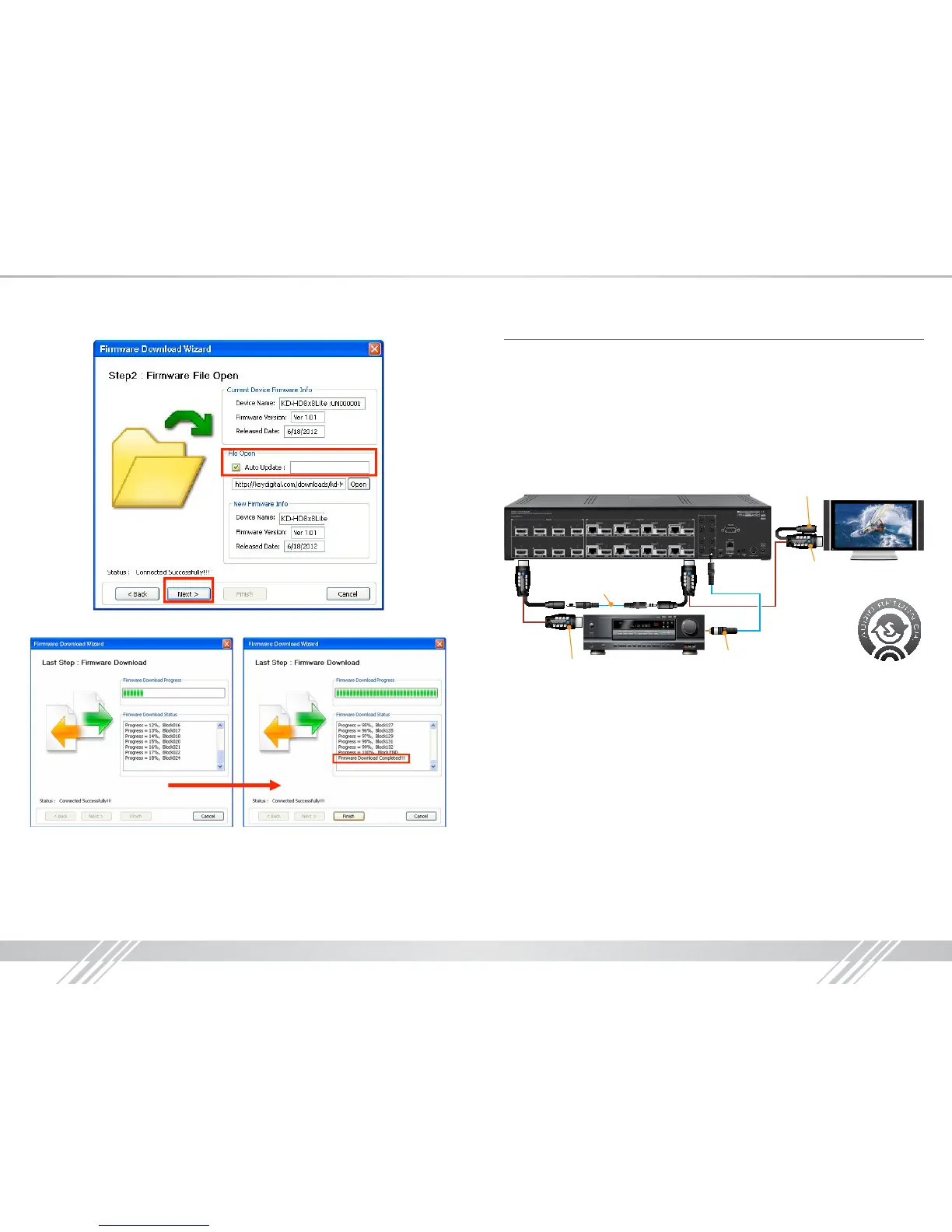
4. Select Auto Update selection box, and then begin the rmware update by selecting Next
5. Observe status of the rmware update through completion
6. Select Finish to close
Audio Return Channel
Audio Return Channel features rely on CEC to work effectively. CEC is not enabled through the
KD-HD4x4/6x6/8x8Lite matrix; therefore a CEC connection must be made elsewhere. This
connection can be enabled by connecting two Champion Series
™
HiFi Commercial ProS HDMI
cables together with a male to male 3.5mm stereo cable from an ARC supported TV and an ARC
supported AV Receiver. The audio return channel is not output via HDMI, but instead it is sent to
the corresponding 3.5mm expansion port of the output to which the ARC audio is connected to.
A common 3.5mm stereo to L/R RCA Y-cable may be used to connect to your AVR, however, the
audio output signal will be PCM digital and will only be carried on one of the RCA leads.
Example: An ARC compatible display is connected to output 8. The audio will be sent to 3.5mm
expansion port number 8.
To ARC Output of AV Receiver
PCM Digital Audio
Carried on One RCA
ARC Input of Display
No Connection
Male-to-Male 3.5mm cable
ARC Requirements:
» Display that supports ARC
» AV Receiver that supports ARC
» Champion Series
™
HiFi Commercial ProS HDMI Cables
» Male to Male Stereo Cable
» 3.5mm to RCA cable



 To Next Page