10 11
Front Panel Buttons Enabled/Disabled:
» ‘SP C FB E/D’
» Where ‘E’ will Enable the front panel buttons and ‘D’ will Disable the front panel buttons.
» Example: To Disable the front panel buttons, issue the command; ‘SPCFBD’
Reset to Factory Defaults:
» ‘SP C DF xx’
» xx = [01-12] and is the default EDID library loaded during a factory reset.
» This command will return the unit to its factory default settings including a user chosen
default EDID setting. (See above for a list of possible default EDID library settings available)
» Example: To reset the unit to factory default with an EDID setting of 1080i 2CH Audio, issue
the command; ‘SPCDF01’
» Example: To reset the unit to factory default with an EDID setting of 3D 1080p 2CH Audio,
issue the command; ‘SPCDF07’
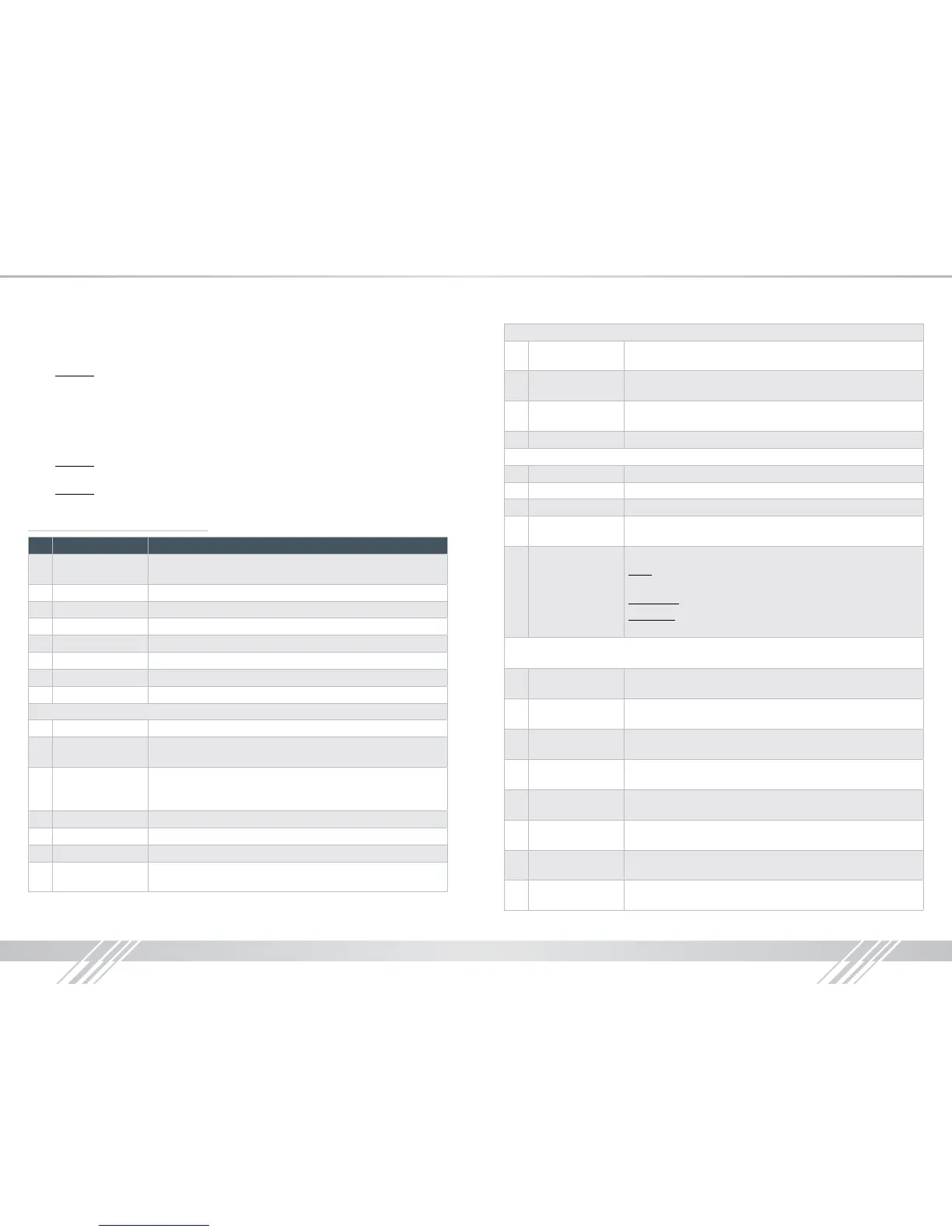
RS-232, USB, TCP/IP Command List:
No Command Description
1 Azz Commands may require an address prex if unit has been
addressed ( zz=[00-99])
2 H Help
3 PHO Help for Output Setup Commands
4 PHE Help for EDID Setup Commands
5 PHC Help for Control I/O Setup Commands
6 PHT Help for Status Commands
7 PF Power Off
8 PN Power ON
System Control Setup Commands
9 SPC A xx Set System Address, xx = [00-99] (00=Single)
10 SPC CM x Set System Command Mode, x = [0-9], Default 0,
Reserved for master control feature with Compass Control
11 SPC UM x Set System User Mode, x = [0-1], Default 1.
If x is 0, return message is by micro-code, and if x is 1, return is by
string message.
12 SPC FB E/D/T Front Panel Buttons Enabled/Disabled/Toggle
13 SPC BIRS z IR Source for HD8x8, z = [1-2] (1-Wired,2-Sensor)
14 SPCDF Set Factory Default without changing EDID
15 SPCDF zz Set Factory Default with updated EDID zz=[01-12]
(DEFAULT EDID 01-12)
Network Setup, xxx = [000-255], zzzz = [0001-9999]
16 SPC ETIPA xxx.xxx.
xxx.xxx
Set Host (unit) IP Address to xxx.xxx.xxx.xxx
17 SPC ETIPM xxx.
xxx.xxx.xxx
Net Mask to xxx.xxx.xxx.xxx
18 SPC ETIPR xxx.xxx.
xxx.xxx
Set Router IP Address to xxx.xxx.xxx.xxx
19 SPC ETIPP zzzz Set TCP/IP Port to zzzz
Video Output Setup Commands xx = [01-08,A], yy = [01-08] (A=All)
20 SPOxx VM E/D/T Set Video Mute for Output xx Video Mute Enabled/Disabled/Toggle
21 SPOxx ON/OFF Set Output ON/OFF
22 SPOxx SI yy Set Output xx to Video Input yy
23 SPO A PT Set All Input/Output Video to Pass-Through
(Ex, Output1 = Input1, Output2 = Input2…., Output8 = Input 8)
24 SPOxx HFM A/D/H
Set Output xx Video Format:
Auto: Set output video format automatically based on connected
display
Forced DVI: Set video format to DVI
H(Bypass): Set output video format according to selected input
video format. DVI in => DVI out, HDMI in => HDMI out
Control I/O Setup Commands xx = [01-08,A], yy = [01-08] (A=All), z = [1-6]
1 = External I/O, 2 = HDMI Input, 3= HDMI Ouput, 4 = CAT5e/6 Output, 5 = Over IP
25 SPI xx IR z S yy Route IR from xx to HDMI input yy from z;
xx=IR destination, yy=IR source, z=IR Origin Port Type
26 SPI xx IRR z S yy Route IR from xx to HDMI input yy from z;
xx=IR destination, yy=IR source, z=IR Origin Port Type
27 SPI xx RS z S yy Route RS232 from xx to HDMI input yy from z;
xx=RS232destination, yy=RS232 source, z=RS232 Origin Port Type
28 SPI xx RSS z S yy Route RS232 from xx to HDMI input yy from z;
xx=RS232destination, yy=RS232 source, z=RS232 Origin Port Type
29 SPOH xx IR z S yy Route IR from xx to HDMI Output yy from z; xx=IR destination,
yy=IR source, z=IR Origin Port Type
30 SPOH xx IRR z S yy Route IR from xx to HDMI Output yy from z;
xx=IR destination, yy=IR source, z=IR Origin Port Type
31 SPOH xx RS z S yy Route RS232 from xx to HDMI Output yy from z;
xx=RS232destination, yy=RS232 source, z=RS232 Origin Port Type
32 SPOH xx RSS z
S yy
Route RS232 from xx to HDMI Output yy from z;
xx=RS232destination, yy=RS232 source, z=RS232 Origin Port Type


 To Next Page
 Loading...





