• For un-balanced audio, use the + and Ground pins of each channel
• Drives audio signals up to 2VRMS with a sampling rate of 192KHz
• Up to 255ms of delay may be added per output using KDMS Pro software or by sending command via
TCP/IP or RS-232. Delay settings apply to both the analog and digital ports for the output.
• There are no volume or tone control features
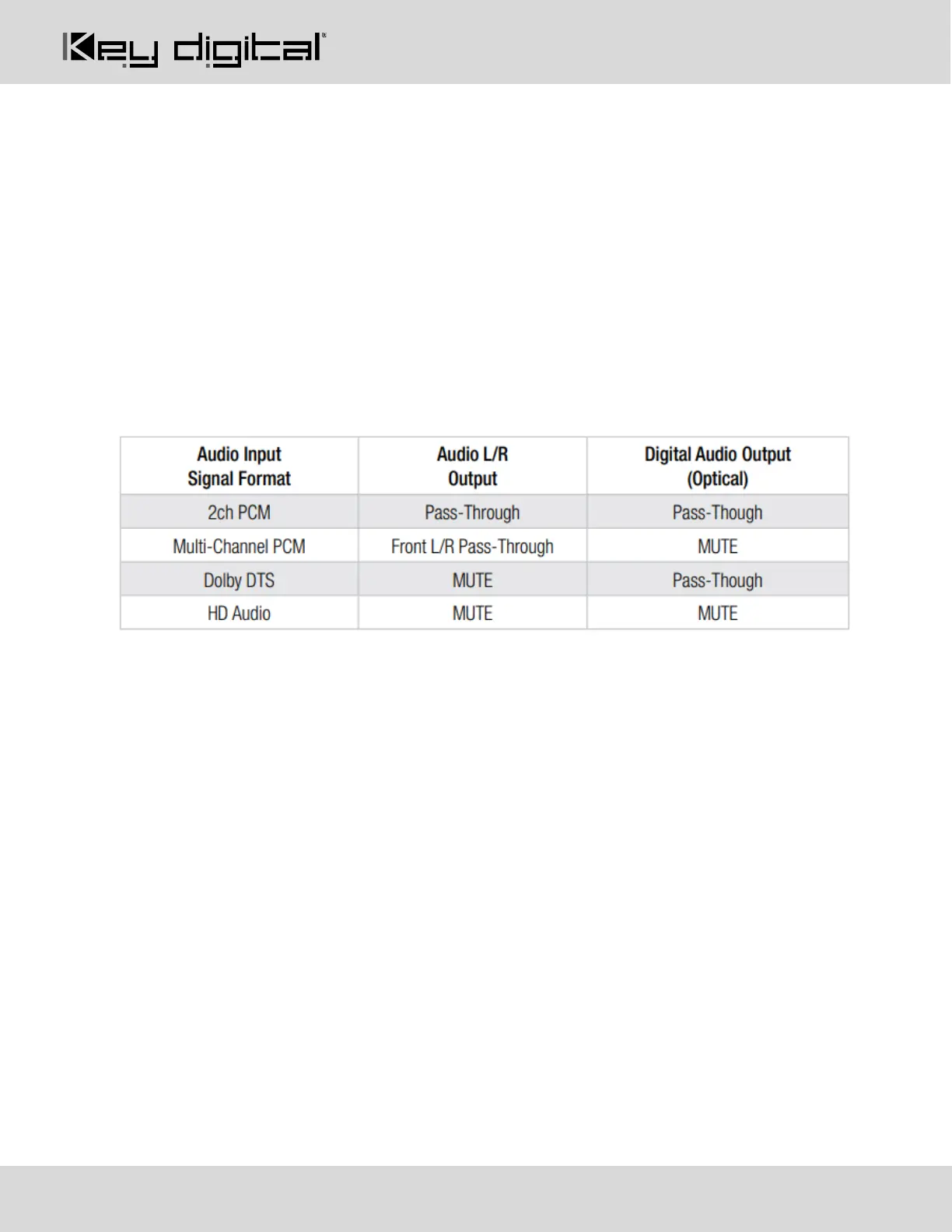
• There are no format conversion features. For example, to achieve 2ch analog audio output, the selected
HDMI input source audio format must be 2ch.
Digital Audio Outputs (4): Optical
• Provides digital audio output from the selected HDMI input source.
• Supports PCM, SPDIF (IEC 60958), Dolby Digital®, and DTS™ up to 5.1 / 6.1
• There are no volume or tone control features
• There are no format conversion features. For example, to achieve 2ch analog audio output, the selected
HDMI input source audio format must be 2ch.
IR In/Out (4):
• The default setting is IR Input. Direction may be changed using KDMS Pro software, TCP/IP or RS-232.
• IR In/Out ports correspond to their respective Rx unit. IR is not routable
• RS-232 is not supported
• Only the provided IR Sensor and IR Emitter should be used. Third-party sensors or emitters may not be
compatible and/or may result in damage
• The included IR Sensor Receives signals from a 90° angle at up to 30 ft. away.
o Maximum supported IR burst frequency is 55kHz.
• Pinout:
o Tip = IR in/out signal, Ring = +5V sensor power, Sleeve = Ground
Service USB (1):
• Micro USB port
• Used for configuration and control from PC via KDMS Pro, KDMS, or third-party control terminal
• Used for firmware updates (consult with Key Digital tech support before updating firmware).
o Note: After updating firmware, all unit settings are restored to defaults except IP information.
Please collect all customized settings info before loading firmware.
• Supports USB driver for Windows, Mac
• Will register as “Prolific USB-to-Serial Comm Port in Device Manager



 To Next Page