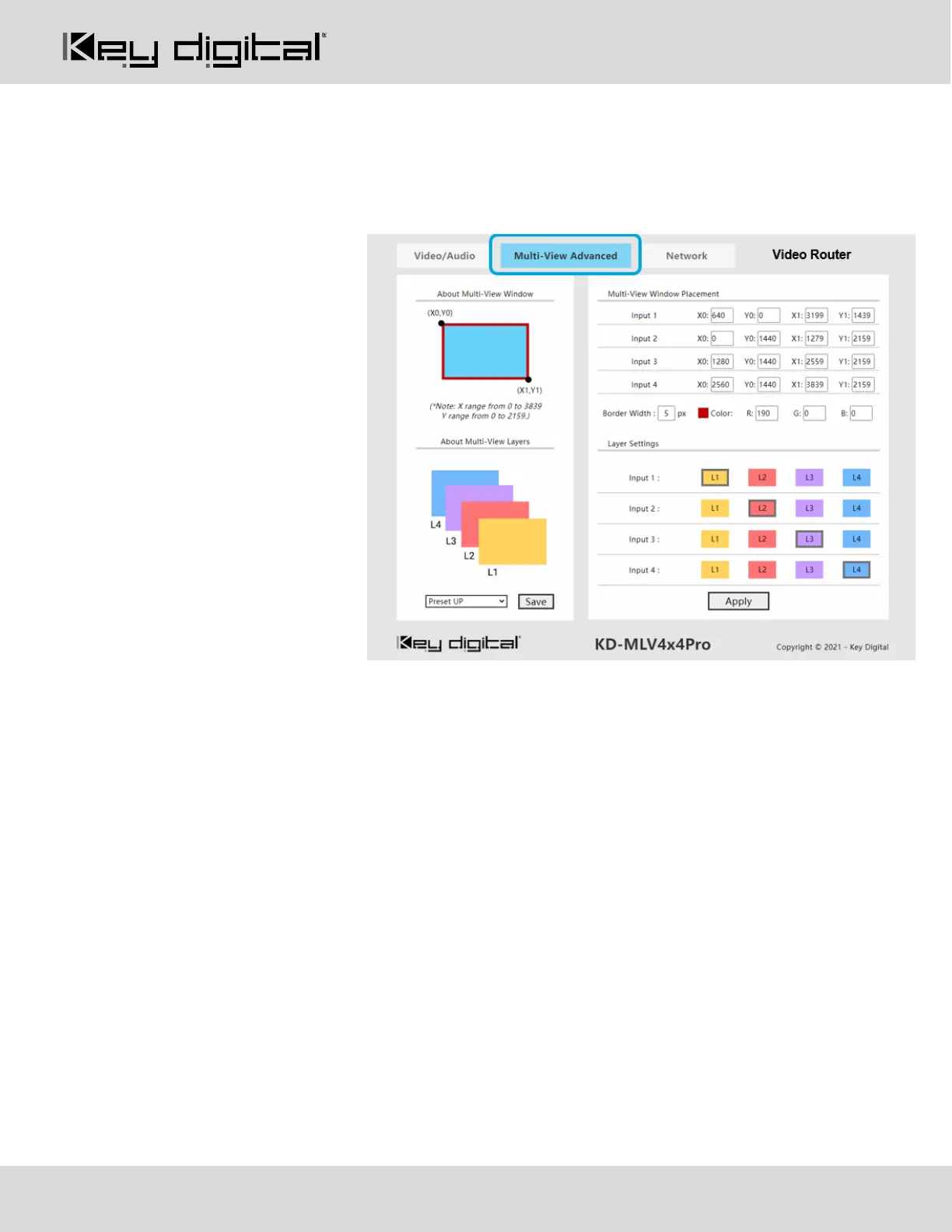
Multi-View Advanced Tab
Create and save custom multi-view layouts using the following tools:
Multi-View Window Placement:
• An X/Y axis is used, enabling
control of each pixel of
3840x2160 screen
• The pixel count begins at 0
o X0/X1 range = 0–3839
o Y0/Y1 range = 0-2159
• X0 = Desired location of the
Top-Left handle of the window,
from Left to Right horizontally
across the screen
• Y0= Desired location of the
Top-Left handle of the window,
from Top to Bottom vertically
across the screen
• X1 = Desired location of the
Bottom-Right handle of the
window, from Left to Right
horizontally across the screen
• Y1= Desired location of the Bottom-Right handle of the window, from Top to Bottom vertically across the
screen
Layer Settings:
• 1 = Top / front layer
• 4 = Bottom / back layer
Apply Button sends the layout to the HDMI output that is currently selected in the Video/Audio tab, Video sub-
section
Save Button saves the specified layout to the preset currently selected in the dropdown menu
Note about Layering: Each HDMI output may have unique layering settings. You may set for each by entering
the Video/Audio tab, Video sub-section and selecting an HDMI output, then applying the layering as desired.



 To Next Page