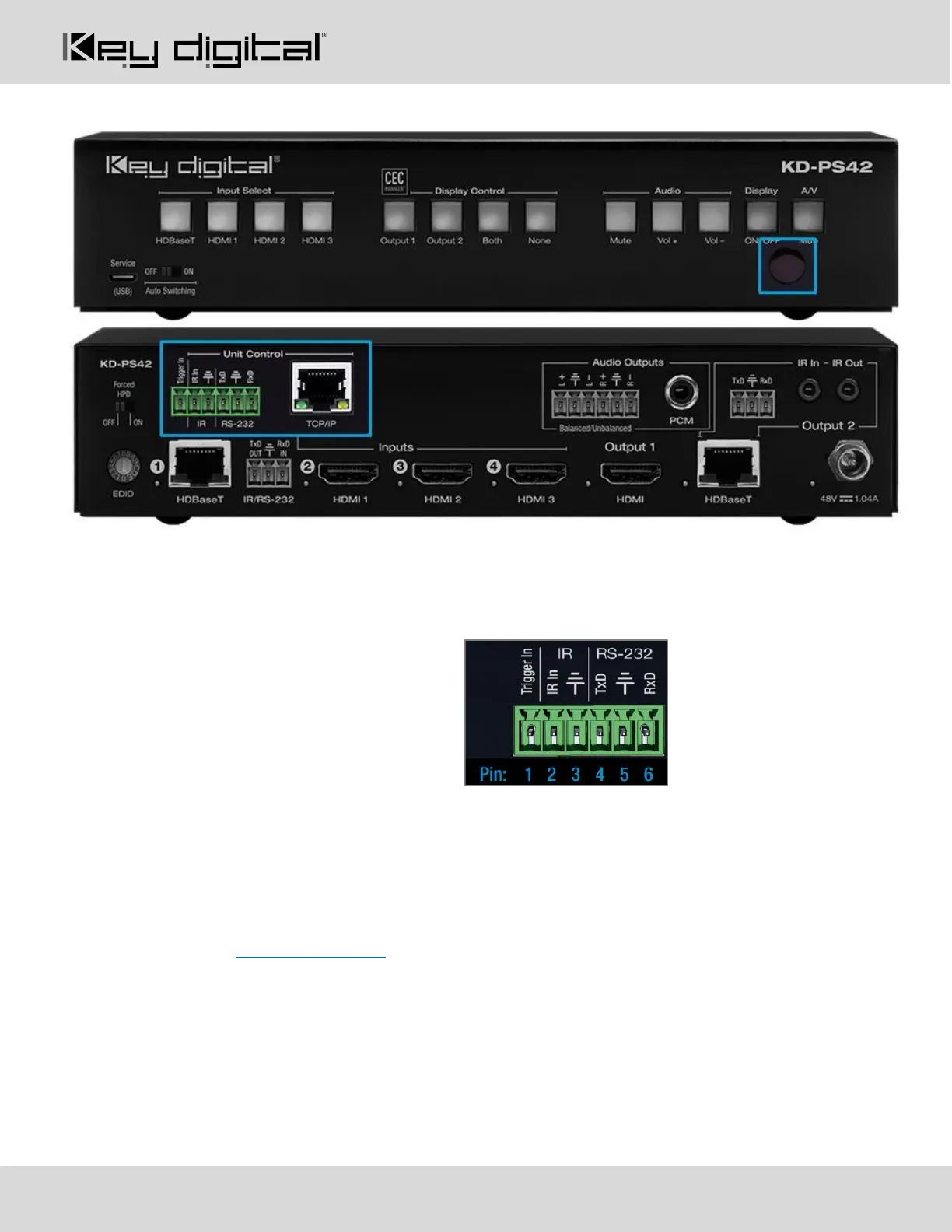
Unit Control Ports
Unit Control Phoenix Connector
• 6-pin terminal block for Trigger In, IR and RS-232
• TCP/IP and RS-232 commands may be found in the TCP/IP & RS-232 Commands section
• Pinout:
o Pin 1 = Trigger In
o Pin 2 = IR In
o Pin 3 = IR/Trigger Ground
o Pin 4 = RS-232 Tx Data
o Pin 5 = RS-232 Ground
o Pin 6 = RS-232 Tx Data
TCP/IP Control Port
• Default static IP address is 192.168.1.239, port 23
• Connect an ether cable from the KD-PS42 to a network router or connect a straight through cable
directly from a PC
• Unit configuration, control, and firmware updates are achieved with Key Digital Management software
downloaded at www.keydigital.com
IR Sensor
• Used to collect line-of-sight IR from remote control
• Receives signals from a 90° angle at up to 30ft away.
• Mount an IR emitter from Compass Control Pro or to control by another professional control system


 To Next Page