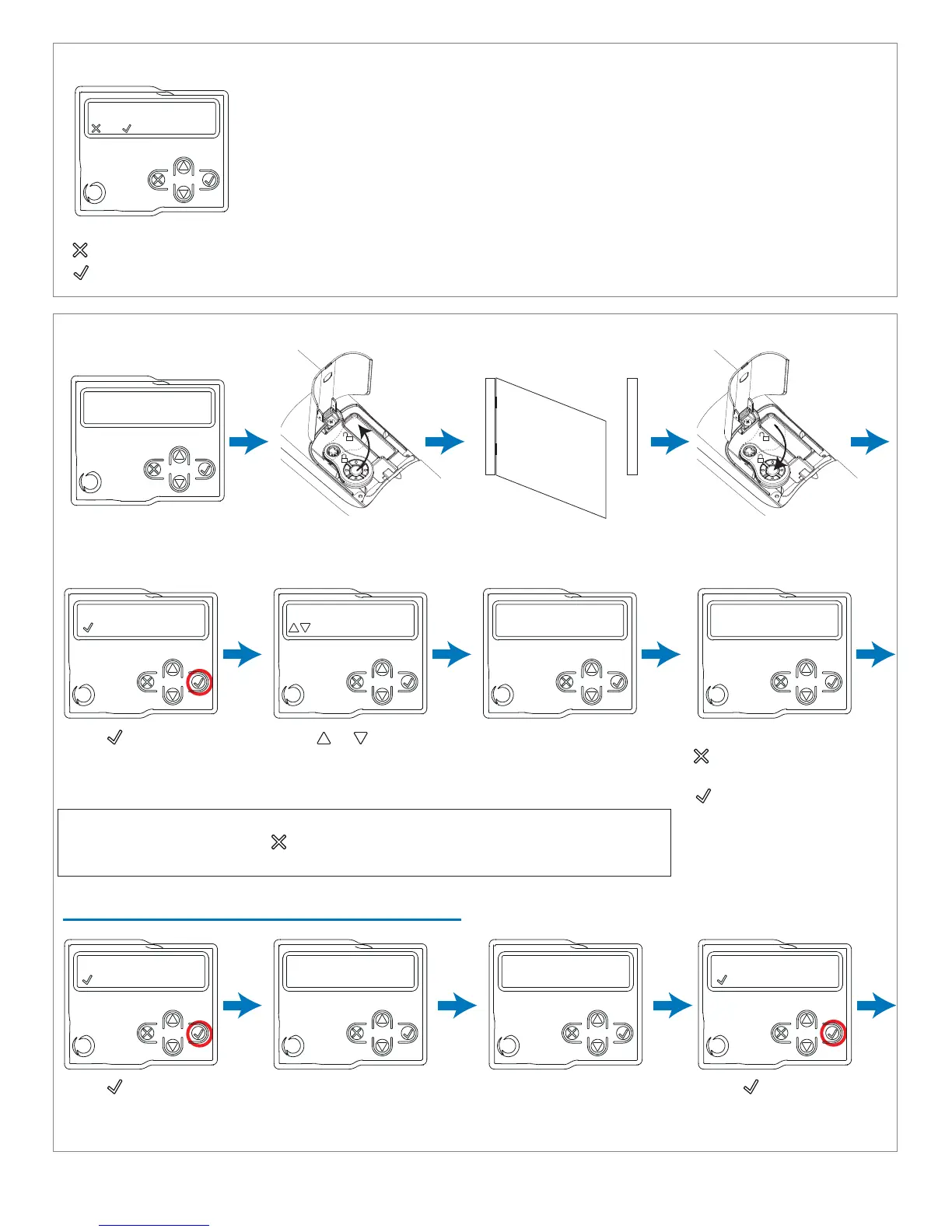
STEP 4: Continue through COMPLETE auto-learning of gate and configure deceleration points by taking the
following steps:
(STEP 3 continued)
NOTE: If there are safety devices connected, during travel stroke programming,
the safety devices can be deactivated to prevent accidental interruption of this
operation. At the end of the autolearning procedure, the safety devices selected
earlier will be reactivated.
SINGLE LEAF CONFIGURATION
(For double leaf configuration, see next page)
UNLOCK MOTOR (S)
Position in the middle of
travel stroke path
Unlock motor(s) with
Key on Transmitter
Manually position gate(s)
in middle of travel stroke
path
Lock motor(s) back in
place with Key on
Transmitter
Press to begin
learning OPEN limit
NOTE: M1 must always open before M2. If the motors are inverted, stop the procedure
in the control unit by pressing on the display, swap the power supply terminals of the
two motors and start again from the beginning.
Press to set the M1
deceleration point on
the closing direction
Press to set the M1
deceleration point on
the closing direction
opening m1...
reverses direction
Press or to
reverse direction of M1
if gate is not traveling in
the OPEN direction
unlock motor (s)...
= OK
learning...
opening...
Indicates learning
opening direction of M1
opening complete
double leaf?
Safety device connected
during programming?
=no =yes
Press either:
if you DO NOT intend safety devices to be enabled during programming
if you DO intend safety devices to be enabled during programming
Learning...
closing m1...
Closing limit of the M1
will be automatically
learned
Learning...
closing completed
closing m1...
= Slow down start
opening m1...
= Slow down start
Press either:
if configuring single leaf
(see below)
if configuring double leaf
(see next page)
20



 To Next Page