Note: If this programming mode is used, both the operning and the closing slow down length can be customized. If no
customized settings are made during programming, the control unit will set the default values automatically.
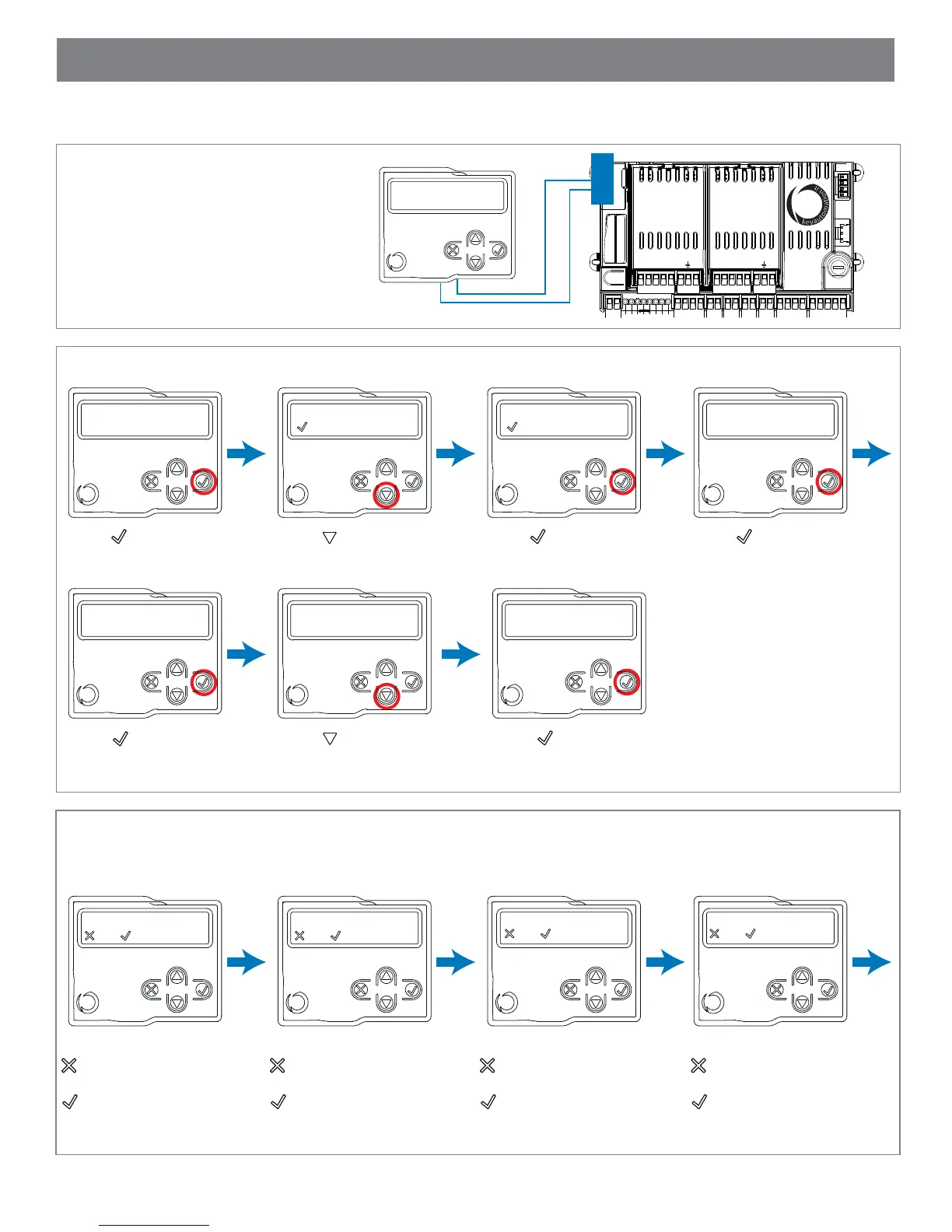
STEP 2: Select the type of installation and the type of motor to be installed by taking the following steps:
STEP 3: Check the Connection of the Safety Devices (Photo 1 – Photo 2 – Sensitive Edge – Stop Button):
During programming, you will be asked whether there are any safety devices connected to the system. If additional safety
devices are connected later, they are simply activated in the relative menu (see advanced settings parameter table).
WARNING: Selecting a
motor type different from
the one connected may
damage the system.
STEP 1: Connect display programmer
to the connection port of the 14A
Controller as shown.
FULL PROGRAMMING WITH DISPLAY PROGRAMMER
SBS
M1
M2
CS1
CS2
V
+
ENC
NEG
M
-
M
+
LS1
LS2
V
+
ENC
NEG
M
-
M
+
14A
Press to select the
14A Controller
Quick programming
= OK
Press to scroll to
‘Full Programming’
Full programming
= OK
Press to select ‘Full
Programming’
installation:
swing gate
Press to select ‘Swing
Gate’ Installation
photo 1 connected?
=no =yes
Press either:
if photo eye 1 is NOT
connected
if photo eye 1 IS
connected
Warning data will be
deleted confirm?
select motor type
ray 2524
Press to confirm
deleting of current data
and to program gate
Press to scroll to
motor type ‘4024’
select motor type
4024
Press to select motor
type ‘4024’
photo 2 connected?
=no =yes
Press either:
if photo eye 2 is NOT
connected
if photo eye 2 IS
connected
sensitive edge connected?
=no =yes
STOP BUTTON connected?
=no =yes
Press either:
if safety edge is NOT
connected
if safety edge IS
connected
Press either:
if stop button is NOT
connected
if stop button IS
connected
19



 To Next Page