3
3. Settings (1)
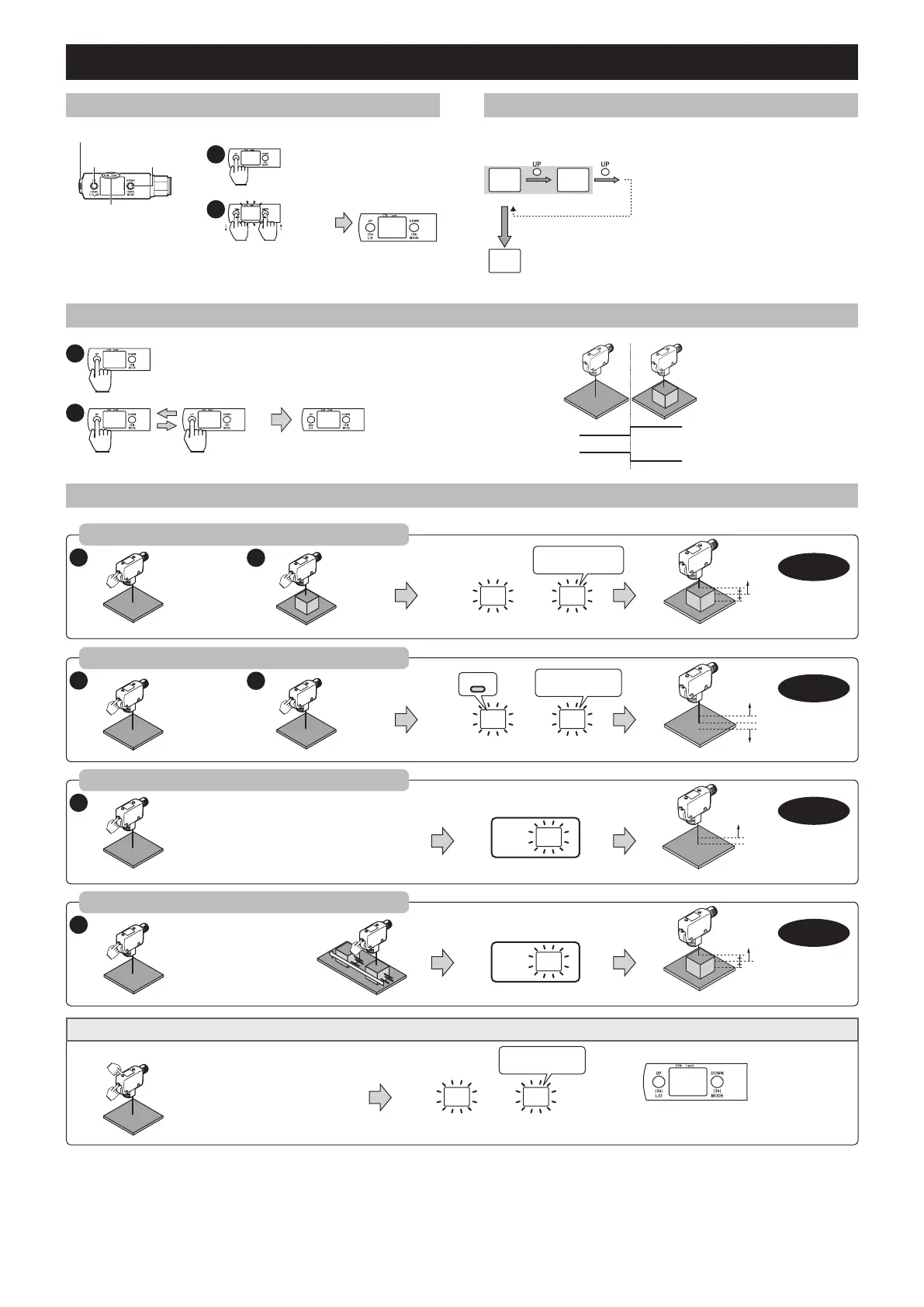
3-1 Part names and functions
• SET: Calibration
DTM : This lights up when datum
calibration is performed.
1 spot : This turns off when no light is
returned, multiple reections
occur, or if detection is not
stable after initiating “Universal
Change Detection”.
• UP
• L.ON/D.ON
• DOWN
• MODE
z Manual adjustment
2
(Run Mode)
-99 to 999
Completed
3s
(Run Mode)
Adjust
sensitivity
Press briey
< 1s
3-2 Initial Settings (PNP/NPN Selection)
When the power is turned on for the rst time after purchase, or initialization is performed,
the initial setting (PNP/NPN selection) is required as shown below.
PNP
Press and hold the [SET]
> 3s
RUN
NPN
* After the initial setup is complete, “PNP/NPN
selection” setting cannot be changed. To
change this setting, initialize the sensor.
“ Initialization (return sensor to factory
default settings)” (page 4)
3-3 Output conguration (L.ON ↔ D.ON)
L.ON D.ON
2
(Detection Status)
(Detection Status)
3s
> 3s
Operation
Output at the time
of L.ON
Output at the time
of D.ON
ON
OFF
ON
OFF
3-4 Sensitivity adjustment
12
1
1
2
1
DTM
Press briey
< 1s
Press briey
< 1s
Press and hold
> 3s
Release the button when [SET] ashes
Press and hold
> 3s
Let the object to be
detected pass
by while holding down the
button until [SEt] ashes.
* This function cannot be used when the background is not within the detecting area.
* This function cannot be used when the background is not within the detecting area.
Press and hold
> 3s
Release the button when [SET] ashes
Press again
< 1s
OK
OK
OK
OK
NG
NG
Setting value
Setting value
Setting value
Setting value A
Setting value -A
When the difference
is too small
When the 1 spot
indicator light is off
Completed
Completed
Completed
Completed
When differentiating two distinct state (i.e. part present vs. absent)
(2-point calibration)
Do-it-all detection for opaque targets
(Datum calibration)
When an object located closer than the background is to be detected
(Maximum sensitivity calibration, background suppression - BGS)
When detecting targets that are moving
(Full auto calibration)
When detecting transparent targets, contrast changes, or opaque targets with the use of a background
(Universal Change Detection)
When the 1 spot
indicator light is off
Release the buttons
when [SET] ashes
Press and hold the [SET] and [UP] buttons at the
same time for 3 or more seconds.
* This function cannot be used when the
background is not within the detecting area.
** The default setting value is 90.
OK NG
Completed
Universal Change Detection
“Universal Change Detection” works by storing the light receiving pattern (distance and returned light intensity) associated with a set background or reference surface. From here, the sensor is
able to detect any variations from the calibrated light receiving pattern (position changes and/or intensity changes). To ensure the sensor properly detects changes in position or returned light
intensity, the “DSC function” is turned ON to ignore gradual changes in the background due to buildup or vibration.
The “DSC function” can be turned OFF, or the correction time can be changed. (For details, see 4-3 “DSC function” (page 5))
When using “Universal Change Detection”, the display represents the degree of conformity with the calibrated light receiving pattern of the background. The display value when xed on the set
background is “
i100
”. This value decreases as the degree of conformity with the background decreases. (When detection appears to be unstable, refer to “
If detection is unstable” (page 2))



 To Next Page