5
4. Advanced Settings (2)
4-1 Response time (SPd)
The longer the response time, the more reliable and stable the detection.
When detection is unstable due to the workpieces moving at a high speed, set the
response time to a smaller value.
4-2 External input (i)
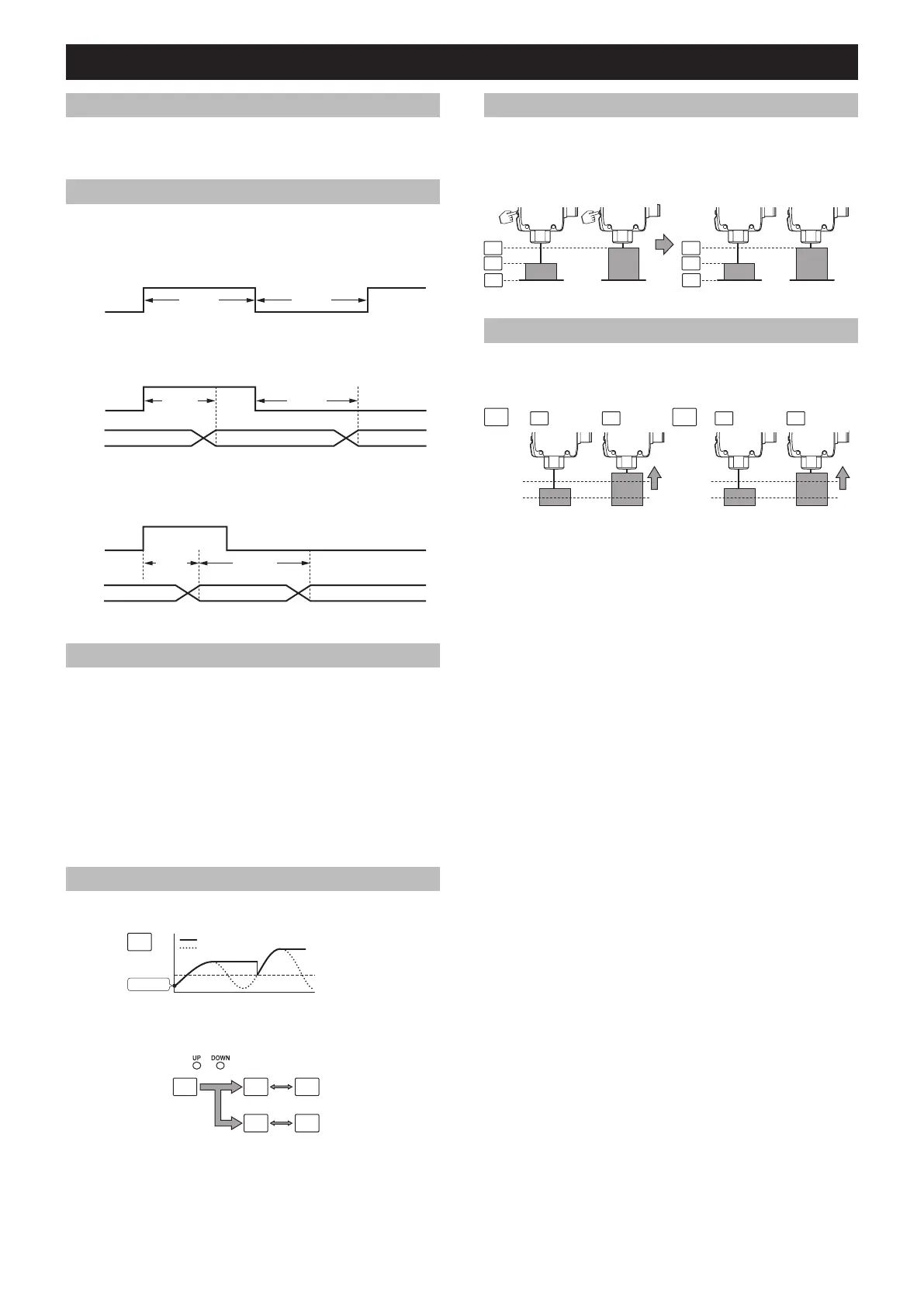
Turning the external input wire ON will enable one of the following functions to be
performed.
z Tuning (St)
This performs the same function as the [SET] button.
ON
OFF
>35 ms >35 ms
* “Universal Change Detection” cannot be performed.
z Transmission OFF (Lo)
This turns off the laser diode.
ON
OFF
<2 ms <20 ms
Transmission OFF Transmission
z Adjust (Ad)
Enabled only when “Universal Change Detection” is performed.
When enabled, this function will recalibrate the background. There is no limit to the
number of times this feature can be used. The setting is reset when power is cycled.
ON
OFF
<35 ms
100 ms
*
* 250 ms when the response time is 50 ms
Output OFF
Output at the new reference surface
4-3 DSC function (dSC)
Enabled only when “Universal Change Detection” is performed. The DSC function works
by compensating for gradual changes in the received light pattern of the background,
caused by vibration or buildup, and maintains the display value at “i100”. This allows the
sensor to only sense instantaneous changes in position or returned light intensity when a
target is present. The correction time can be changed in the settings.
• 0.25 seconds (025): Correct approx. every 0.25 seconds.
• 1 second ( 1) (Default): Corrects approx. every second.
• 3 minutes ( ): Corrects approx. every 3 minutes.
• OFF (o): Sets the DSC function to OFF.
(Note)
When the speed of an object is very slow, the correction function may be affected by the
object, and detection may not be correctly performed.
In this case, slow down the correction time, or set this function to OFF.
4-4 Hold function (Ld)
Display values can be held. The hold value is updated each time the detected value
exceeds the setting value.
Setting value
Peak value
Detected value
Power ON
z Setting procedure
1. Set the hold function (page 4).
2. Switch the display screen.
Peak value
Bottom value
(
+ ) <1s
(Run Mode)
4-5 Shift function (SFt)
Can be used for calibrations other than “Universal Change Detection”.
Turning the shift function ON will shift the display when calibrating. In Datum calibration,
the display value is shifted regardless of this function setting.
(Example of a 2-point calibration)
Before calibration After calibration
4-6 Clamp function (LP)
Can be used for calibrations other than “Universal Change Detection”.
Turning the clamp function ON will maintain the previous display value and output status
when light is not received by the unit.
Clamp function OFF
Upper limit of
detection
Upper limit of
detection
ON ONOFF ON
Setting value Setting value
* It is invalid when datum calibration is
performed or transmission is turned off.



 To Next Page