3 - Programming the DC Source
Measuring Output Pulses (Keysight 66312A, 66332A Only)
Current Detector
Check that the current detector is set to ACDC when measuring current pulses or other waveforms with a
frequency content greater than a few kilohertz.
SENSe:CURRent:DETect ACDC
Only select DC as the measurement detector if you are making only DC current measurements and you
require a measurement offset better than 2mA on the High current measurement range. Note that this
selection gives inaccurate results on current waveforms that have ac content.
SENSe:CURRent:DETect DC
Pulse Measurement Queries
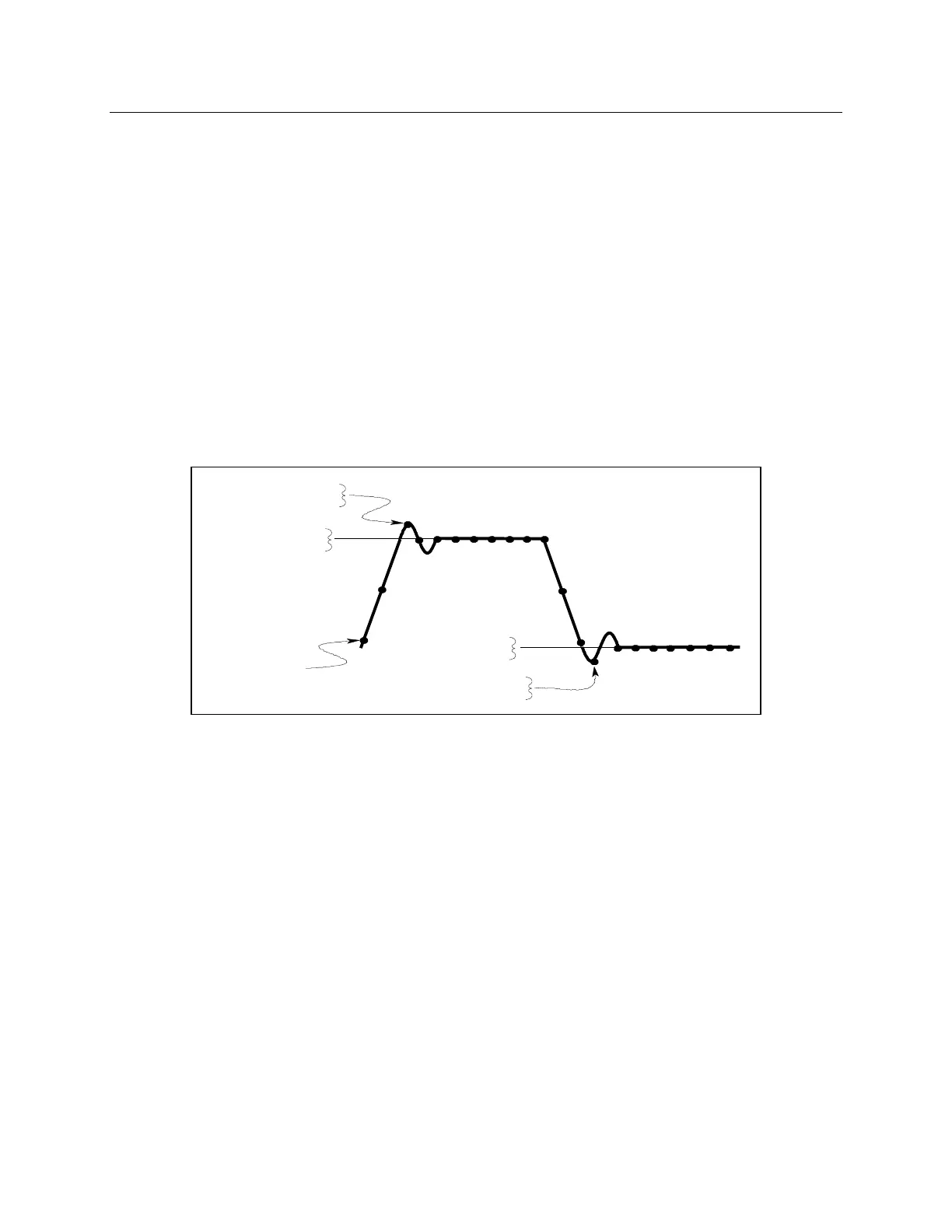
The dc source has several measurement queries that return key parameters of pulsewaveforms as shown
in Figure 3-4.
Figure 3-4. Measurement Commands Used to Return Pulse Data
To return the maximum or minimum value of a pulse waveform use the following commands. Note that
the data points of the measurement sample may not coincide with the actual maximum or minimum point
on the waveform.
FETCh:VOLTage:MAXimum? or
FETCh:VOLTage:MINimum?
FETCh:CURRent:MAXimum? or
FETCh:CURRent:MINimum?
The average value of the high level or low level of a pulse can also be measured. To return the average
value of the high level, use:
FETCh:CURRent:HIGH? or
FETCh:VOLTage:HIGH?
To return the average value of the low level, use:
FETCh:CURRent:LOW? or
FETCh:VOLTage:LOW?



 To Next Page