Compatibility Language - B
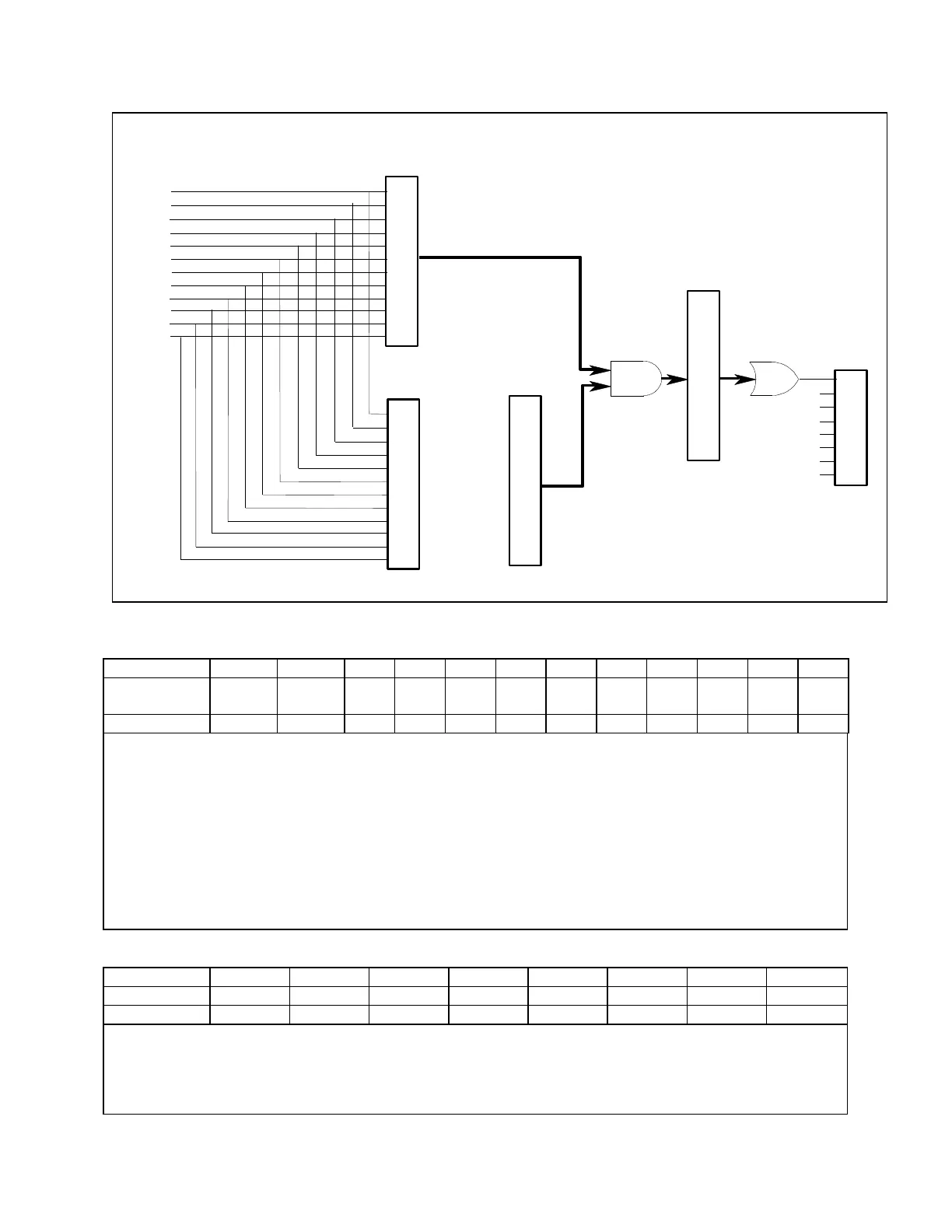
Figure B-1. COMpatibility Status Model
Table B-4. Bit Assignment of Status, Astatus, Fault, & Mask Registers
CV = The unit is operating in constant voltage mode.
CC+ = The unit is operating in constant current mode.
UNR = The output of the unit is unregulated.
OV = The overvoltage protection circuit has tripped.
OT = The over-temperature protection circuit has tripped.
OC = The overcurrent protection circuit has tripped.
ERR = A programming error has occurred. Use ERR? to clear.
CC = The unit is operating in negative constant current mode.
INH = The external remote inhibit signal has turned the output off.
FAST = The output is in Fast operating mode. (Keysight 66332A, 6631B, 6632B, 6633B, 6634B only)
NORM = The output is in Normal operating mode. (Keysight 66332A, 6631B, 6632B, 6633B, 6634B only)
Table B-5. Bit Configuration of Serial Poll Register
RQS = The dc source has generated a service request. Use a serial poll to clear.
ERR = Same as ERR bit in Status register. Use ERR? to clear.
RDY = This bit cleared when unit busy processing commands. Set when processing complete.
PON = A Power-on has occurred. Use CLR to clear.
FAU = A bit has been set in the Fault register. Use FAULT? to clear.



 To Next Page