2121
Bluetooth wireless technology
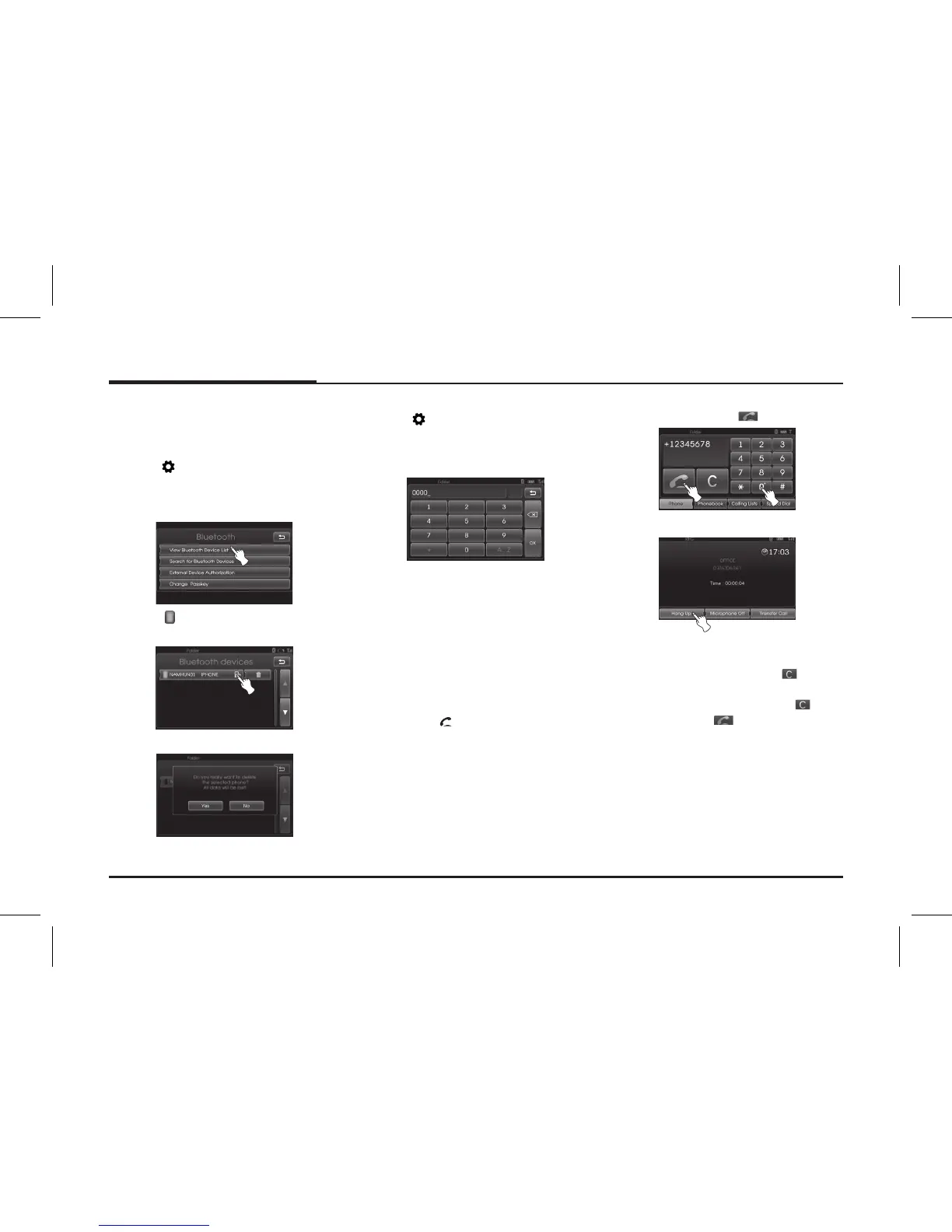
Deleting a connected phone
If you no longer need to use a phone,
you can delete it from [Bluetooth evic-
es] List.
1. Press [
] > Select [Bluetooth].
2. Touch [View Bluetooth device list] on
the “Bluetooth” screen.
3. Select
mark on the right side of
the phone you wish to delete.
4. Touch [Yes].
The selected phone is now deleted.
Changing the passkey
1. Press [ ] > Select [Bluetooth] >
[Change passkey].
2. Input the passkey using the keypad.
3. Touch [Ok].
Making a call by entering
phone number
Connect your unit and bluetooth phone
before you make a call.
1. Press the button on the control
panel.
The phone main screen is displayed
on the unit.
2. Enter the phone number using the
keypad and select
.
3. To finish the call, select [Hang up].
✽Note
•If you make a mistake, press
shortly
to remove the last digit. To remove the
whole number, press and hold .
• Select and hold
to redial.
• To enter "+", select and hold [0].



 To Next Page