10
Control Panel
10
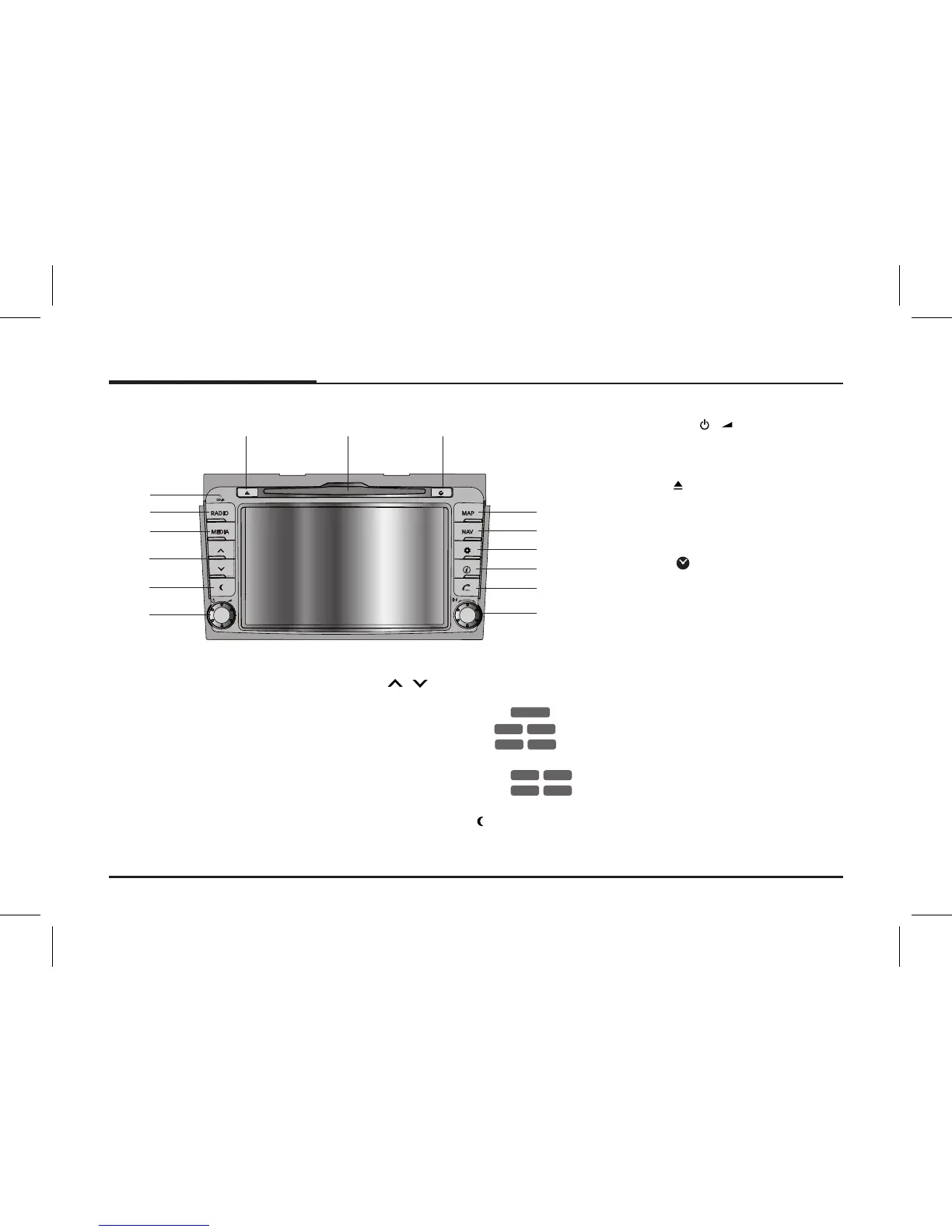
Name of each component
1. CD indicator light
When a disc is inserted, the indicator
is illuminated.
2. RADIO
Press to select FM/AM band.
3. MEDIA
Press to selects a source: CD/ USB/
iPod/ BT/ AUX
4.
/
• Press to:
- Automatic tuning:
RADIO
- Track up/down:
USB
CD
BT
iPod
• Press and hold to:
- Search (FF/REW):
USB
CD
iPod
BT
5. Display on/off ( )
Press to switch between the display
on and off.
6. Left knob (
/ )
- Press: Power on/off
- Turn: Volume control
7. Eject (
)
Press to eject a disc from the unit.
8. Disc slot
9. Clock (
)
• Press to display the digital/analog
clock in both power on/off status.
• Press and hold to display to the
[Clock] menu. (Page 16)
10. MAP
Press to display the map.
11. NAV
Press to enter a destination menu.
Various methods for entering a des-
tination are available.
3
4
5
6
14
15
87 9
13
12
11
1
2
10



 To Next Page