Audio system
53
✽✽
NOTICE
Tinted rear window may affect the
proper functioning of the antenna.
Steering Wheel Audio Controls
(if equipped)
The steering wheel may incorporate
audio control buttons.
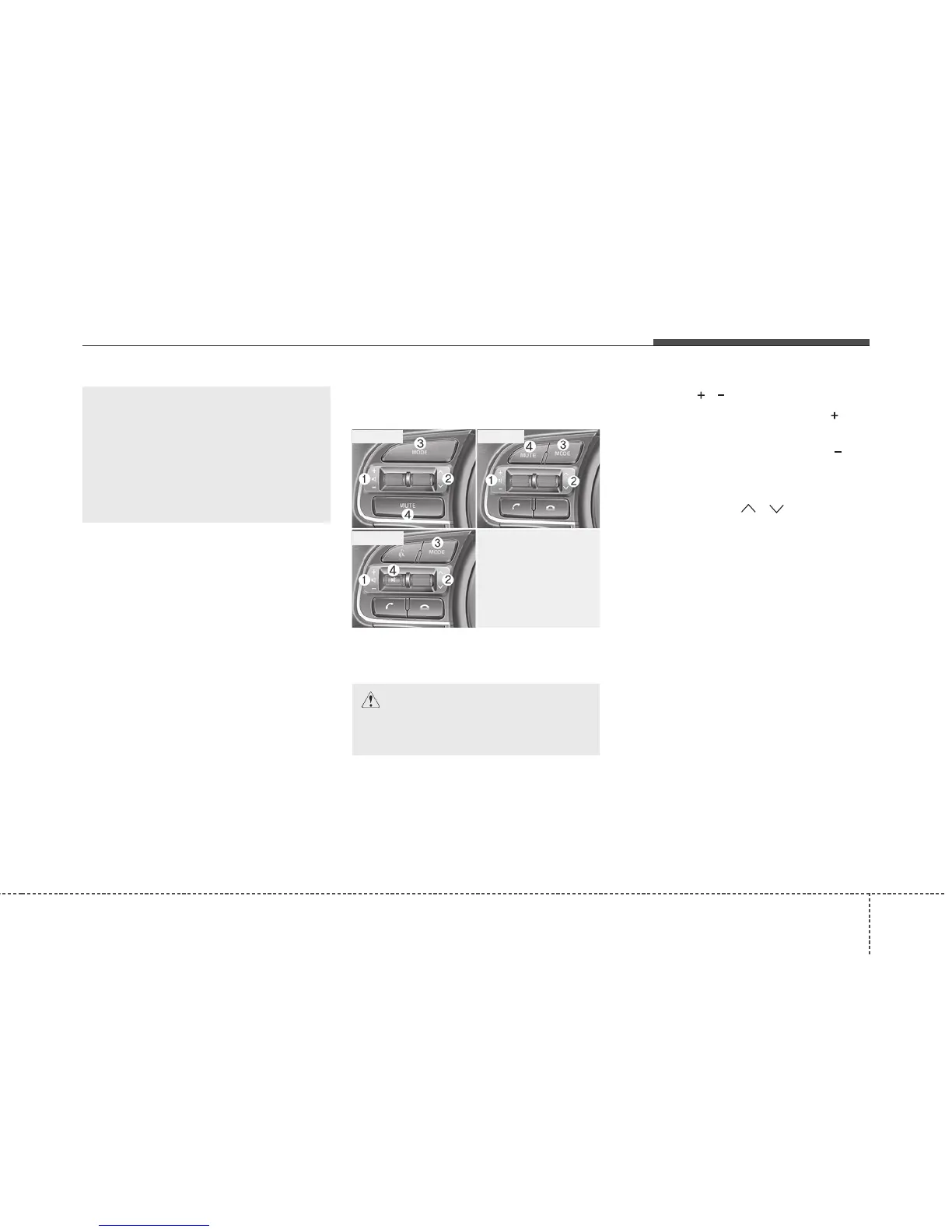
VOLUME ( / ) (1)
• Press the lever upward ( ) to
increase the volume.
• Press the lever downward ( ) to
decrease the volume.
SEEK/PRESET ( / ) (2)
The SEEK/PRESET button has dif-
ferent functions based on the system
mode. For the following functions the
button should be pressed for 0.8 sec-
onds or more.
RADIO mode
It will function as the AUTO SEEK
select button.
CD/USB/iPod
®
mode
It will function as the FF/REW button.
If the SEEK/PRESET button is
pressed for less than 0.8 seconds, it
will work as follows in each mode.
OJFA045307L
■ Type A
■ Type C
■ Type B
CAUTION
Do not operate audio remote
control buttons simultaneously.
(Continued)
• When putting a sticker on the
inside surface of the rear win-
dow, be careful not to damage
to the rear glass antenna.
• Do not put sharp instruments
near the rear glass antenna.


 To Next Page