4147
Features of your vehicle
Using CD Player
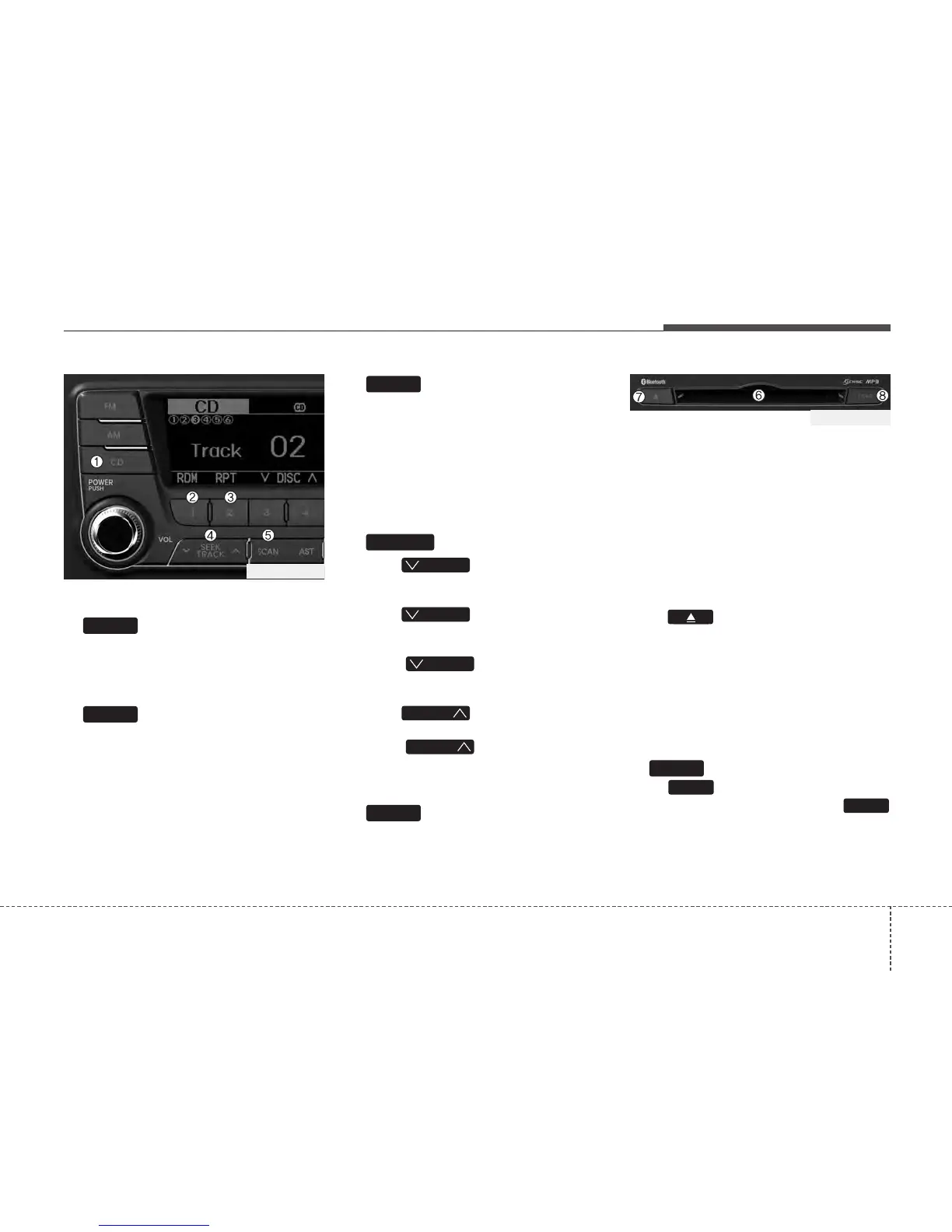
1. Button
If the CD is loaded, turns to CD mode. If
no CD, it displays “No Disc” for 3 seconds
and returns to the previous mode.
2. Button (RANDOM)
Press this button for less than 0.8 second
to activate ‘RDM’ mode and longer than
0.8 second to activate ‘A.RDM’ mode.
• RDM : Only files/tracks in a folder/disc
are played back in random sequence.
• A.RDM(MP3/WMA Only) : All files in a
disc are played back in random
sequence.
3. Button (REPEAT)
Press this button for less than 0.8 second
to activate ‘RPT’ mode and more than 0.8
seconds to activate ‘FLD.RPT’ mode.
• RPT : Only a track(file) is repeatedly
played back.
• FLD.RPT (MP3/WMA Only) : Only files
in a folder are repeatedly played back.
4. Button
• Push button for less than
0.8 second to play from the beginning
of current song.
• Push button for less than
0.8 second and press again within 1
seconds to play the previous song.
• Push button for 0.8 or
longer to initiate reverse direction high
speed sound search of current song.
• Push button for less than
0.8 second to play the next song.
• Push button for 0.8 or
longer to initiate high speed sound
search of current song.
5. Button
Plays first 10 seconds of each song in
the DISC. To cancel the mode, press the
button once again.
6. CD Slot
Please face printed side upward and gen-
tly push in. When the ignition switch is on
ACC or ON and power is off, power is auto-
matically turned on if the CD is loaded.
This CDP supports only 12cm CD. If VCD,
Data CD are loaded, "Reading Error" mes-
sage will appear and CD will be ejected.
7. CD Eject Button
Push button for less than 0.8 sec-
onds to eject the CD during CD playback.
This button is enabled when ignition switch
is off.
• ALL EJECT(CD Changer : PA760)
Press this button for more than 0.8 sec-
onds to eject all discs inside the deck in
respective order.
8. Button
Push button to load CDs to avail-
able CDC deck (from 1~6). Push
button for more than 2 seconds to load
into all available decks. The last CD will
play. 10 seconds idle status will disable
loading process.
LOAD
LOAD
LOAD
SCAN
TRACK
TRACK
T
TRACK
T
TRACK
T
TRACK
TRACK
2
1
CD
PA760TFG_CD
PA760TFG_CD






 To Next Page