Features of your vehicle
1704
Using USB device
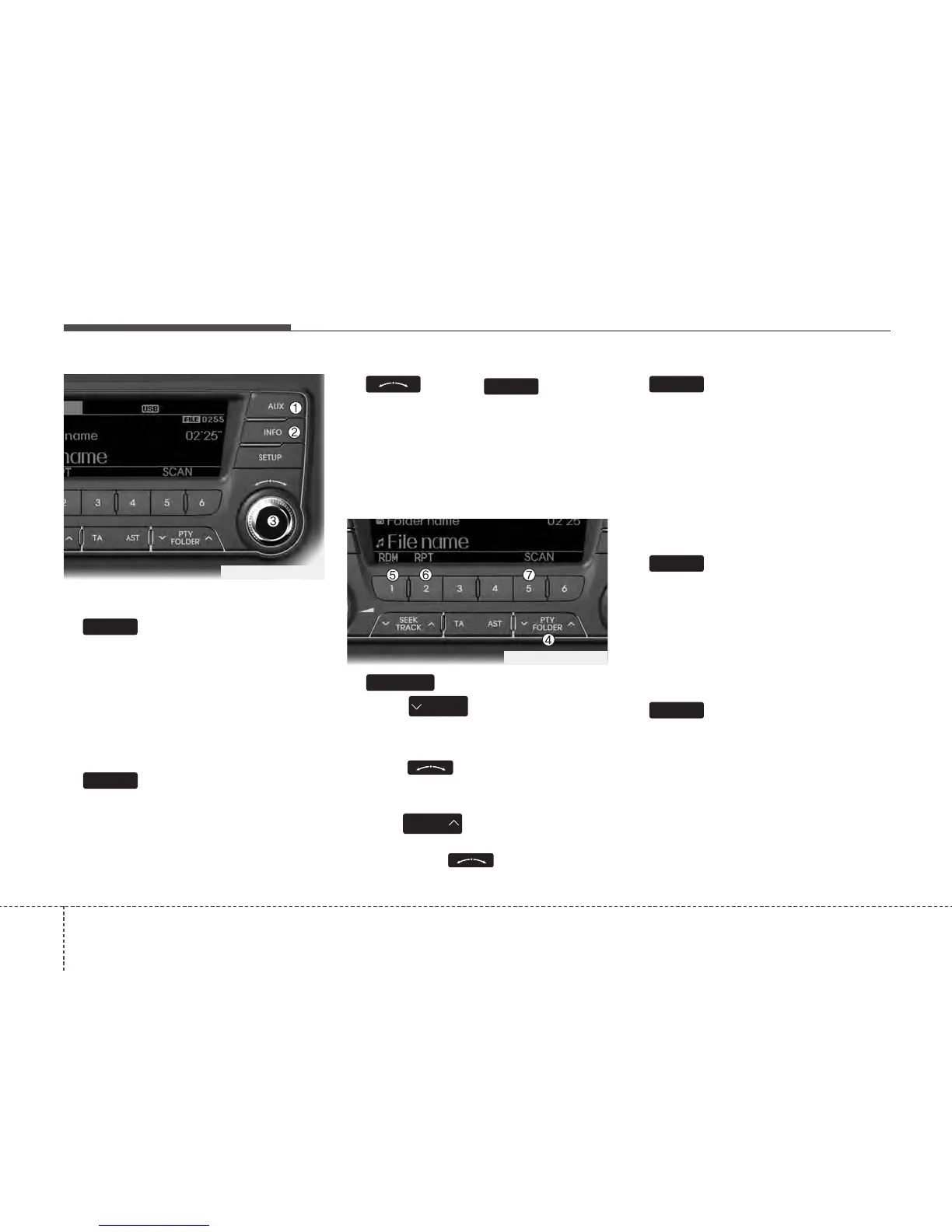
1. Button (USB)
If the auxiliary device is connected, it
switches to AUX or USB mode to play the
sound from the auxiliary player.
If there is no auxiliary device, then the
message “No Media” will become dis-
played on the LCD for 3 seconds and
returns to previous mode.
2. Button
Displays the information of the file current-
ly played in the order of FILE NAME
➟
TITLE ➟ ARTIST ➟ ALBUM ➟ FOLDER ➟
TOTAL FILE ➟ NORMAL DISPLAY ➟
FILE NAME… (Displays no information if
the file has no song information.)
3.
Knob & Button
• Turn this knob clockwise to browse
songs after current song, or counter
clockwise to browse songs before cur-
rent song. To play the displayed song,
press the knob.
• Pressing this knob without turning
enters to AUDIO CONTROL mode.
4. Button
• Press button to move to
child folder of the current folder and
display the first song in the folder.
Press knob to move to the
folder displayed. It will play the first
song in the folder.
• Press button to move to par-
ent folder display the first song in the
folder. Press knob to move to
the folder displayed.
5. Button (RANDOM)
• Press this button for less than 0.8 sec-
onds to play songs randomly in current
folder.
• Press this button for 0.8 seconds or
longer to play songs randomly in entire
USB device.
• To cancel RANDOM play, press this
button again.
6. Button (REPEAT)
• Press this button for less than 0.8 sec-
onds to repeat current song.
• Press this button for 0.8 seconds or longer
to repeat all songs in current folder.
• To cancel REPEAT, press this button
again.
7. Button (SCAN)
Play each song in the CD for 10 seconds.
To cancel SCAN Play, press this button
again.
5
2
1
PTY
FOLDER
PTY
FOLDER
FOLDER
ENTER
INFO
AUX
TF_PA710TFE_USB
TF_PA710TFE_USB






 To Next Page