4173
Features of your vehicle
Using iPod
®
❋
iPod
®
is a trademark of Apple Inc.
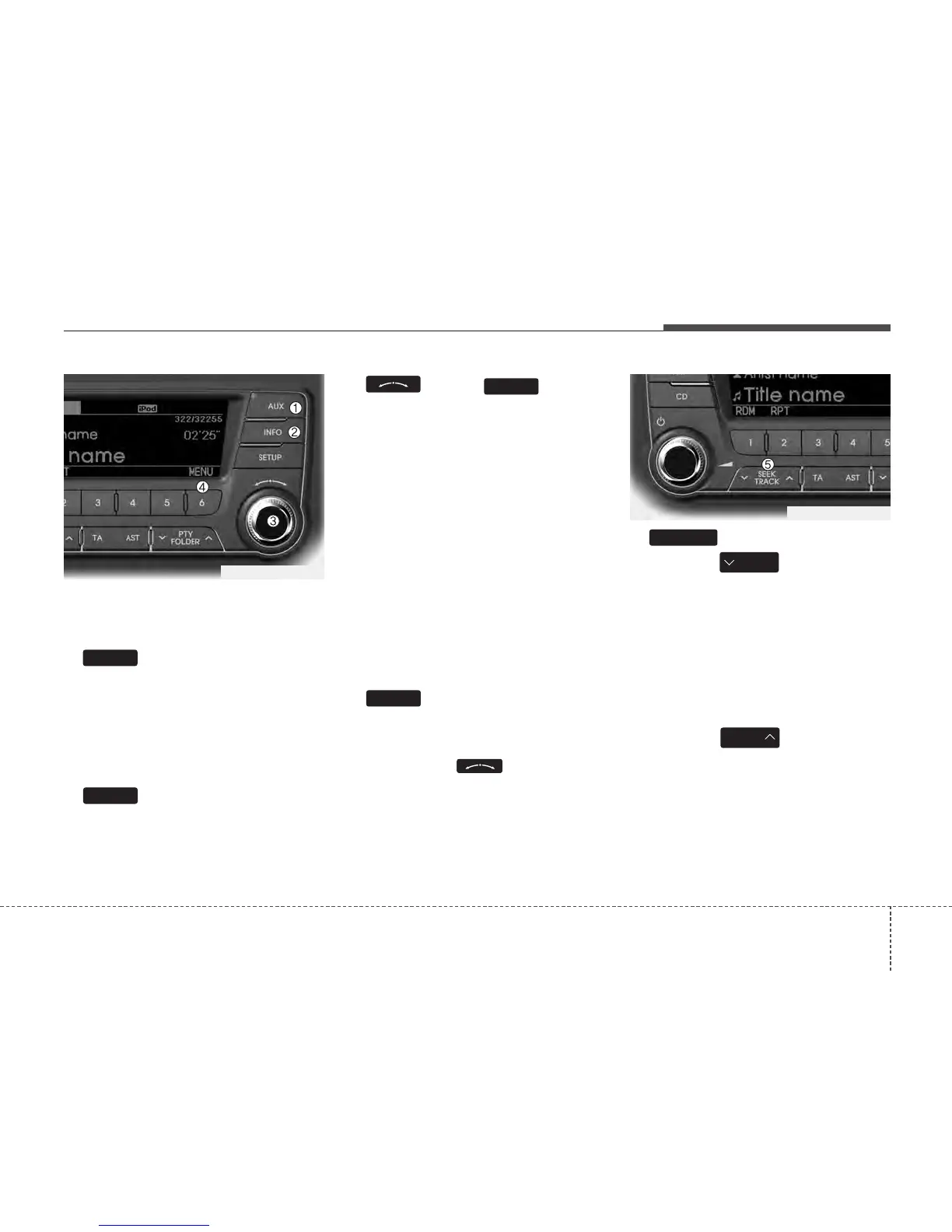
1. Button (iPod
®
)
If iPod
®
is connected, it switches to the
iPod
®
mode from the previous mode to
play the song files stored in the iPod
®
.
If there is no iPod
®
connected, then it dis-
plays the message "No Media" for 3 sec-
onds and returns to the previous mode.
2. Button
Displays the information of the file cur-
rently played in the order of
TITLE ➟ ARTIST ➟ ALBUM ➟ NORMAL
DISPLAY
➟ TITLE... (Displays no informa-
tion if the file has no song information.)
3.
Knob & Button
When you rotate the knob clockwise, it
will display the songs (category) ahead
of the song currently played (category in
the same level).
Also, when you rotate the knob counter-
clockwise, it will display the songs (cate-
gory) before the song currently played
(category in the same level).
To listen to the song displayed in the
song category, press the button to skip to
and play the selected song.
Pressing the button changes the BASS,
MIDDLE, TREBLE, FADER and BAL-
ANCE TUNE mode. The mode selected
is shown on the display. After selecting
each mode, rotate the Audio control knob
clockwise or counterclockwise.
4. Button (MENU)
Moves to the upper category from cur-
rently played category of the iPod
®
.
To move to (play) the category (song)
displayed, press knob.
You will be able to search through the
lower category of the selected category.
The standard order of iPod
®
’s category is
SONGS
➟ ALBUMS ➟ ARTISTS ➟ GEN-
RES
➟ iPod
5. Button
• Press the button for less
than 0.8 seconds to play from the
beginning of the song currently played.
Press the button for less than 0.8 sec-
onds and press it again within 1 sec-
ond to move to and play the previous
track.
Press the button for 0.8 seconds or
longer to play the song in reverse
direction in fast speed.
• Press the button for less
than 0.8 seconds to move to the next
track.
Press the button for 0.8 seconds or
longer to play the song in forward direc-
tion in fast speed.
SEEK
TRACK
SEEK
TRACK
TRACK
6
ENTER
INFO
AUX
TF_PA710TFE_iPod
TF_PA710TFE_iPod






 To Next Page