Feature oý Your Audio
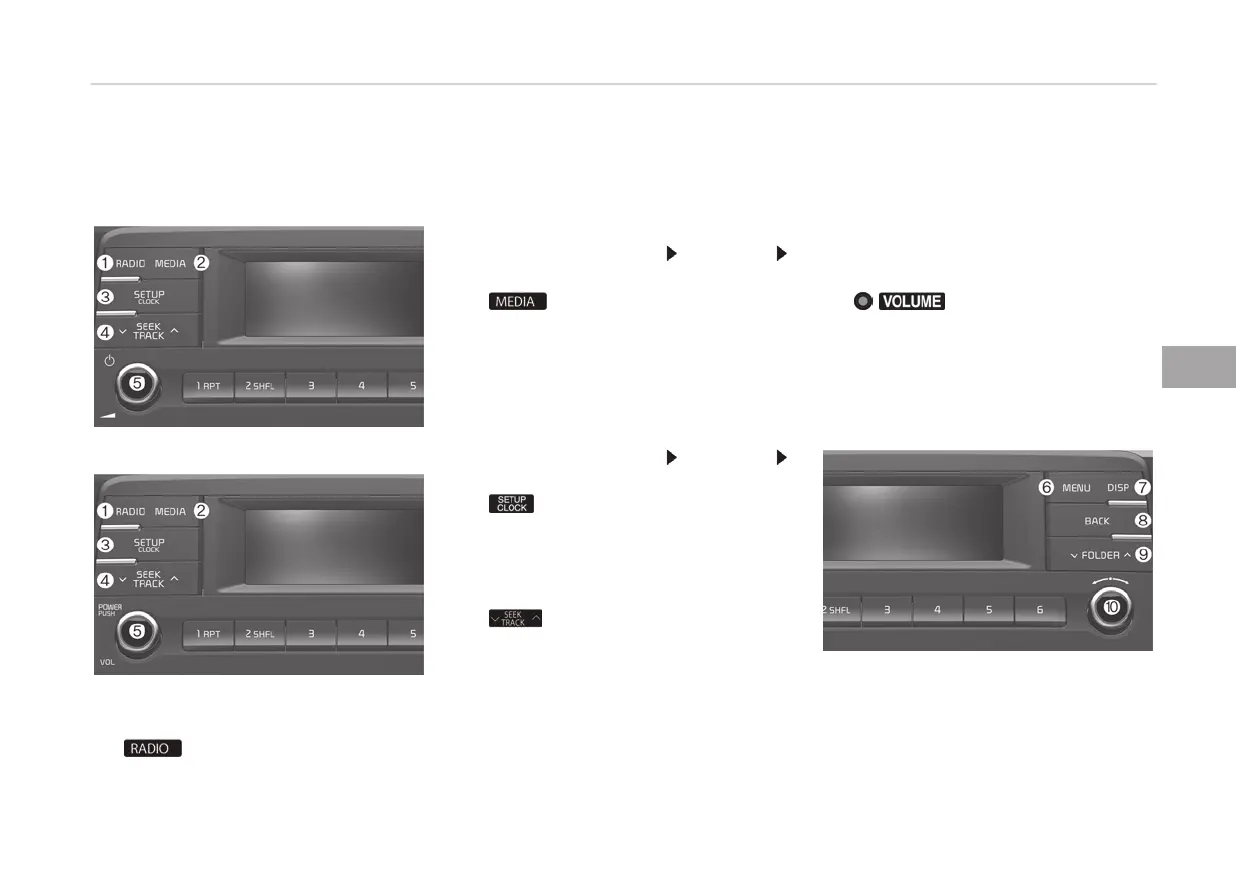
Head Unit
• Type A
• Type B
❈ The actual ýeatures in the vehicle
may diýýer ýrom the illustration.
1.
• çlays Radio(FM/AM) mode.
• Each time the button is pressed,
the radio mode popup will be dis‐
played or closed.
• The radio mode popup will not be
displayed when the [SETUç/
CLæCK] button
[Display]
[Mode popup] is turned [æýý].
2.
•
çlays USB(içod
®
), AUX mode.
• Each time the button is pressed,
the media mode popup will be
displayed or closed.
• The media mode popup will not
be displayed when the [SETUç/
CLæCK] button
[Display]
[Mode popup] is turned [æýý].
3.
When pressed quickly
• Moves to Setup screen.
When pressed and held
• Moves to the Time Settinþs.
4.
When pressed quickly
• Radio mode: Searches broadcast
ýrequencies.
• Media mode: Chanþes the track,
ýile or title. (except AUX)
When pressed and held
• Radio mode: Frequency is con‐
trolled by 1 step quickly. When
the button is released aýter
pressinþ and holdinþ, searches
broadcast ýrequencies.
• Media mode: Rewinds or ýast-
ýorwards the sonþ. (except AUX)
5.
/ knob
• çower knob: Turns power æn/æýý
by pressinþ the knob.
• Volume knob: Sets volume by
turninþ the knob leýt/riþht.
• Type A
• Type B
5-07
5
Audio system









 To Next Page