INSTRUMENT CLUSTER
*IF EQUIPPED
8
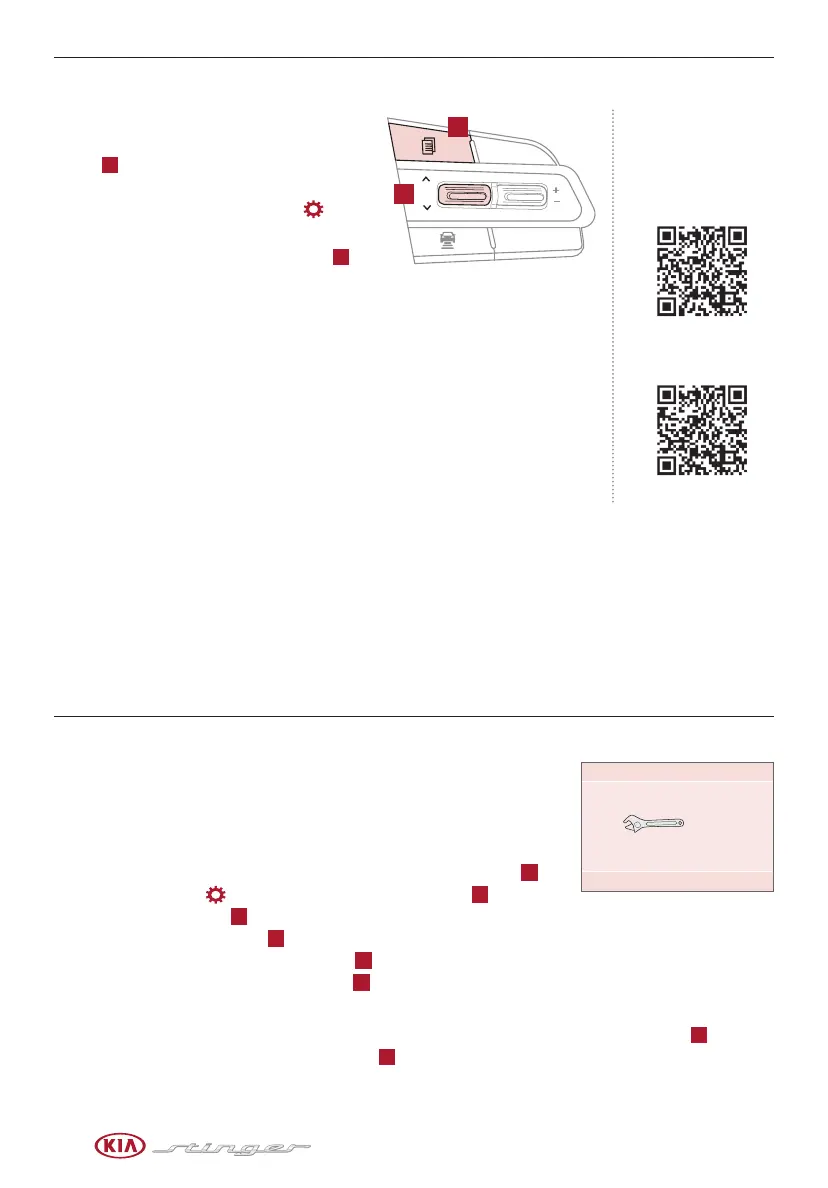
To enter the User Settings mode in the LCD
Instrument Cluster Modes, press the Mode
button
A
when the vehicle is at a standstill
and with the Engine Start/Stop button in the
ON position and select User Settings .
You can navigate the selections on the display
by pressing the Select/Reset (OK) button
B
up
or down, and then pressing again to enter.
User Settings Modes:
Head-Up Display (HUD)*: Enable HUD, Display Height, Rotation, Brightness, Contents
Selection, Speed Size, Speed Color
Driving Assist: Smart Cruise Control with Stop & Go, Driver Attention Warning, Lane
Keeping Assist, Forward Collision-Avoidance Assist, Blind-Spot Collision Warning Sound
Door/Liftgate: Automatic Lock, Automatic Unlock, Two-press Unlock, Smart Power
Liftgate*
Lights: One-Touch Turn Signal, Headlamp Delay
Sound: Park Assist System*, Welcome Sound*
Convenience: Seat Easy Access*, Steering Easy Access*, Welcome Mirror/Light*, Wiper/Light Display*, Gear Position
Pop-Up*, Icy Road Warning*
Service Interval: Service Interval On/Off
Other Features: Fuel Economy Auto Reset, Fuel Economy Unit, Temperature Unit, Tire Pressure Unit, Torque Unit*
Language: Choose the language
Reset: Reset User Settings to factory default
When Service Mode is activated, set and vehicle service is required, the
following message will be displayed on the LCD, Service Required, and
display the remaining days/miles till service is due.
Service Mode ON and Interval Setting
To activate Service Mode and set the interval, press the Mode button
A
,
scroll to User Settings and press Select/Reset (OK) button
B
to enter.
Then press the OK button
B
up/down to scroll to Service Mode and
again to enter. Press OK button
B
up/down to select the option to set the
interval. Adjust interval and press OK button
B
to save. To reset the Service
Mode system, press and hold the OK button
B
for more than 1 second.
Service Mode Off
To turn Service Required OFF, go to User Settings and scroll to Service Mode, press OK button
B
to enter.
Select option to deactivate and press OK button
B
to save.
User Settings
Service Mode
CRUISE
CANCEL
RES
OK
SET
A
B
To view videos on your
mobile device, snap these
QR Codes or visit the listed
website. Refer to page 2 for
more information.
LCD DISPLAY VIDEO
LCD DISPLAY:
MAINTENANCE VIDEO
www.youtube.com/KiaFeatureVideos
(Button layout on right of steering wheel)
-20 mi
-5 day
Service required



 To Next Page