*IF EQUIPPED ALWAYS CHECK THE OWNER’S MANUAL FOR COMPLETE OPERATING INFORMATION AND SAFETY WARNINGS.
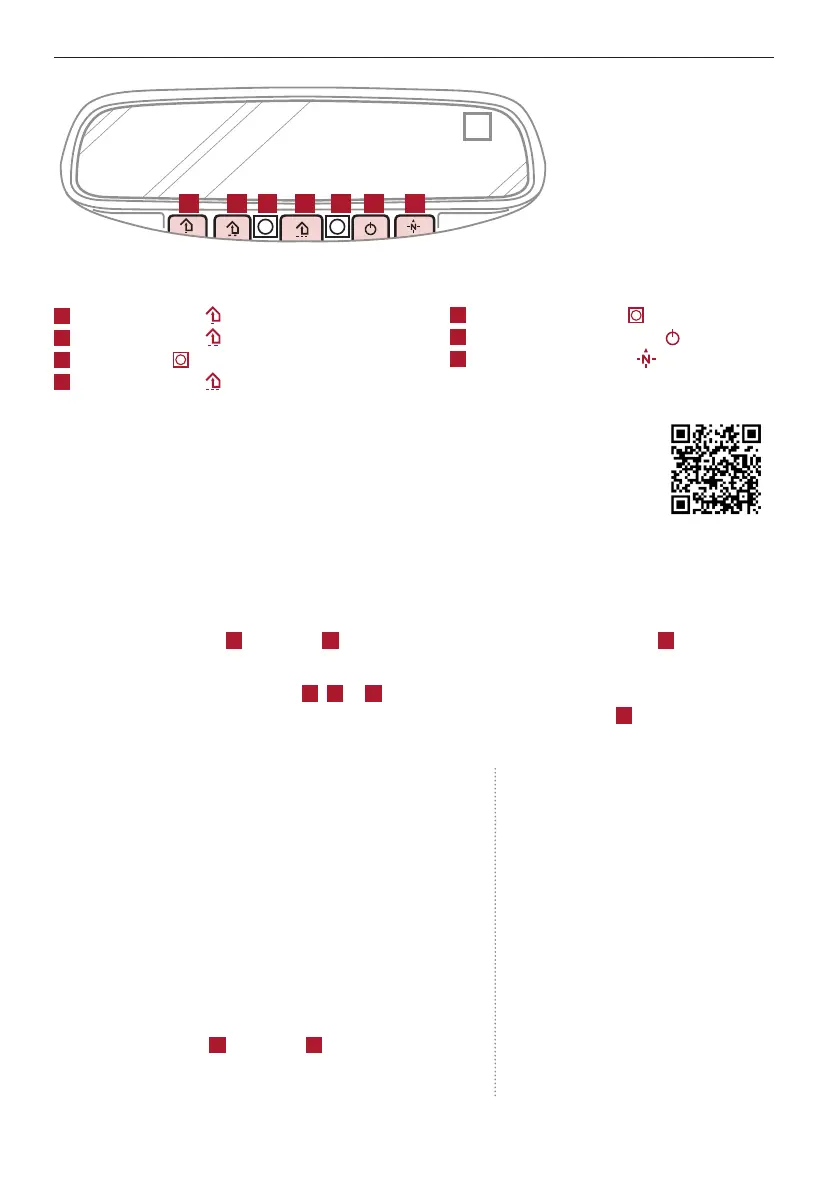
A B C D E F G
Auto-Dimming Rearview Mirror
Designed to help reduce glare from a vehicle’s headlights
located in the rear and also connect up to three electronic
transmitters in one location.
REMINDER: Mirror indicator light will illuminate when automatic dimming is ON.
HomeLink
®
Setup - How to Sync Transmitter
If programming for the first time, begin with Step 1 (repeating this step will delete all information).
To program non-rolling and rolling code garage door openers and other devices:
1. Press and hold the left
A
and center
D
buttons simultaneously until the indicator light
C
begins
to flash (to reprogram buttons, skip this step)
2. Press and hold the desired button
A
,
B
or
D
and hold the button on the transmitter while it is
approximately 1 to 3 inches away from the mirror. The HomeLink
®
Indicator light
C
will flash
rapidly once the frequency signal has been successfully programmed
To finish programming rolling code garage door
openers, complete these steps:
1. Locate the “learn” or “smart” button on the garage door’s
motor head unit. Press and release the button and complete
Step 4 within 30 seconds.
2. Firmly press and release the programmed HomeLink
®
button up to three times.
Operating HomeLink
®
:
Press one of the programmed HomeLink
®
buttons.
Erasing programmed buttons:
Press and hold the left
A
and center
D
buttons
simultaneously for approximately 20 seconds, and
then release both buttons within 30 seconds.
HomeLink
®
with Auto-Dimming Rearview Mirror
A
HomeLink
®
button
B
HomeLink
®
button
C
Indicator light
D
HomeLink
®
button
E
Glare detection sensor
F
Automatic dimming ON/OFF
G
Compass control button
If your garage door opener was manufactured in 2011
or later, and you’re unable to program your vehicle’s
HomeLink
®
system, you may need to purchase a
HomeLink Repeater Kit. For more information, go to
www.HomeLink.com or call (800) 355-3515.
Quick Tips
- You can reprogram a single HomeLink
®
button
by repeating Step 2
- Erasing programmed buttons will delete all
trained transmitters
43
OTHER KEY FEATURES
HOMELINK REARVIEW
MIRROR SETUP VIDEO
To view a video on
your mobile device,
snap this QR Code or
visit the listed website.
Refer to page 2 for
more information.
www.youtube.com/KiaFeatureVideos



 To Next Page