INSTRUMENT CLUSTER
7
*IF EQUIPPED ALWAYS CHECK THE OWNER’S MANUAL FOR COMPLETE OPERATING INFORMATION AND SAFETY WARNINGS.
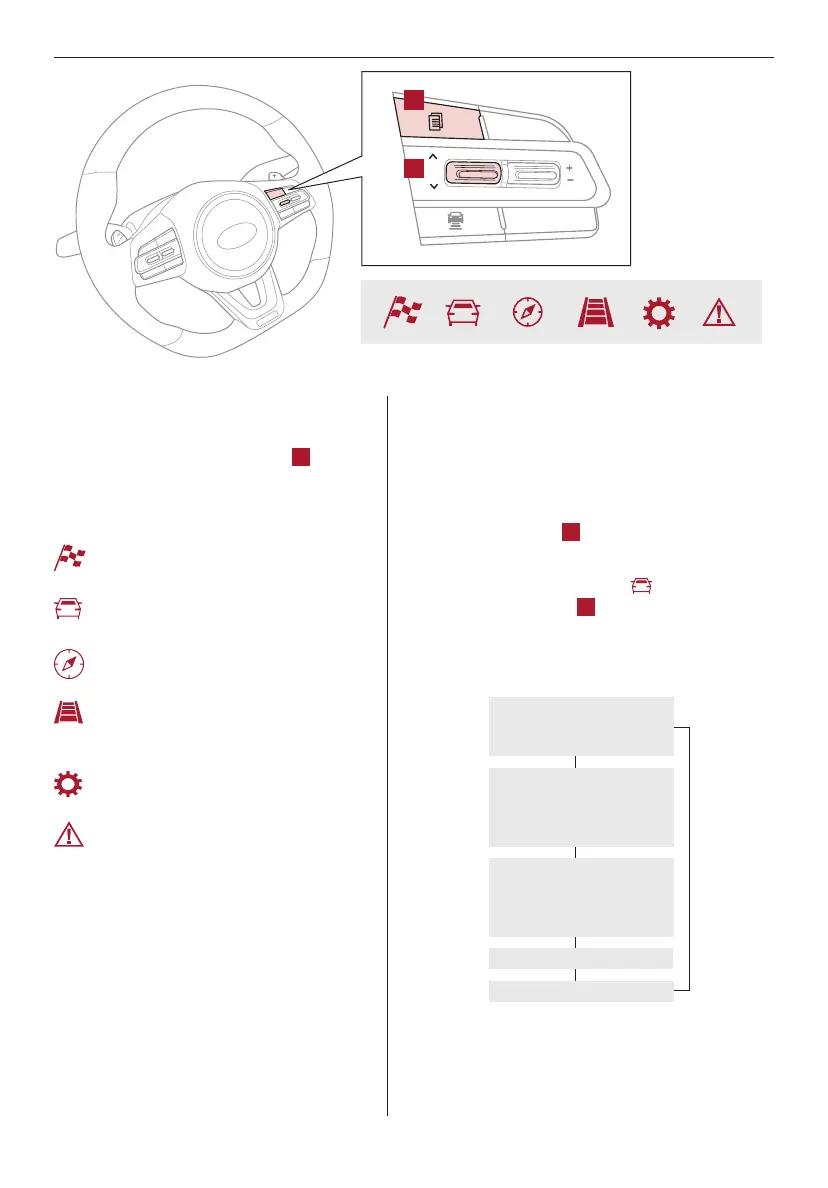
LCD Instrument Cluster Modes*
The LCD Instrument Cluster modes can be
changed by using the mode button
A
on the
right side of the steering wheel.
Modes (Type B Instrument Cluster):
Trip Information / Trip Computer
The Trip Computer is a driver information system that
displays information related to driving when the Engine
Start/Stop button is in the ON position.
To cycle through the LCD Instrument Cluster modes,
press the Mode button
A
on the right side of the
steering wheel.
When in the Trip Computer mode , press the
Select/Reset (OK) button
B
to cycle through the
screens. When displaying TRIP A or TRIP B screens,
press and hold the OK button to reset the Tripmeter
to zero.
REMINDERS:
- Appearance of Tripmeter display may differ as equipped
- All stored driving information (except Odometer and Range)
is reset if the battery is disconnected
Sport Mode*: This mode displays Gauge,
Lap Timer, G-Force.
Trip Computer Mode: Displays driving
information for tripmeter, fuel economy, etc.
Turn-by-Turn Mode*: Displays the state
of the navigation system
Smart Cruise Control (SCC) with Stop
& Go / Lane Departure Warning (LDW)*:
Displays the state of the SCC and LDWS
User Settings Mode: Change settings of
the doors, lamps and other features
Master Warning Mode: Informs of
warning messages related to washer
fluid or malfunction of Blind-Spot Collision
Warning (BCW), etc.
Your vehicle’s steering wheel buttons and LCD modes may
differ from those in the illustrations.
Drive Info
• Tripmeter B
• Fuel Economy
• Timer
Accumulated Info
• Tripmeter A
• Average MPH
• Elapsed Time (E/T)
TRIP
• Average Fuel Economy
• Instant Fuel Economy
Drive Mode
Digital Speedometer
(Modes on Instrument Cluster LCD)
CRUISE
CANCEL
RES
OK
SET
A
B



 To Next Page